


Visão geral
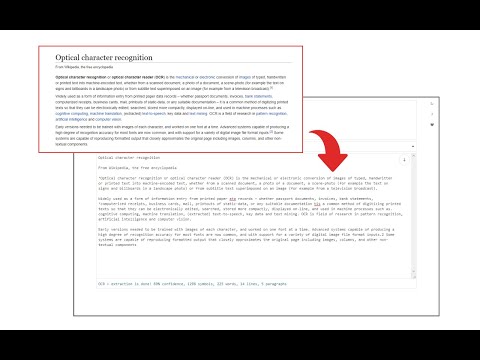
Easily get words out of an image with OCR engine!
Image Reader (OCR) extension helps you easily get words out of any image. It uses two different open-source OCR engines. The 1st engine is called Tesseract. Tesseract.js is an open-source JavaScript library and is made via an Emscripten port of the famous Tesseract OCR Engine written in C and C++. Please visit (https://github.com/naptha/tesseract.js) to get more info. The 2nd engine, called Granite Docling, is developed by IBM (https://huggingface.co/ibm-granite/granite-docling-258M). Please note that when you choose IBM Granite Docling, the app needs to download training data (~1200MB) for the AI engine. So please be patient while it is loading. To work with this addon, simply open the addon's interface and load your image via the file selector (top section). Before using the addon, please make sure to select the appropriate OCR engine and language. For Tesseract, the default OCR language is set to English. For Granite Docling, you do not need to set a language; just select the desired backend (CPU or GPU) and wait for the app to load completely. Note: For the Tesseract OCR engine, this addon uses the "https://github.com/naptha/tessdata/tree/gh-pages/" GitHub repo to fetch language data required for the OCR operation. For the IBM Granite Docling, it uses "https://huggingface.co/onnx-community/granite-docling-258M-ONNX" to fetch training data required for the OCR operation. Both language data packs are very large and cannot be included in the addon package. To report bugs, please fill out the bug report form on the extension's homepage (https://mybrowseraddon.com/image-reader.html).
3,6 de 527 notas
Detalhes
- Versão0.2.0
- Atualização10 de novembro de 2025
- Oferecido porSevina
- Tamanho13.19MiB
- IdiomasEnglish
- Desenvolvedor
E-mail
sevina.lucia@gmail.com - Não negocianteEsse desenvolvedor não se identificou como comerciante. Caso você seja da União Europeia, observe que os direitos do consumidor não se aplicam a contratos firmados entre você e esse desenvolvedor.
Privacidade
O desenvolvedor declara que seus dados
- Não são vendidos a terceiros, exceto nos casos de uso aprovados
- Não são usados ou transferidos para fins não relacionados à função principal do item
- Não são usados ou transferidos para informações de crédito ou empréstimo
Suporte
Para receber ajuda com perguntas, sugestões ou problemas, acesse o site de suporte do desenvolvedor.