

Image Overlay Tool
4 ratings
)
Overview
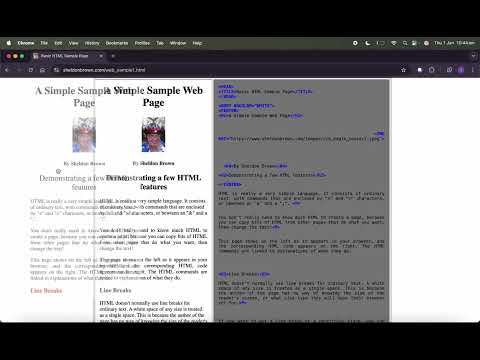
Overlay images on any website with draggable positioning and opacity control
Image Overlay Tool lets you overlay images on top of any website with full control over positioning, appearance, and styling. Perfect for: • Web designers comparing mockups to live sites • Developers implementing pixel-perfect designs • Artists tracing references • Anyone needing visual alignment tools Features: ✓ Drag and drop positioning ✓ Adjustable opacity (0-100%) ✓ Custom width in pixels or natural size ✓ Precise X/Y offset controls ✓ Z-index adjustment for layer stacking ✓ Custom CSS for filters, transforms, borders, and more ✓ All settings persist across page reloads How to use: 1. Click the extension icon 2. Upload an image 3. Adjust settings in real-time 4. Drag to position or use offset inputs 5. Apply custom CSS for advanced styling The overlay stays fixed on screen while you scroll and navigate, making it easy to compare designs or trace elements. Privacy: - Single purpose: Image overlay tool - No user data collected - No remote code execution - Data stored locally using Chrome storage API
5 out of 54 ratings
Details
- Version2.0
- UpdatedJanuary 1, 2026
- Offered byOPProduct
- Size12.75KiB
- LanguagesEnglish
- Developer
Email
opproductinfo@gmail.com - Non-traderThis developer has not identified itself as a trader. For consumers in the European Union, please note that consumer rights do not apply to contracts between you and this developer.
Privacy

This developer declares that your data is
- Not being sold to third parties, outside of the approved use cases
- Not being used or transferred for purposes that are unrelated to the item's core functionality
- Not being used or transferred to determine creditworthiness or for lending purposes
Support
For help with questions, suggestions, or problems, visit the developer's support site