

Image Harvest - Download Any Image from Any Webpage

概述
Batch download images. Multi-tab extract, similar detection, reverse image search, batch highlight, collections, color extract.
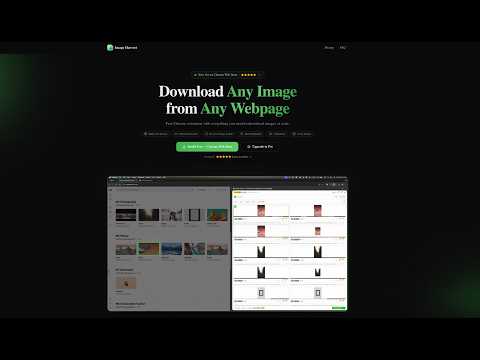
🔍 Smart Image Extraction Automatically finds every image on any webpage — including standard images, CSS backgrounds, responsive images, and high-resolution variants. Scans deep into Shadow DOM and iframes for complete coverage. Live monitoring detects new images as you scroll (Pro). 🎛️ Powerful Filtering & Sorting Filter by size (Small/Medium/Large/XL/Custom), format (JPG/PNG/WebP/SVG/GIF), layout (Square/Landscape/Portrait/Panorama), or URL keywords. Smart grouping by Domain, Format, Size Range, or Tab (Pro). Sort by size, format, or natural order. 📥 BATCH DOWNLOAD IMAGES Download individual images or batch download multiple images as a single ZIP file. Track download progress with a visual progress bar. Free users can download up to 20 images per batch; Pro users enjoy unlimited batch downloads. 🌐 MULTI-TAB EXTRACT Extract images from multiple browser tabs at once. No need to switch tabs one by one — scan all open tabs simultaneously and download everything in one go. Perfect for research, shopping, or content curation across multiple pages. 🔎 SIMILAR IMAGE DETECTION Automatically detect and group visually similar images using advanced perceptual hashing. Avoid downloading duplicates or near-identical variants. Saves time and storage by identifying redundant images before you download. 🔍 REVERSE IMAGE SEARCH Find where else an image appears online. Free users can search via Google Images. Pro users unlock 4 search engines: Google Images, TinEye, Baidu, and Yandex — giving you comprehensive coverage to track image usage, find higher resolutions, or verify authenticity. ✨ BATCH HIGHLIGHT Select multiple images in the panel to highlight them all on the webpage simultaneously. Auto-scrolls to each highlighted image so you can quickly locate and verify them on the page. Ideal for reviewing large batches before downloading. ⭐ IMAGE COLLECTIONS Save your favorite images to a local collection with custom tags and notes. Browse, search, and filter your saved images anytime. Batch export entire collections as ZIP files. Build your personal image library without leaving your browser. 🎨 COLOR EXTRACT Automatically extract the top 5 dominant colors from each image. View color palettes directly in the panel. Pro users can copy HEX color codes for design work, branding analysis, or creative projects. ✅ FREE vs ⚡ PRO FREE includes: • Full smart image extraction • Filter by size, format, layout, and URL • Sorting and view mode switching • ZIP download (up to 20 images) • Single image page highlight • Color bars (view only) • Reverse search via Google • Side Panel & Popup modes • 3 layout densities + Light/Dark theme PRO unlocks: • Unlimited batch ZIP downloads • Format conversion (PNG/JPG/WebP) • Custom naming templates • Multi-tab batch extract • Similar image detection (pHash) • Full color extraction + HEX copy • Reverse search (4 engines) • Batch highlight & auto-scroll • Image collections with tags & notes • Live monitoring (MutationObserver) • Advanced grouping (5 modes) • Image removal from list 🔒 PRIVACY FIRST Image Harvest does NOT collect any user data. All processing happens locally in your browser. No analytics, no tracking, no data transmission. ⌨️ KEYBOARD SHORTCUTS • Ctrl+Shift+S (Cmd+Shift+S on Mac): Toggle Image Harvest 💡 COMPATIBILITY Works on Chrome 88+. Built with Manifest V3. 🌐 WEBSITE https://image-harvest.kyriewen.cn 📧 SUPPORT singerwen@qq.com
5 星(5 星制)1 个评分
详情
隐私权

该开发者已声明,您的数据:
- 不会因未获批准的用途出售给第三方
- 不会为实现与产品核心功能无关的目的而使用或转移
- 不会为确定信用度或放贷目的而使用或转移
支持
若有任何疑问、建议或问题,请在桌面浏览器中打开此页面