


概述
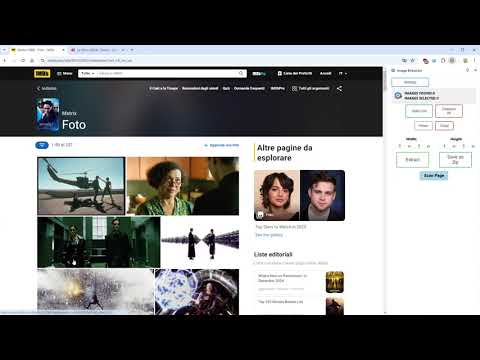
Scan webpages and bulk download images. Optimized for scan speed, finding image variants, save as zip and many other features...
‼️ FIRST START: use it with the contextual menu. Right-click on a webpage or image and click EXTRACT IMAGE(S) 🖼️ and let the magic begin. 📜(SEE BELOW FOR FULL CHANGELOG)📜 🔹 This extension scans webpages using an efficient system that processes multiple images simultaneously, making the scanning process faster. 🔹 A simple side panel shows all found images and their variants in an easy-to-navigate format. 🔹 You can SEARCH with GOOGLE 🔍 a single image for every scanned image with JUST ONE CLICK. 🔹 You can BULK DOWNLOAD 📥 selected images, save them as a ZIP file or as individual files, and automatically rename them using a custom name and incremental numbers. 🔹 Aspect Ratio Filters to show only what images you're looking for. 🔹 You can STOP/PAUSE ⏸️ downloads. 📌 PRE-OPTIMIZED SITES Many sites are fully optimized and tested with Image Extractor: ✔️ Instagram, IMDB – Automatically scroll galleries and find the original image versions. ✔️ CSFD / FilmBooster – Image Extractor provides variants and original versions of images. ✔️ You can request specific sites to be optimized, and I will check if it's possible. 🌍 OTHER FEATURES 🔹 MULTILANGUAGE support: English, Italian, Spanish, French, German. 🔹 Right-click on an image to scan only that image with all available variants. 🔹 You can enable or disable cache ⚡ for a full-speed scan or more precise scan. 🔹 The EXPERIMENTAL 'Automatic Gallery Scroll' 🔄 in settings lets you automatically scroll through image galleries on sites like Instagram and IMDB. The function stops automatically once all images are found. 🔹 Image Extractor automatically filters out unwanted images 🚫 like favicons, images smaller than 100x100 pixels, and other irrelevant items. 💬 Feel free to report bugs, suggestions, and feature requests. 📜 CHANGELOG 📅 (v.1.8.3.7) 26/05/2026 ✔️Disney+ finetuned: normal scan now extracts gallery images from series pages more precisely, includes page background artwork, and detects useful image variants based on the real no-width version. 📅 (v.1.8.3.6) 29/04/2026 ✔️IMDb actor-name extraction revisited: actor names are now prepared before the download starts, making filename association more reliable. A clearer progress bar now shows the extraction process. 📅 (v.1.8.3.5) 09/04/2026 ✔️ Added a new popup option to quickly dock it to the left or right side. ✔️ Fixed an issue where the changelog was not shown in Popup view. ✔️ Fixed IMDb actor-name extraction when downloading a lower-resolution variant. ✔️ Fixed a scan loading spinner that could remain visible after scan completion. ✔️ Apple TV Press finetuned: actor names can now be extracted and added to downloaded filenames. ✔️ Improved filename safety: actor names are now trimmed automatically if the final filename would be too long. ✔️ Download-complete overlay now auto-closes after 15 seconds and also closes when clicking outside. 📅 (v.1.8.3.1) 05/04/2026 ✔️ Added a quick "Open folder" button at the end of each download. 📅 (v.1.8.3) 04/04/2026 ✔️ Popup Mode improvements: better overall popup workflow with remembered size/position, internal multi-tab session handling for multiple scanned pages, and more consistent synchronization/focus with the related source tab. ✔️ New save-name overlay: replaced browser prompt dialogs with an integrated filename overlay for ZIP and individual downloads. 📅 (v.1.8.2) 01/04/2026 ✔️ NEW Popup Mode: you can now choose between classic Sidebar and Popup view in settings. Popup mode shows source-page info, includes a quick "Go back to tab" button, and closes automatically if the source tab is closed or navigates to a new page. ✔️ Added compatibility for browsers without Side Panel support: when Side Panel is unavailable, Image Extractor now opens automatically in Popup mode. ✔️ Improved multi-tab popup workflow: when switching tabs, the extension now automatically brings the popup linked to that tab to the front. ✔️ IMDb actor-name extraction fix: removed an unsafe DOM fallback that could reuse the same name across different images. 📅 (v.1.8.1) 30/03/2026 ✔️New Scan Method control: replaced the old Deep Scan toggle with a dedicated Scan Method selector (NORMAL / DEEP / UNFILTERED) for clearer scan behavior selection. ✔️Image visibility fix: fixed a case where valid images could be excluded from results when resolution probing failed, preventing false negatives in scan output. 📅 (v.1.8.0) 27/03/2026 ✔️ Major stability update: internal communication has been refactored to improve reliability across scans, downloads and sidepanel interactions. ✔️ Improved tab isolation: better handling of parallel scans/downloads on different tabs. ✔️ Download progress fixes: smoother and more accurate progress behavior. ✔️ Keep Scanned improvements: better ordering and consistency across consecutive scans. ✔️ Extract Names fixes: improved reliability after extension reload and multi-scan workflows. ✔️ IMDb Extract Names improved: better support outside gallery pages. ✔️ Various bug fixes and under-the-hood resilience improvements. 📅 (v.1.7.3) 26/03/2026 ✔️ Fixed download of large files (>30MB): files that previously caused the download to freeze are now handled via chunked transfer, ensuring reliable ZIP and individual downloads even for very large images. 📅 (v.1.7.2.5) 26/03/2026 ✔️Internal version 📅 (v.1.7.2) 25/03/2026 ✔️ Fixed CSFD/FilmBooster gallery scanning: adapted to the site's updated page structure. ✔️ Improved scan resilience: if a site changes its layout, the extension now automatically falls back to a full page scan instead of finding no images. ✔️ A notification banner will inform you when this fallback is active. 📅 (v.1.7.1) 12/03/2026 ✔️Actor Names Extraction now available on CSFD, FilmBooster and regional variants. You can now extract actor names (when available) by enabling the option. Names will be automatically added to the corresponding downloaded filenames, just like on IMDb. 📅 (v.1.7.0) 18/02/2026 ✔️Internal version 📅 (v.1.6.9) 10/02/2026 ✔️Internal version 📅 (v.1.6.8) 27/01/2026 ✔️Fixed actor name extraction on m.imdb.com (mobile version). 📅 (v.1.6.7) 16/01/2026 ✔️Minor fixes to IMDb name extractions. 📅 (v.1.6.6) 13/01/2026 ✔️New options in Settings: Hover Zoom and Grid Layout. ✔️Hover Zoom: when enabled, see a larger preview for thumbnails on mouse hover. Can be disabled in Settings. (enabled by default) ✔️Grid Layout: choose how many images per row (1, 2, or 3) in the sidepanel. (default 3) 📅 (v.1.6.5) 08/01/2026 ✔️Internal version 📅 (v.1.6.4) 06/01/2026 ✔️Improved automatic gallery scrolling. ✔️Resolution filter improved: restricting the resolution range is now more precise, using only the resolutions detected during the scan with the help of a smart slider. ✔️Real-time filters update: image sorting is now updated instantly during filtering. ✔️Bugfixes: fixed issues with file size synchronization and resolution range resets when switching filters. ✔️Small aesthetic improvements and other minor fixes. 📅 (v.1.6.3) 26/12/2025 ✔️Download progress bar improvements: transfer speed and data are now displayed in real-time, with more accurate progress percentage. ✔️ Instant Pause & Stop: pause and stop buttons now work immediately without waiting for current downloads to complete. ✔️ Download Report: when a download is stopped before the end, a report with remaining URLs not downloaded is generated. ZIP files always include a full detailed report. 📅 (v.1.6.2) 24/12/2025 ||| INTERNAL RELEASE ||| ✔️ Major scan speed improvements: scanning is now much faster, in many cases almost instant compared to previous versions. ✔️Sidepanel enhancements: images appear instantly at the end of the scan, now showing individual image sizes and total size for selected images. ✔️ media.netflix (Netflix press site) finetuned. 📅 (v.1.6.1) 23/12/2025 ✔️ New feature for IMDb: ACTOR NAME EXTRACTION. When scanning on IMDb, users can now extract actor names from photos (when available) and automatically add them to downloaded filenames ✔️ New Scan Shortcut Quickly start a scan with Ctrl+Shift+X (default) or configure a custom shortcut in settings. 📅 (v.1.6.0) 20/12/2025 ✔️Major changes under the hood. Please report any issues you encounter. ✔️New end-of-scan animation: in the settings menu you can now choose between: No animation, Crossfade, Slow crossfade, Smooth. ✔️Fixed critical bugs in 'Retry Download' menu: resolved UI crashes and empty file downloads. ✔️New Fast Download toggle under settings: experimental. Suggested for huge bulk downloads (more than 500 images). ✔️Fixed a bug where dimension sliders showed 0 on first scan. 📅 (v.1.5.1) 16/12/2025 ✔️ New feature UNDO: added the ability to restore the previous selection after pressing "Select / Deselect All" button or de-flag selected images. ✔️ Optimized the compact theme with an even leaner design. ✔️ Fixed an issue where compact theme options affected the classic theme. ✔️ The selection button is now correctly hidden during scan. ✔️ Added smooth end-of-scan animation; restored labels for the Resolution filter; minor bug fixes. 📅 (v.1.5.0) 14/12/2025 ✔️ Complete UI redesign with improved usability and modern interface. ✔️ New sorting options: sort images by Original Order (scan order) or Resolution. ✔️ New aspect ratio filters: filter images by Vertical, Horizontal, Square or All. ✔️ Improvement: better image preview quality on sidepanel resize. ✔️ New Compact Theme: optimized for small monitors. ✔️ Compact theme includes Scan & View Options menu to personalize the interface and maximize workspace efficiency. 📅 (v.1.4.1) 08/12/2025 ✔️ Fixed ORIGINAL checkbox on CSFD sites: now works correctly and allows downloading original files for selected images. Thanks to JERRY YANG for reporting this issue. ✔️Added FilmBooster (international version of CSFD) with all its regional variants to finetuned sites. 📅 (v.1.4.0) 30/07/2025 ✔️ arte.tv finetuned: scan process can now detect a greater number of variants 📅 (v.1.3.9) 30/07/2025 ✔️ IMDb finetuned: scan process can now detect a greater number of variants. 📅 (v.1.3.8) 05/07/2025 ✔️ Added an option to preserve the original filename when downloading single images. ✔️Comicartfans site has been optimized to find original versions of images. 📅 (v.1.3.7) 26/03/2025 ✔️ Fixed progress bar display issue: download progress now correctly shows only in the active tab. ✔️ Improved tab management for better multi-tab download experience. ✔️ Various performance optimizations for simultaneous downloads. 📅 (v.1.3.6) 23/03/2025 ✔️ Search with Google now automatically finds exact matches. 📅 (v.1.3.5) 23/03/2025 ✔️ Fixed STOP and PAUSE functions for downloads. ✔️ When downloading single images, the original filename is now preserved without adding a suffix. ✔️ Images without extensions are now automatically saved as .jpg format. ✔️ Fixed an issue where original file extensions were not respected (now JPG files remain JPG instead of converting to WebP). 📅 (v.1.3.4) 16/03/2025 ✔️ Improved URL variant detection: Image Extractor now finds more original versions of images by generating all possible combinations when URLs contain repeated patterns. 📅 (v.1.3.3) 10/03/2025 ✔️ Bug fix: In rare cases, variants were not being associated with the individual thumbnail. Fixed. 📅 (v.1.3.2) 10/03/2025 ✔️ Added a button to search all scanned images using Google. Added a setting to disable this button. 📅 (v.1.3.0) 09/03/2025 ✔️ New DEEP SCAN option near SCAN PAGE: find more images when selected, but might group fewer similar images together. ✔️ New variant filter: Image Extractor searches in a smarter way for the original version of images. ✔️ Fixed a bug that always showed 0 as the minimum value of the first scan (in range sliders). 📅 (v.1.2.0) 25/02/2025 ✔️ New SCAN-PER-TAB system: every tab can now individually scan and download images while keeping other scans active in separate tabs. ✔️ Optimized parallelized deep scan to prevent sites from blocking too many simultaneous requests. ✔️ Fine-tuned CSFD site scan (cz and sk versions). ✔️ Small fixes in the "Keep Scanned Images" option. ✔️ Layout enhancements and other minor fixes. 📅 (v.1.1.0) 22/02/2025 ✔️ New option KEEP SCANNED IMAGES next to the SCAN button: temporarily retain images found during multiple scans on the same page. ✔️ When extracting a specific image with right-click, selecting KEEP SCANNED IMAGES allows users to add and download multiple images together. ✔️ New header menu graphics – Settings menu is now in the header logo. 📅 (v.1.0.8) 21/02/2025 ✔️ Fine-tuned JustWatch: now finds variants for posters inside the JustWatch site. ✔️ Minor bug fixes. 📅 (v.1.0.7) 07/02/2025 ✔️ Fine-tuned animeclick. ✔️ Bug fix: In rare cases, scans of more than 2000 images would not populate the side panel or complete properly. 📅 (v.1.0.6) 02/02/2025 ✔️ Various fixes and improvements under the hood. 📅 (v.1.0.5) 01/02/2025 ✔️ Fine-tuned IMDB: always finds the original version and lists it as default in the menu, if available. ✔️ Thumbnail now always shows the smaller image.
4.9 星(5 星制)25 个评分
详情
- 版本1.8.3.7
- 上次更新日期2026年5月26日
- 提供方dosdcmdev
- 大小348KiB
- 语言English (United States)
- 开发者
邮箱
dosdcmdev@gmail.com - 非交易者该开发者尚未将自己标识为交易者。欧盟地区消费者须知:消费者权利可能不适用于您与该开发者达成的合约。
隐私权

该开发者已声明,您的数据:
- 不会因未获批准的用途出售给第三方
- 不会为实现与产品核心功能无关的目的而使用或转移
- 不会为确定信用度或放贷目的而使用或转移
支持
若有任何疑问、建议或问题,请在桌面浏览器中打开此页面