Item logo image for Image Edit Ease - All-in-One Offline Toolkit

Image Edit Ease - All-in-One Offline Toolkit

Item media 4 (screenshot) for Image Edit Ease - All-in-One Offline Toolkit
Item media 1 (screenshot) for Image Edit Ease - All-in-One Offline Toolkit
Item media 2 (screenshot) for Image Edit Ease - All-in-One Offline Toolkit
Item media 3 (screenshot) for Image Edit Ease - All-in-One Offline Toolkit
Item media 4 (screenshot) for Image Edit Ease - All-in-One Offline Toolkit
Item media 1 (screenshot) for Image Edit Ease - All-in-One Offline Toolkit
Item media 2 (screenshot) for Image Edit Ease - All-in-One Offline Toolkit
Item media 3 (screenshot) for Image Edit Ease - All-in-One Offline Toolkit
Item media 4 (screenshot) for Image Edit Ease - All-in-One Offline Toolkit

Overview

Offline image editor: compress, resize, crop, convert, text, stickers, filters, blur, watermark. Sleek design, works offline.

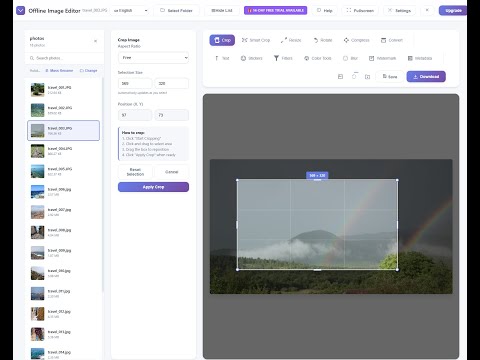
Transform Your Images with Professional Ease - All Offline! Image Edit Ease is a powerful, all-in-one image editing extension for Chrome that brings professional-grade photo editing tools right into your browser. No internet connection required, no complicated software to install - just pure, seamless image editing whenever you need it. WHY CHOOSE IMAGE EDIT EASE? 🚀 Complete Offline Functionality Work anywhere, anytime - no internet connection required. Your images stay private and secure on your device. Perfect for traveling, areas with poor connectivity, or when you simply want to maintain privacy. 🎨 Professional Editing Tools Everything you need to perfect your images in one elegant interface: BASIC EDITING: • Crop & Resize: Precisely crop images with free or constrained aspect ratios (1:1, 16:9, 4:3). Resize with exact pixel dimensions while maintaining aspect ratios, or use interactive drag-to-resize for visual control. • Rotate: Smooth rotation with real-time preview. Rotate by preset angles or fine-tune to exact degrees. • Compress: Optimize image file sizes without losing quality. See before/after size comparisons in real-time. • Format Conversion: Convert between major image formats while automatically preserving metadata. ADVANCED EDITING: • Smart Crop: Intelligent cropping with three detection modes - Face Detection (automatically centers on faces), Edge Detection (focuses on content), and Center Weighted (balanced composition). Perfect for social media thumbnails and profile pictures. • Filters & Effects: Professional-grade filters including Brightness, Contrast, Saturation, Blur, Hue Rotate, Invert, and Opacity controls. Plus 12 artistic presets: Grayscale, Sepia, Vintage, Warm, Cool, Vivid, Fade, Noir, Dramatic, Soft, and more. • Advanced Color Tools: EyeDropper tool for precise color picking, HSL adjustments (Hue, Saturation, Lightness), Color temperature and tint controls, Color replacement with tolerance settings, Curves adjustments for shadows, midtones, and highlights, Gradient overlays (linear and radial) with full opacity control CREATIVE TOOLS: • Text Overlay: Add custom text with adjustable font size, color selection, and drag-to-position. Perfect for memes, captions, or watermarking. • Stickers & Emojis: Large collection of fun stickers and emojis. Simply click to add, drag to reposition, double-click to delete. • Watermarking: Protect your images with custom text watermarks. Fully customizable size, color, and positioning. • Blur Tool: Selective blur with three effect types (Blur, Darken, Pixelate). Adjustable brush size for precise control - perfect for privacy protection or artistic effects. TECHNICAL TOOLS: • Metadata Editor: View, edit, and remove EXIF data including GPS location, camera settings, date/time, and more. Export images with or without metadata for privacy control. • Face Detection: Built-in face detection for smart cropping and blur features. 📁 Powerful File Management PHOTO GALLERY BROWSER: • Select entire folders to browse and edit multiple images • Quick search to find images instantly • Mass rename files with customizable prefixes and numbering • Switch between images without losing your edits SMART SAVE OPTIONS: • Save directly over original files or create new copies • Set default save folders for quick access • Download images to any location on your device • Automatic filename handling with conflict resolution 🌍 Multi-Language Support Interface available in 33 languages including English, Spanish, French, German, Italian, Portuguese, Polish, Russian, Arabic, Japanese, Korean, Chinese (Simplified & Traditional), Turkish, Dutch, Swedish, Norwegian, Danish, Finnish, Czech, and many more. Switch languages on-the-fly without restarting. ⚙️ Customizable Settings • Direct Launch: Skip the popup and open the editor directly • Fullscreen Mode: Maximize your workspace for detailed editing • Auto-Extract Metadata: Automatically view image information when opening files • Smart Overwrite Protection: Choose whether to allow overwriting original files • Image Name Display: Show or hide the current filename in the header 🎯 User-Friendly Design • Apple-inspired Interface: Clean, modern design with intuitive controls • Real-time Preview: See your changes instantly before applying • Unlimited Undo: Revert any action with a single click • Drag & Drop: Simply drag images into the editor to start • Keyboard Shortcuts: Work faster with convenient hotkeys • Responsive Layout: Works perfectly on any screen size 🔒 Privacy First • 100% Offline Processing: All editing happens on your device • No Data Collection: Your images never leave your computer • No Account Required: Start editing immediately, no sign-up needed • Metadata Control: Choose what information to keep or remove 💼 Perfect For: • Photographers: Quick edits, batch processing, metadata management • Social Media Managers: Resize, crop, and optimize images for different platforms • Content Creators: Add text, watermarks, and creative effects • Privacy-Conscious Users: Remove sensitive metadata before sharing • Students & Professionals: Fast, reliable image editing without expensive software • Travelers: Edit photos offline without internet access • E-commerce: Optimize product photos, add watermarks • Bloggers & Writers: Quick image adjustments for articles 🎁 Free Trial Included Try all premium features with a 14-day free trial. No credit card required. Experience the full power of Image Edit Ease before deciding. 📞 Support & Feedback Built-in help system allows you to contact support directly from the extension. Choose from Bug Report, Feature Request, Question, or Feedback topics. We respond quickly and value your input! 🔧 Technical Highlights • Built with HTML5 Canvas for smooth, high-performance editing • Supports modern web APIs (File System Access, Face Detection, EyeDropper) • Automatic format detection and conversion • Preserves image quality during edits • Efficient memory management for large images • No external dependencies or libraries needed 🚀 Getting Started 1. Click the extension icon in your browser toolbar 2. Drag an image into the editor or click to browse 3. Select a tool from the sidebar 4. Make your edits with real-time preview 5. Save or download your perfected image It's that simple! ⭐ Why Users Love Image Edit Ease: "Finally, a Chrome extension that does everything I need for image editing without the bloat. The offline functionality is a game-changer!" "The interface is beautiful and intuitive. I can edit photos faster than ever before." "Perfect for my e-commerce business. I can quickly watermark and resize product photos without leaving my browser." 🆚 Compare to Traditional Software: Traditional Photo Editors: ❌ Expensive subscription fees ❌ Large downloads and installations ❌ Complicated interfaces ❌ Requires internet connection ❌ Slow startup times Image Edit Ease: ✅ Affordable one-time pricing ✅ Lightweight browser extension ✅ Intuitive, modern interface ✅ Works completely offline ✅ Instant access from your browser 📊 Feature Comparison: FREE TRIAL (14 days): ✓ Basic Tools (Crop, Resize, Rotate) ✓ Filters & Effects ✓ Format Conversion ✓ Text & Stickers ✓ Advanced Color Tools ✓ Metadata Editor ✓ Smart Crop with Face Detection PREMIUM: ✓ All Free Trial Features ✓ Unlimited Processing ✓ Priority Support 🔄 Regular Updates We continuously improve Image Edit Ease based on user feedback. New features, performance improvements, and bug fixes are released regularly. 🏆 Join Thousands of Satisfied Users Image Edit Ease has helped thousands of users streamline their image editing workflow. From casual users to professional photographers, everyone finds value in our powerful yet simple tools. Ready to transform your image editing experience? Install Image Edit Ease today and discover how easy professional photo editing can be. With our 14-day free trial, you have nothing to lose and perfectly edited images to gain! Click "Add to Chrome" to get started now!

Details

  • Version
    1.0.0
  • Updated
    December 2, 2025
  • Features
    Offers in-app purchases
  • Size
    302KiB
  • Languages
    30 languages
  • Developer
    Marek Bar
    Albigowa 1194 Albigowa 37-122 PL
    Website
    Email
    solidsoft.marekbar@outlook.com
    Phone
    +48 736 935 975
  • Trader
    This developer has identified itself as a trader per the definition from the European Union and committed to only offer products or services that comply with EU laws.

Privacy

The developer has disclosed that it will not collect or use your data.

This developer declares that your data is

  • Not being sold to third parties, outside of the approved use cases
  • Not being used or transferred for purposes that are unrelated to the item's core functionality
  • Not being used or transferred to determine creditworthiness or for lending purposes

You might also like…

Screenshot Tool - Screen Capture & Editor

4.7

Innovative screenshot tool lets users screen capture and edit screenshot. Full page screen capture.

Smallpdf—Edit, Convert, Compress, & AI Summarize PDF

4.6

Easy-to-use PDF tools to compress, convert, merge, chat to, split, e-sign, and edit PDF files in your browser.

Readline

4.1

Unleash the Power of Distraction-Free Reading: Simplified Layout, Consistent Formatting, Image & Ad Removal, High Customizability!

Image Splitter

4.9

🪟 Split or change size of image, crop, resize & create photo grids effortlessly using Image Splitter! You perfect grid maker!

Google apps