


개요
Professional image cropping and editing tool with advanced adjustments.
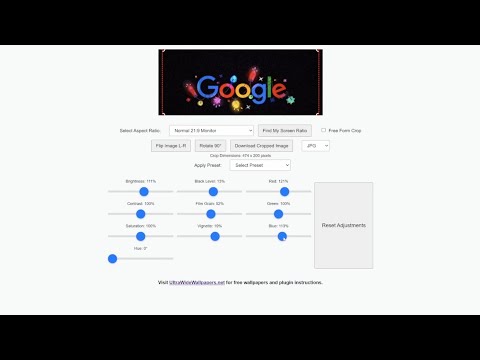
Image Crop & Edit - by UltrawideWallpapers.net Take your in browser image editing to the next level with ICE (Image Crop & Edit), a powerful and intuitive plugin designed to simplify cropping and fine-tuning images directly in your browser. Whether you’re resizing for your website, social post, ultrawide monitors, preparing wallpapers, or making quick edits, this plugin offers seamless functionality with professional-grade precision. Features: Simplicity: Edit any image by clicking on the toolbar icon, or Right Clicking on a webpage. Pre-sets: Built in pre-sets for a very wide variety of looks Custom Aspect Ratios: Lots of custom Crop ratios built in, including extensive Social Media Support for Instagram, TikTok, YT, X Twitter, Social Banners etc. Real-Time Previews: See your changes instantly with live cropping and adjustment previews. Professional Level image adjustments: Several simply laid out tools to creatively manipulate the image. Black-Level Adjustments: Perfect for OLED displays, ensuring true blacks and optimized contrast. Multi-Purpose Use: Ideal for wallpapers, social media graphics, presentations, and more. Why Choose Ultrawide Crop Tool? Designed for Social Media Managers, Web Developers, Creatives, Gamers and PC Setup Enthusiasts. Built by the creator of UltrawideWallpapers.net, the go-to hub for ultrawide content. Completely Free: No hidden fees, no subscriptions—just powerful tools at your fingertips. Community-Driven: Supports a growing community of ultrawide monitor users and creatives. How It Works: Add the plugin to Chrome. Edit any image by clicking on the toolbar icon and uploading from your computer, or Right Clicking on a webpage to reveal screenshot and where a site allows it - right clicking on an image to edit it. Please note sites like some banking sites that intentionally block screenshots will not screenshot. Fine-tune aspect ratios, levels, and more. Save and share your masterpiece! About the Creator: This plugin is created by professional music industry photographer Peter Neill (@ShootTheSound) and developer with a passion for quality imagery. It’s an extension of UltrawideWallpapers.net, a thriving community created by Peter offering high-resolution wallpapers and creative tools. Enhance your editing workflow today! Download the Ultrawide Crop Tool and unlock the potential of browser-based image editing.
5점 만점에 4.8점평점 13개
세부정보
개인정보 보호
개발자가 사용자 데이터에 관해 다음과 같이 선언했습니다
- 승인된 사용 사례를 제외하고 서드 파티에 판매하지 않음
- 항목의 핵심 기능과 관련 없는 목적으로 사용하거나 전송하지 않음
- 신용도 판단 또는 대출 목적으로 사용하거나 전송하지 않음
지원
질문, 제안 또는 문제와 관련하여 도움이 필요하면 데스크톱 브라우저에서 이 페이지를 여세요.