

Image Bank

Overview
Capture, organize and reuse images and GIFs.
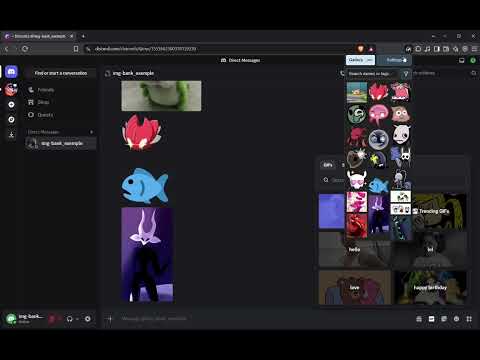
Your personal image and GIF collection, right in Chrome. Image Bank began as a way to reuse favorite Discord emotes in messages and servers where they weren’t available. Now it helps you collect, organize, find, and reuse images and GIFs while browsing. Add to your collection • Drag image files into the popup, paste an image, or choose files with Settings → Import Items. • Use Settings → Start Click Capture, then select an image or GIF on a supported webpage. An on-page indicator shows the remaining time. Saving a new item restarts the 10-second timer, and you can stop capture at any time. • Prefer highest-quality source is on by default. When a reliable original or larger version is available, Image Bank tries it first and falls back to the clicked media if needed, I recommend disabling this if you want to preserve smaller source sizes, such as Discord emotes. Find and reuse images • Switch between the IMG and GIF galleries. Search names and tags, combine search terms, and sort by name or tag. • Click an item to copy it. Supported hosted GIFs copy their share link; other media uses the clipboard formats available in your browser. • Select one or multiple items to download them from the gallery. Multiple items are packaged into a single archive. • Drag saved images into applications that accept them. Results depend on the application and media format. Make the gallery yours • Rename items, edit tags across multiple items, show or hide labels, and adjust the layout and preview sizes. • Choose a light, dark theme and toolbar icon; its Automatic setting follows your system color preference, which may differ from a custom Chrome theme. Protect your collection • Export a backup of your images, GIFs, names, tags, and source links, and restore it when needed. • Check saved originals for missing or damaged files. Storage cleanup is available after checking a backup. Click Capture depends on the webpage and its available media. Restricted browser pages cannot be captured, and some sites block downloads. GIF playback, copying, and dragging depend on the format and destination application.
0 out of 5No ratings
Details
- Version1.0.3
- UpdatedSeptember 30, 2026
- Size94.31KiB
- LanguagesEnglish
- Developer
Email
orihnsomnia@gmail.com - Non-traderThis developer has not identified itself as a trader. For consumers in the European Union, please note that consumer rights do not apply to contracts between you and this developer.
Privacy

This developer declares that your data is
- Not being sold to third parties, outside of the approved use cases
- Not being used or transferred for purposes that are unrelated to the item's core functionality
- Not being used or transferred to determine creditworthiness or for lending purposes