


Overview
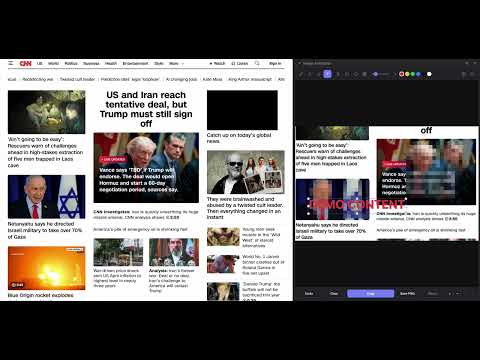
Mark up screenshots and images: pen, arrows, shapes, numbered callouts, text and mosaic redaction. Copy or save as PNG.
Image Annotator is a lightweight Chrome tool for quickly marking up images — no sign-in, no uploads, no external services. Everything runs locally in your browser. It opens in its own resizable window so the page you're capturing keeps its full width, and docks into the Chrome side panel whenever you'd rather have it there. ── LOAD IMAGES ── • Drag & drop an image onto the panel • Paste from clipboard (Ctrl+V / Cmd+V) • Open any image file (PNG, JPG, GIF, WebP) • Screenshot the current tab — the whole view, or crop to any region ── DRAWING TOOLS ── • Pen — freehand drawing • Line — draw straight lines at any angle • Arrow — directional arrows with a solid arrowhead • Rectangle — outlined boxes to highlight areas • Circle / Ellipse — rounded callout shapes • Callout — an outlined box with a numbered badge on its left or right edge; numbers itself 1, 2, 3…, takes any label you type, and slides along the edge • Text — click to type, or drag to set the box width; text wraps on its own and never runs off the image. Supports multiline and per-character colour • Eraser — remove strokes with a scalable brush • Mosaic / Redact — pixelate sensitive regions to hide personal info ── EDITING ── • Select & Move — click any shape to reposition or resize it • Reshape text — drag the side handles to reflow the text, corners to scale the font • Restyle anytime — change the colour or stroke thickness of a shape after drawing it • Layer order — bring shapes forward or send to back • Undo — up to 10 steps (Ctrl+Z / Cmd+Z) • Clear — remove all annotations at once ── WINDOW OR SIDE PANEL ── • Opens in its own window by default, so the tab you're screenshotting isn't squeezed • Dock into the Chrome side panel with one click — and pop back out just as easily ── COLOURS & SIZE ── • 6 colour swatches: red, yellow, green, blue, black, white • Stroke size slider (1–30 px), which also resizes whatever shape is selected • Text tool picks up the active colour; select text mid-edit to recolour individual characters ── EXPORT ── • Copy — copy the annotated image to clipboard as PNG at the original resolution (paste directly into Slack, email, docs) • Save PNG — download to your computer with a timestamp filename ── PRIVACY ── No data leaves your browser. No accounts, no servers, no analytics. Perfect for bug reports, design feedback, tutorials, redacting screenshots, and any workflow where you need to mark up an image fast.
5 out of 51 rating
Details
- Version1.3
- UpdatedAugust 25, 2026
- Size30.67KiB
- LanguagesEnglish (United Kingdom)
- DeveloperWebsite
Email
edwin@blackdash.my - Non-traderThis developer has not identified itself as a trader. For consumers in the European Union, please note that consumer rights do not apply to contracts between you and this developer.
Privacy

This developer declares that your data is
- Not being sold to third parties, outside of the approved use cases
- Not being used or transferred for purposes that are unrelated to the item's core functionality
- Not being used or transferred to determine creditworthiness or for lending purposes