

PDFPilot - Free PDF Editor, Merge, Split & Convert
1 rating
)
Overview
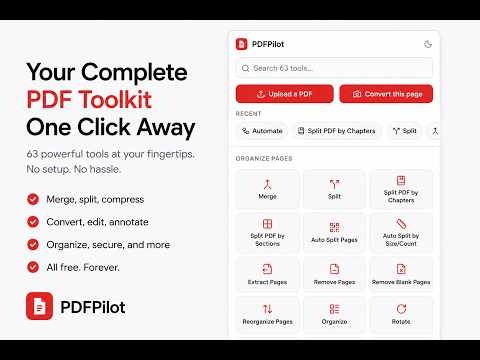
63 PDF tools in one click — edit text, merge, split, compress, convert, sign, and more, right from your Chrome toolbar.
➣ 100% FREE ➣ Unlimited PDF tools ➣ No signup required PDFPilot gives you quick access to 60+ PDF tools directly from your Chrome toolbar. Open a PDF, click PDFPilot, search for the task you need, and go straight to the appropriate tool with your file ready to use. 🤔 WHY PDFPILOT Working with PDFs often means downloading a file, finding a suitable online tool, uploading the file, completing the task, and downloading the result. PDFPilot simplifies the first part of that process. It detects the PDF you are currently viewing and helps you quickly open the tool you need. You can also choose a PDF directly from the extension popup. ✅ WHAT YOU CAN DO PDFPilot provides tools for common PDF tasks, including: • Organize pages — merge, split, reorder, rotate, crop, extract, and remove pages. • Convert files — convert PDFs between common document, spreadsheet, presentation, and image formats. • Compress and repair — reduce file size and repair damaged PDF documents. • Protect documents — add or remove passwords, manage permissions, redact content, and sanitize files. • Sign documents — add signatures, work with certificates, and validate signed PDFs. • Edit and annotate — add text, images, stamps, watermarks, page numbers, attachments, and annotations. • Work with scanned documents — improve scans, apply cleanup effects, and extract pages from scanned images. • Extract and inspect — extract images, view document information, compare PDFs, and inspect metadata. • View PDFs — open and work with PDF documents directly through the available tools. • Automate tasks — simplify repetitive PDF operations with built-in workflow tools. Everything is accessible from one searchable popup. ❓ HOW IT WORKS 1. Open a PDF or click the PDFPilot toolbar icon. 2. Search or browse for the task you need. 3. Open the selected tool with your PDF ready to use. 🛡️ PRIVACY PDFPilot does not operate its own file-processing servers and does not store your PDF files. The extension helps you navigate to the selected PDF tool and passes your file to that service. PDFPilot only stores a small amount of local information, such as your theme preference and recently used tools, on your device. POWERED BY STIRLING PDF PDFPilot is a launcher for PDF tools rather than a PDF editor itself. The PDF processing is provided by Stirling PDF, an open-source PDF toolkit. PDFPilot's role is to help you find and open the appropriate tool quickly. PDFPilot is an independent project and is not affiliated with or endorsed by Stirling PDF. 📌 ABOUT PDFPILOT PDFPilot currently provides more than 60 tools covering document organization, conversion, editing, security, signatures, scanning, extraction, viewing, and automation. The available tools may change and improve over time as PDFPilot evolves. For more information, visit the PDFPilot website. Contact: contact.topext@gmail.com
5 out of 51 rating
Details
- Version1.0.0
- UpdatedSeptember 17, 2026
- Offered byTanzim
- Size164KiB
- LanguagesEnglish
- Developer
Email
tanzim1463@gmail.com - Non-traderThis developer has not identified itself as a trader. For consumers in the European Union, please note that consumer rights do not apply to contracts between you and this developer.
Privacy

This developer declares that your data is
- Not being sold to third parties, outside of the approved use cases
- Not being used or transferred for purposes that are unrelated to the item's core functionality
- Not being used or transferred to determine creditworthiness or for lending purposes