

MeetingFlow Live Translate

Overview
Record meeting and video audio, follow live transcripts, and translate speech in the Chrome sidebar.
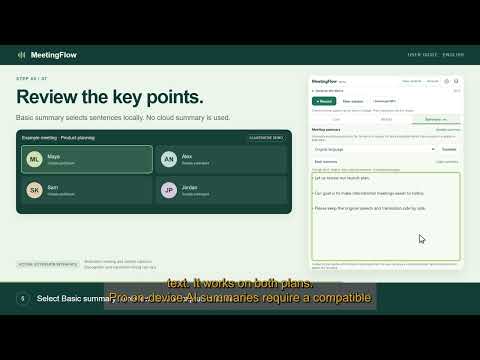
# Chrome Web Store listing Version 0.3.7 payment-choice update copy. Deploy AI summary is enabled and verified with synthetic content. ## Name MeetingFlow Live Translate ## Short description Record web meeting audio and follow live transcription and translation in Chrome's side panel. ## Detailed description Follow meetings, web videos and livestreams in your chosen language without leaving the conversation. MeetingFlow brings audio recording, live transcription and translation into Chrome's side panel. Keep your meeting or video visible while you read original speech and translated text side by side. FOLLOW THE CONVERSATION • Choose the spoken language and translation language before recording. • Read original speech and translation in two adjustable columns. • Change languages from the sidebar when the conversation changes. • Collapse controls to give the text more room. READ AT YOUR OWN PACE • Open All text to read the accumulated transcript in one language. • Keep your reading position while the meeting continues. • Switch to a translated version when you need it. • Use Basic summary to select key sentences from the transcript captured so far. Pro AI Summary synthesizes the full captured transcript through Deploy, using the DeepSeek model, after confirmation. Choose a language for the summary or translate the saved summary into another language. SAVE AND CHECK YOUR RECORDINGS • Record audio from the selected browser tab, with optional microphone audio. • Keep recordings and transcripts on your device and revisit saved sessions. • Download speech-optimized MP3 or the original WebM audio. • Export transcript text and check important quotes against the recording. Recognition timestamps are approximate. PROCESSING AND PRIVACY Recordings, transcripts and translations are stored locally in the extension. MeetingFlow's service does not receive meeting content for recording or live speech processing. The default Chrome online speech mode may send audio to Google for recognition. Choose on-device speech, where supported, or recording-only mode in Settings if you prefer. Translation uses Chrome's on-device Translator API after any required language packs are downloaded. You control local retention and deletion. The extension does not automatically notify meeting participants. Use recording in accordance with the rules that apply to your meeting. REQUIREMENTS AND LIMITATIONS Desktop Chrome 139 or later is required. Language availability depends on Chrome and its speech and translation services. On-device AI and speech features have additional hardware, storage and language requirements. Online speech requires an internet connection. Protected pages or media may prevent capture. MeetingFlow records audio, not video. Transcription, translation and summaries may be delayed or contain errors. Check important statements against the audio. MP3 export may be unavailable for very large recordings on devices with limited memory; the original WebM remains an alternative. FREE AND PRO Create a MeetingFlow account to use recording allowances. Free includes 45 minutes per recording, 180 recording minutes per month and one translation target. Pro includes up to 3 hours per recording, 1,800 recording minutes per month, up to three translation targets, SRT/JSON export and optional cloud AI summaries without Chrome AI hardware requirements. Basic summary is available on both plans. Pro costs USD 6.99 for one month or USD 59 for one year. Choose Pay once for manual renewal without automatic charges, or Auto-renew with PayPal for recurring billing until cancelled. Cancel automatic renewal from Account; verified paid access remains until the paid period ends. Pay-once passes expire unless renewed. PayPal decides whether guest credit/debit-card checkout is available to each buyer; a PayPal login may still be required. No no-login card guarantee is made. Refunds and reversals can remove the corresponding paid access. One recording may run at a time per account. Monthly allowances reset on the first day of each month at 00:00 UTC, without rollover. Connected recording requires internet authorization. Saved local recordings and downloaded files remain available after cancellation. Pro cloud AI allowance is 300 text-equivalent minutes, 30 requests and 1.5 MB of input per calendar month, shared by AI summaries and their translations. Each updated summary processes the entire snapshot again. Input is limited to 450 KB per request. Shared launch capacity is 15,000 requests and 500 MB input per calendar month across all users, subject to a service spending safeguard that may pause AI earlier. Individual allowance is not a guarantee of availability after shared capacity or spending safeguards are reached. Recording, saved downloads and local features remain available. This pilot is limited, not unlimited or guaranteed availability. Transcript text is sent through Cloudflare to Deploy only after confirmation; audio is not sent for summaries. Deploy processing and retention policies apply. Results are saved locally. Declining a cloud request leaves local features available. No separate API key or additional installed app is required for the features described above. Published by TechBiz. Support: support@techbiz.site ## Metadata - Publisher display name: TechBiz - Primary language: English - Category: Communication - Support email: support@techbiz.site - Website: leave the optional website field blank until the main TechBiz website has been published. The privacy subdomain already works. - Privacy policy: https://privacy.techbiz.site/meetingflow.html - Support URL: leave unset until an actual public support page exists. Do not invent a /support page.
0 out of 5No ratings
Details
- Version0.3.7
- UpdatedNovember 7, 2026
- FeaturesOffers in-app purchases
- Offered byTechBiz
- Size183KiB
- LanguagesEnglish
- DeveloperNGUYEN THI THU THUY
4b Tan Hai Ho Chi Minh city, Thành phố Hồ Chí Minh 700000 VNEmail
support@techbiz.sitePhone
+84 358 212 787 - TraderThis developer has identified itself as a trader per the definition from the European Union and committed to only offer products or services that comply with EU laws.
Privacy

MeetingFlow Live Translate has disclosed the following information regarding the collection and usage of your data. More detailed information can be found in the developer's privacy policy.
MeetingFlow Live Translate handles the following:
This developer declares that your data is
- Not being sold to third parties, outside of the approved use cases
- Not being used or transferred for purposes that are unrelated to the item's core functionality
- Not being used or transferred to determine creditworthiness or for lending purposes