


Overview
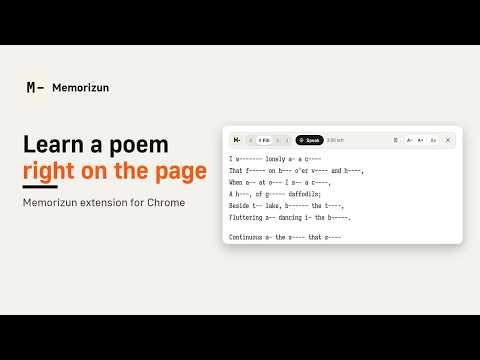
Finds the poem on a page and hides its words right in the text. Click a word to peek. Free, no sign-up.
Learn a poem by heart without leaving the page you found it on. Memorizun finds the poem on the page and puts a small “Learn this poem” button right above it. One click and the words hide in place, exactly like in the Memorizun method, so you can practise recall on the original text. HOW IT WORKS (the same four steps as in the Memorizun trainer) • Read – the poem as it is on the page. • Fill – every second word shrinks to its first letter. • Recall – every word shows only its first letter. • Check – every letter is hidden, test yourself fully. • Click any hidden word to peek at it, click again to hide it. • “Save to My texts” keeps the poem in your Memorizun texts without leaving the page: a small Memorizun window saves it under your account (or as a guest) and closes itself. • In Fill, Recall and Check you can also say the poem out loud: press Speak and each word opens in green as you say it. MADE TO STAY OUT OF THE WAY • The poem is detected by its shape on the page, not by site-specific tricks, and the page is restored exactly as it was when you close the panel. • Pick one of several fonts or keep the site’s own, and set the text size. Your choice is remembered. • The panel adapts to the width of the poem block, from wide desktop columns to narrow ones. WORKS ON ANY SITE On several popular poetry websites the button appears by itself. On any other page, click the extension icon and choose “Learn the text on this page”: the extension finds the poem, takes the text you have selected, or lets you click the block you want. Until you click, it does nothing on other sites. VOICE CHECK In Fill, Recall or Check press Speak and say the poem. The extension uses your browser’s built-in speech recognition (Chrome, Edge), so your browser will ask for microphone access for the site you are on. The limits are the same as on the Memorizun website: 3 minutes a day as a guest, 12 minutes with an account, no limit with a subscription. TOOLBAR BUTTON Click the extension icon to learn the text on the current page, pick a block yourself, see how much voice time is left today and use quick actions: save the poem from the page or any text you have selected to your Memorizun texts, open your texts, or sign in for more voice time. PRIVACY The extension has no analytics. In your browser it stores only your font and size choice, the number of voice seconds used today and a short summary of your plan from the Memorizun website (signed in or not, daily voice limit; no name, no email). It never records or stores audio or recognized text. If you use voice check, the audio is processed by your browser’s speech recognition (in Chrome it may be sent to Google’s speech service), not by the extension. A poem or selected text is sent to memorizun.com only when you click a save button. Free, no sign-up.
0 out of 5No ratings
Details
- Version1.1.0
- UpdatedOctober 30, 2026
- FeaturesOffers in-app purchases
- Size165KiB
- Languages2 languages
- Developer
- TraderThis developer has identified itself as a trader per the definition from the European Union and committed to only offer products or services that comply with EU laws.
Privacy

Memorizun: Memorize Poems & Any Text by Heart has disclosed the following information regarding the collection and usage of your data. More detailed information can be found in the developer's privacy policy.
Memorizun: Memorize Poems & Any Text by Heart handles the following:
This developer declares that your data is
- Not being sold to third parties, outside of the approved use cases
- Not being used or transferred for purposes that are unrelated to the item's core functionality
- Not being used or transferred to determine creditworthiness or for lending purposes
Support
For help with questions, suggestions, or problems, visit the developer's support site