


概述
Chrome屏幕录制器,截图,录屏和录像,捕获,编辑并即时分享
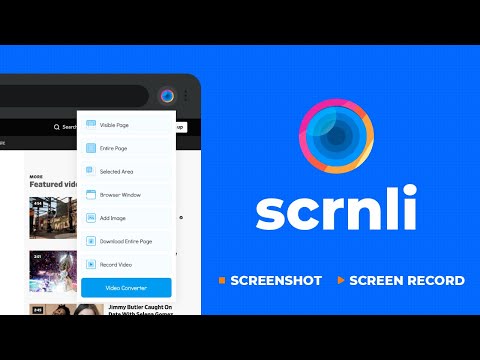
Scrnli 是一款强大的 Chrome 屏幕录制和截图工具,可以让您捕捉屏幕、录制视频、截取屏幕截图并即时分享内容。 使用 Scrnli 录制您的屏幕,捕捉完整页面,编辑截图,并为工作、学习或沟通创建视频录制。 为什么选择 Scrnli 屏幕录制和截图应用 Chrome 截图工具 - 捕捉完整页面、选定区域或可见屏幕 Chrome 屏幕录制器 - 录制屏幕、浏览器标签或桌面视频 编辑截图 - 注释、绘图、添加文本、箭头和高亮 即时捕捉 - 一键截取屏幕截图和录制屏幕 轻松分享 - 通过链接即时分享截图和视频 保存和下载 - 将截图和屏幕录制保存在本地 轻量级扩展 - 平稳运行,不会减慢 Chrome 的速度 安全和隐私 - 您的数据保持安全并在您控制之下 您可以使用 Scrnli 做什么 截取截图 - 捕捉完整页面截图或选定区域 录制屏幕视频 - 录制教程、会议和演示 创建教程 - 录制屏幕并直观地解释过程 改善沟通 - 分享截图和视频而不是文本 保存重要内容 - 捕捉并存储有用的信息 如何使用屏幕录制和截图工具 1. 从 Chrome 网上应用店安装 Scrnli 2. 点击扩展图标 3. 选择截图或屏幕录制模式 4. 捕捉您的屏幕或录制视频 5. 即时编辑、保存或分享 使用这个易于使用的 Chrome 屏幕录制器,在几秒钟内捕捉和录制您的屏幕。 截图功能 完整页面截图 - 捕捉整个网页 可见屏幕捕捉 - 捕捉您所看到的内容 区域截图 - 选择并捕捉特定区域 即时编辑 - 添加文本、箭头和高亮 屏幕录制功能 录制屏幕 - 捕捉桌面、浏览器标签或窗口 视频录制 - 流畅性能下录制视频 快速分享 - 即时分享录制内容 保存视频 - 下载录制以供离线使用 用户为何安装 Scrnli 屏幕录制器 • 易于使用的截图和屏幕录制工具 • 快速捕捉和编辑功能 • 即时分享截图和视频 • 轻量级且简单易用 • 适合工作、学习和日常任务 隐私与安全 Scrnli 屏幕录制器不会收集或存储个人数据。您的截图和录音保持私密。 Scrnli is a powerful screen recorder and screenshot tool for Chrome that lets you capture your screen, record video, take screenshots, and share content instantly. Use Scrnli to record your screen, capture full pages, edit screenshots, and create video recordings for work, study, or communication. Why Choose Scrnli screen recorder and screenshot app Screenshot Tool for Chrome - Capture full page, selected area, or visible screen Screen Recorder for Chrome - Record screen, browser tab, or desktop video Edit Screenshots - Annotate, draw, add text, arrows, and highlights Instant Capture - Take screenshots and record screen with one click Easy Sharing - Share screenshots and videos instantly via link Save and Download - Save screenshots and screen recordings locally Lightweight Extension - Works smoothly without slowing down Chrome Secure and Private - Your data stays safe and under your control What You Can Do with Scrnli Take Screenshots - Capture full page screenshots or selected areas Record Screen Video - Record tutorials, meetings, and presentations Create Tutorials - Record screen and explain processes visually Improve Communication - Share screenshots and videos instead of text Save Important Content - Capture and store useful information How to Use Screen Recorder & Screenshot Tool 1. Install Scrnli from the Chrome Web Store 2. Click the extension icon 3. Choose screenshot or screen recording mode 4. Capture your screen or record video 5. Edit, save, or share instantly Capture and record your screen in seconds with this easy-to-use screen recorder for Chrome. Screenshot Features Full Page Screenshot - Capture entire web pages Visible Screen Capture - Capture what you see Area Screenshot - Select and capture specific areas Instant Editing - Add text, arrows, and highlights Screen Recorder Features Record Screen - Capture desktop, browser tab, or window Video Recording - Record video with smooth performance Quick Sharing - Share recordings instantly Save Video - Download recordings for offline use Why Users Install Scrnli Screen Recorder • Easy screenshot and screen recording tool • Fast capture and editing features • Share screenshots and videos instantly • Lightweight and simple to use • Perfect for work, study, and daily tasks Privacy and Security Scrnli Screen Recorder does not collect or store personal data. Your screenshots and recordings remain private.
4.7 星(5 星制)1.1万 个评分
详情
隐私权

该开发者已声明,您的数据:
- 不会因未获批准的用途出售给第三方
- 不会为实现与产品核心功能无关的目的而使用或转移
- 不会为确定信用度或放贷目的而使用或转移