

Twinread: Dual Subtitles on YouTube & Bilingual Page Translator

Overview
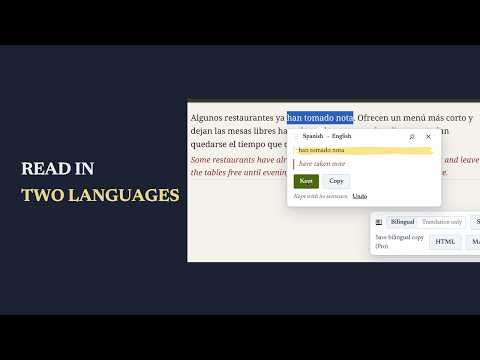
Two languages at once: dual subtitles on YouTube and other videos, and on-device translation under each paragraph of a page.
• Video on YouTube and other sites: each line in two languages, the whole video, a transcript beside the player, a pause after each line, a repeat, a click on any word for its translation • Bilingual page translator: the translation under each paragraph, or the translation alone • Phrases you keep, saved with the sentence they came from, to review later • PDFs and your own subtitle files, read the same way Translation: the browser's built-in on-device translator. No account. Page text stays on your computer unless you add your own DeepL or OpenAI-compatible key; with a key, the text being translated goes to that provider. Free: any page, the whole video, a starter list of saved words. Pro: unlimited saved words, transcript export, Anki and CSV word export, bilingual copy of a PDF, article copies. Pro comes as a timed pass or Pro forever. Trial: one full copy of each export (Anki, CSV word list, PDF copy, article copy, transcript). Sent: your licence key, the product name and a random install id, when you activate Pro and at most once a day after that. Kept phrases go to Anki on your computer when you press Send to Anki. Text goes to your own provider only after you save its key. PERMISSIONS • activeTab: the page you are on, when you press the toolbar button or a shortcut • scripting: adds the translation to the page you pick • storage: settings, glossary, kept phrases, licence key and trial dates, kept in your browser • unlimitedStorage: lets a long list of kept phrases grow past the browser's default storage cap • optional access to any site you choose: asked one site at a time, when you switch on Always translate for it • optional access to www.youtube.com: asked when you switch on the player button on YouTube pages • optional access to www.netflix.com, www.primevideo.com, www.amazon.com/gp/video and www.disneyplus.com: asked one site at a time, when you switch on dual subtitles there • optional access to your translation provider's host: asked when you save an own-key setting • optional access to 127.0.0.1: asked when you press Send to Anki, to reach AnkiConnect on your computer Guides and updates: https://twinread.exotools.dev Roadmap: https://twinread.exotools.dev/roadmap
0 out of 5No ratings
Details
- Version1.4.0
- UpdatedOctober 29, 2026
- Offered byexochard
- Size2.38MiB
- LanguagesEnglish
- DeveloperGiuseppe Castelluccio
Contrada Forno Alto, 35 Capo d'Orlando, ME 98071 ITEmail
peppecastellos245@gmail.comPhone
+39 324 811 7462 - TraderThis developer has identified itself as a trader per the definition from the European Union and committed to only offer products or services that comply with EU laws.
Privacy

Twinread: Dual Subtitles on YouTube & Bilingual Page Translator has disclosed the following information regarding the collection and usage of your data. More detailed information can be found in the developer's privacy policy.
Twinread: Dual Subtitles on YouTube & Bilingual Page Translator handles the following:
This developer declares that your data is
- Not being sold to third parties, outside of the approved use cases
- Not being used or transferred for purposes that are unrelated to the item's core functionality
- Not being used or transferred to determine creditworthiness or for lending purposes
Support
For help with questions, suggestions, or problems, visit the developer's support site