

Web Scraper & Data Extractor – Clura

Overview
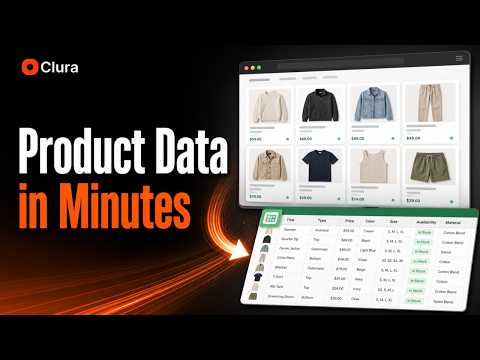
Smart Web Scraper & Data Extractor. Auto-detect lists, tables & pagination. Export to Excel/CSV. 100% local, private & no-code.
Clura Web Scraper turns websites into structured data directly from Chrome. Use Clura to collect visible page data, review it in a clean table, enrich rows with contact details, pull fields from linked detail pages, schedule recurring runs, and send data to the tools your team already uses. ⚡ How Clura works 1. Open a webpage in Chrome 2. Run Quick Scrape to detect repeated records on the page 3. Review the extracted rows and columns 4. Add fields from linked detail pages when needed 5. Scrape detail pages to enrich rows 6. Export to CSV or Excel 7. Send data to Notion, HubSpot, Airtable, or a webhook 8. Use Agents to run repeat collection on a schedule or monitor changes ✅ Core features Quick Scrape Turn visible records on a webpage into a structured table. Quick Scrape works well on pages with repeated layouts, such as directories, listings, search results, product pages, job pages, profile pages, tables, and cards. Sub-page Scrape Go beyond the first page. After collecting a list, Clura can visit linked detail pages and add selected fields back to your original table. This is useful when important information appears inside company profiles, product pages, job descriptions, property pages, or other detail pages. Enrichment Add available contact information to the rows you collect, including emails, phone numbers, and LinkedIn URLs. Teams use this to build source-backed prospect lists, vendor lists, recruiting lists, research datasets, and account research spreadsheets. Agents Schedule selected workflows to run daily, weekly, or monthly. Agents help teams keep datasets fresh, collect new records, and monitor pages for changes over time. Connectors Send scraped and enriched data to Notion, HubSpot, Airtable, or a generic webhook. New records can be appended to existing destinations, reducing manual CSV uploads and cleanup. 🎯 Common workflows Lead generation and outbound teams use Clura to build custom prospect lists from niche directories, review sites, association pages, marketplaces, local business listings, and company profile pages. E-commerce teams use Clura to collect product names, prices, ratings, availability, seller details, product URLs, and specifications for research, catalog building, or monitoring. Recruiters and sales teams use Clura to collect job posts, company names, roles, locations, posting dates, and job detail fields from public career pages and job boards. Real estate and local research teams use Clura to collect property, business, location, pricing, rating, address, and contact-related fields from listing-style pages. 🔌 Built for data workflows Clura is designed for teams that need web data in spreadsheets or business tools without writing scraping code, maintaining selectors, or manually copying records from page to page. Use it when you need to turn public website information into structured, reviewable data for sales, research, recruiting, operations, e-commerce, or reporting workflows. 🛡️ Responsible use Clura is designed for extracting visible data from pages you can access in Chrome. Please use Clura responsibly: - Respect website terms of service - Do not collect private, restricted, or sensitive data - Do not use extracted data for spam or harmful activity - Review exported data before using it in sales, marketing, recruiting, or research workflows - Follow applicable privacy, email, and data protection laws Clura helps teams turn public websites into clean, structured data workflows without code.
5 out of 53 ratings
Details
- Version1.7.0
- UpdatedSeptember 11, 2026
- FeaturesOffers in-app purchases
- Size2.11MiB
- Languages52 languages
- DeveloperWebsite
Email
rohith@clura.ai - Non-traderThis developer has not identified itself as a trader. For consumers in the European Union, please note that consumer rights do not apply to contracts between you and this developer.
Privacy

Web Scraper & Data Extractor – Clura has disclosed the following information regarding the collection and usage of your data. More detailed information can be found in the developer's privacy policy.
Web Scraper & Data Extractor – Clura handles the following:
This developer declares that your data is
- Not being sold to third parties, outside of the approved use cases
- Not being used or transferred for purposes that are unrelated to the item's core functionality
- Not being used or transferred to determine creditworthiness or for lending purposes
Support
For help with questions, suggestions, or problems, visit the developer's support site