


Overview
Free & unlimited X (Twitter) mass unfollow tool. Bulk unfollow, clean your following list, and remove non-followers with ease.
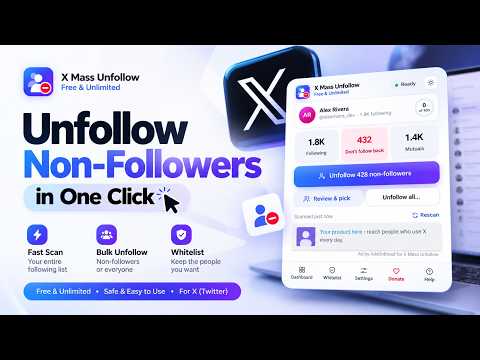
Mass unfollow on X (Twitter) for free, with no limits. See who doesn't follow you back, find out who unfollowed you, and bulk unfollow non-followers, inactive accounts and accounts without a blue check in a few clicks, right from Chrome. No subscription. No daily quota. No sign-up. No paywall. Every feature is free and unlimited. X (Twitter) Mass Unfollow Tool reads your following list straight from X in your own signed-in browser, shows you exactly who follows you back and who doesn't, and unfollows the accounts you pick at a safe, steady pace while you keep browsing. You decide who goes, who stays and how fast it runs. ━━━━━━━━━━━━━━━━━━━━━━━━━━━━━━ WHAT YOU CAN DO ━━━━━━━━━━━━━━━━━━━━━━━━━━━━━━ ✓ Unfollow non-followers: everyone who doesn't follow you back, in one click ✓ See who unfollowed you on X, with the dates between your checks ✓ Follow back new followers and fans you don't follow yet ✓ Undo mistakes: follow again anyone you unfollowed, straight from your history ✓ Find inactive accounts by the date of their last post (30, 90, 180 days or a year+) ✓ Find accounts without an X Premium blue check ✓ Unfollow everyone at once, or only the accounts you select ✓ Smart filters: no photo, few posts, few followers, follow-spam, follower range, follow ratio, account age, bio keywords and writing system ✓ Whitelist and Keep rules, so the people you care about are never unfollowed ✓ Saved groups, CSV import and export, and a full follow/unfollow history ✓ Safe pacing with random delays, breaks and a daily limit ✓ Runs in the background, with optional desktop notifications ✓ A growth chart of your following and followers over time ✓ Multiple X accounts, light and dark mode, and 7 languages ━━━━━━━━━━━━━━━━━━━━━━━━━━━━━━ NEW IN THIS VERSION ━━━━━━━━━━━━━━━━━━━━━━━━━━━━━━ • Who unfollowed me: a Followers page that lists everyone who unfollowed you since your last check, your new followers and the people you don't follow back • Follow back, and "Follow again" from History • Grace period: keep accounts you followed recently, so they have time to follow you back • More filters, saved groups and a growth chart • Optional desktop notifications • Separate data for each X account you use • Now in English, Español, Português (Brasil), हिन्दी, Bahasa Indonesia, Türkçe and العربية ━━━━━━━━━━━━━━━━━━━━━━━━━━━━━━ MASS UNFOLLOW ON X (TWITTER) IN A FEW CLICKS ━━━━━━━━━━━━━━━━━━━━━━━━━━━━━━ If you follow hundreds or thousands of accounts, unfollowing them one by one takes hours. This mass unfollow tool turns it into a few clicks. Scan your whole following list (it usually takes about a minute and changes nothing), review the results, then start a bulk unfollow run. The extension sends the same request X's own Unfollow button sends, one account at a time, so you never have to open every profile and click by hand. Big lists are fine: it reads thousands of accounts page by page, picks up where it left off, and keeps working in the background while you switch tabs or close the popup. ━━━━━━━━━━━━━━━━━━━━━━━━━━━━━━ UNFOLLOW EVERYONE WHO DOESN'T FOLLOW YOU BACK ━━━━━━━━━━━━━━━━━━━━━━━━━━━━━━ One scan shows every account you follow that doesn't follow you back. Unfollow all non-followers in one click, or open the dashboard and pick exactly who goes. Non-followers pile up over time: people stop following you, you follow accounts for a moment, interests change. Clearing them keeps your timeline relevant and your follower ratio healthy. Mutuals (people who follow you back) are never touched unless you deliberately choose "Unfollow everyone". ━━━━━━━━━━━━━━━━━━━━━━━━━━━━━━ SEE WHO UNFOLLOWED YOU ON X ━━━━━━━━━━━━━━━━━━━━━━━━━━━━━━ X doesn't tell you when someone unfollows you. This unfollower tracker does. After each scan it reads your followers, compares them with your previous check and lists: • Unfollowed you: everyone who left since your last check, with the dates between the two checks • New followers: people who started following you • You don't follow back: followers you haven't followed yet Select people you still follow to unfollow them in return, or select new followers to follow them back. If X returns an incomplete list, nothing is compared, so no one is ever listed by mistake. Accounts with very large follower counts are checked when you press "Check now". ━━━━━━━━━━━━━━━━━━━━━━━━━━━━━━ FOLLOW BACK & UNDO ━━━━━━━━━━━━━━━━━━━━━━━━━━━━━━ Unfollowed someone by mistake? Open History, select them and press "Follow again". Want to follow back your new followers or loyal fans? Select them on the Followers page and press "Follow back". Follows use the same safe pacing and count toward the same daily limit as unfollows. Private accounts get a follow request. ━━━━━━━━━━━━━━━━━━━━━━━━━━━━━━ FIND INACTIVE ACCOUNTS & ACCOUNTS WITHOUT A BLUE CHECK ━━━━━━━━━━━━━━━━━━━━━━━━━━━━━━ Two extra tabs on the Following page help you clean up beyond non-followers: • Inactive: accounts whose last post, reply or repost is 30+, 90+ or 180+ days old, or more than a year old. Sort by most or least inactive and see "Last active: 247 days ago" for each account. • Not blue: accounts you follow without an X Premium blue check. Legacy and organization checks are tagged, and your Keep rules still protect them. X doesn't show when someone last logged in, so "last active" is the date of their newest post. If it can't be read, the account is listed as Unavailable, never guessed. ━━━━━━━━━━━━━━━━━━━━━━━━━━━━━━ SMART FILTERS, SEARCH & SAVED GROUPS ━━━━━━━━━━━━━━━━━━━━━━━━━━━━━━ A full dashboard lets you search by name, @handle or bio, sort, and filter your following list before you unfollow anything: • Don't follow back, mutuals, inactive, not blue, kept and unfollowed • No profile photo, under 10 posts, under 50 followers • Follow-spam: accounts that follow 10x more people than follow them • Verified or private accounts • Followers at least / at most, and a follows-to-followers ratio • When the account joined X (last 30 days, last year, 5+ or 10+ years ago) • Bio contains / doesn't contain your keywords • Writing system: Latin, Arabic, Cyrillic, Chinese/Japanese/Korean, Devanagari and more Select accounts one by one or all at once, save any selection as a named group to find it again later, and export a list, a group or your selection to CSV. ━━━━━━━━━━━━━━━━━━━━━━━━━━━━━━ WHITELIST, KEEP RULES & GRACE PERIOD ━━━━━━━━━━━━━━━━━━━━━━━━━━━━━━ Protect the accounts you never want to lose. Add anyone to your whitelist with one tap: whitelisted accounts are never unfollowed, in any mode. Keep rules protect whole groups automatically: verified accounts, private accounts, big accounts above a follower count you choose, anyone whose name, handle or bio contains your keywords, and accounts you followed in the last N days (a grace period, so new follows have time to follow you back). ━━━━━━━━━━━━━━━━━━━━━━━━━━━━━━ IMPORT & EXPORT ━━━━━━━━━━━━━━━━━━━━━━━━━━━━━━ Already know who you want gone? Import a CSV or paste a list of handles, and the extension unfollows exactly those accounts, nothing else. Export non-followers, inactive accounts, a selection, a saved group, your followers changes or your history to CSV for your own records. ━━━━━━━━━━━━━━━━━━━━━━━━━━━━━━ SAFE PACING & DAILY LIMITS ━━━━━━━━━━━━━━━━━━━━━━━━━━━━━━ X limits accounts that follow or unfollow too quickly, so the extension works at a human pace: • Safe: 15-35 seconds apart, a break every 30, up to 250 a day • Balanced (recommended): 8-20 seconds apart, a break every 50, up to 400 a day • Fast: 4-10 seconds apart, a break every 80, up to 1,000 a day (for X Premium) • Custom: set your own delays, breaks and daily limit The daily limit is a rolling 24-hour window: when it's reached, the run rests and continues on its own. If X asks you to slow down, it backs off automatically. If X asks you to verify your account, it stops and waits for you. Emergency stop: Alt + Shift + S. No tool can guarantee that X will never rate-limit or restrict an account. Reasonable limits and following X's rules keep the risk low. ━━━━━━━━━━━━━━━━━━━━━━━━━━━━━━ WORKS IN THE BACKGROUND ━━━━━━━━━━━━━━━━━━━━━━━━━━━━━━ Runs are driven by the extension itself, not by the page, so you can browse, switch tabs or close the popup. Watch live progress with a countdown, and pause, resume or stop at any time. Optional desktop notifications tell you when a run reaches the daily limit, finishes or needs you, and when people unfollow you. ━━━━━━━━━━━━━━━━━━━━━━━━━━━━━━ GROWTH CHART & MULTIPLE ACCOUNTS ━━━━━━━━━━━━━━━━━━━━━━━━━━━━━━ The Overview charts your following and followers over time (30 days, 90 days or all), so you can see both your cleanup and your growth. Manage more than one X account: each account keeps its own scan, whitelist, history, groups and daily count. Sign in to X as another account and its data loads automatically. ━━━━━━━━━━━━━━━━━━━━━━━━━━━━━━ 7 LANGUAGES, LIGHT & DARK MODE ━━━━━━━━━━━━━━━━━━━━━━━━━━━━━━ Available in English, Español, Português (Brasil), हिन्दी, Bahasa Indonesia, Türkçe and العربية (right to left). It follows your browser language, or pick one in Settings. The interface follows your system theme, or switch between light and dark with one tap. ━━━━━━━━━━━━━━━━━━━━━━━━━━━━━━ HOW TO MASS UNFOLLOW ON X (TWITTER) ━━━━━━━━━━━━━━━━━━━━━━━━━━━━━━ 1. Add the extension to Chrome. It's free. 2. Open x.com and sign in as usual. 3. Click the extension icon and press "Scan my following". 4. Review who doesn't follow you back, inactive accounts and accounts without a blue check. 5. Protect anyone you want to keep with the whitelist or Keep rules. 6. Press "Unfollow non-followers", or open the dashboard and select exactly who goes. 7. Pick a pace and start. Close the popup if you like: it keeps going. To see who unfollowed you, scan again later. The Followers page lists everyone who left since your last check. ━━━━━━━━━━━━━━━━━━━━━━━━━━━━━━ FREQUENTLY ASKED QUESTIONS ━━━━━━━━━━━━━━━━━━━━━━━━━━━━━━ How do I see who doesn't follow me back on Twitter (X)? Install the extension, open x.com and press "Scan my following". Every account that doesn't follow you back is listed under "Don't follow back". How do I see who unfollowed me on X? Scan once to save your followers, then scan again any time later. The Followers page lists everyone who unfollowed you since the previous check, with dates. How do I unfollow everyone on X at once? After a scan, choose "Unfollow all...". Your whitelist and Keep rules still apply, and you can pause or stop at any time. How do I unfollow inactive accounts on Twitter? Open the Inactive tab on the Following page, run the last-active check, pick how long they've been quiet (30 days to a year+), select them and press "Unfollow selected". Is it really free? Are there limits? Yes, it's free. There's no subscription, no sign-up and no cap on how many accounts you can process. The only limits are the daily limits you choose to keep your account safe. How many accounts can I unfollow per day? X commonly limits around 400 follow/unfollow actions a day on a free account and about 1,000 with X Premium. The default limit is 400; when it's reached, the run continues automatically as the 24-hour window frees up. Is it safe for my account? It works at a human pace with random delays, breaks and a daily limit, backs off when X asks, and stops if X asks you to verify your account. It never asks for your password. Can I undo an unfollow? Yes. Open History, select the accounts and press "Follow again". Will it unfollow my friends or mutuals? Only if you choose "Unfollow everyone". Whitelisted accounts and accounts covered by your Keep rules are never unfollowed. Does it work with X Premium and verified accounts? Yes. Premium accounts can use the Fast preset, and Keep rules can protect verified accounts. Does it work on twitter.com? Yes, on both x.com and twitter.com, in Google Chrome. ━━━━━━━━━━━━━━━━━━━━━━━━━━━━━━ PRIVACY ━━━━━━━━━━━━━━━━━━━━━━━━━━━━━━ Your following list, followers, whitelist and history stay in your browser and are never uploaded to any server. The extension works through your existing X session and never asks for your X password. To count installs and catch bugs, it sends anonymous statistics only: a random install ID, the version, an aggregate count of actions and approximate country. Never your IP address, your X account or your lists. You can turn this off in Settings. ━━━━━━━━━━━━━━━━━━━━━━━━━━━━━━ RESPONSIBLE USE ━━━━━━━━━━━━━━━━━━━━━━━━━━━━━━ • Review your selection before you start. • Keep a reasonable daily limit, and start with a smaller run if you're new. • Pause or stop if X shows a warning or a verification request. • Don't run several automation tools at the same time. • Keep Chrome and the extension updated: X changes often, and updates keep everything working. You're responsible for using the extension in line with X's current rules. ━━━━━━━━━━━━━━━━━━━━━━━━━━━━━━ SUPPORT ━━━━━━━━━━━━━━━━━━━━━━━━━━━━━━ Found a bug or have an idea? Use "Report a bug" inside the extension or the support link on this page. Please include your extension version, your Chrome version, what you were doing and what happened. A screenshot helps. ━━━━━━━━━━━━━━━━━━━━━━━━━━━━━━ DISCLAIMER ━━━━━━━━━━━━━━━━━━━━━━━━━━━━━━ X, Twitter and X Corp. are trademarks of their respective owners. This is an independent browser extension, not affiliated with, endorsed by or sponsored by X Corp. or Twitter. X can change its website, rules and limits at any time, and features may change in future versions. ━━━━━━━━━━━━━━━━━━━━━━━━━━━━━━ FREE. UNLIMITED. BUILT FOR X. ━━━━━━━━━━━━━━━━━━━━━━━━━━━━━━ Stop clicking Unfollow for hours. Find who doesn't follow you back, see who unfollowed you, mass unfollow non-followers and inactive accounts, and keep a clean, relevant X following list, for free. Add X (Twitter) Mass Unfollow Tool to Chrome and clean up your following list in minutes.
4.9 out of 530 ratings
Details
- Version7.3.3
- UpdatedNovember 3, 2026
- Size316KiB
- Languages7 languages
- DeveloperWebsite
Email
shahriar.bmb@gmail.com - Non-traderThis developer has not identified itself as a trader. For consumers in the European Union, please note that consumer rights do not apply to contracts between you and this developer.
Privacy

This developer declares that your data is
- Not being sold to third parties, outside of the approved use cases
- Not being used or transferred for purposes that are unrelated to the item's core functionality
- Not being used or transferred to determine creditworthiness or for lending purposes
Support
For help with questions, suggestions, or problems, please open this page on your desktop browser