


Overview
Honest email tracking for Gmail: opens and clicks, hosted in Europe, without reading your inbox.
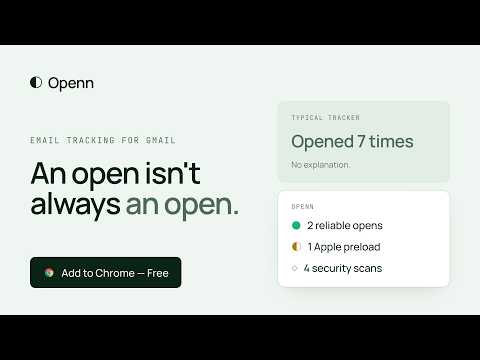
Openn tells you when the emails you send from Gmail are opened, when the links in them are clicked, and how much each signal can be trusted. An open is not always an open. Apple Mail can preload an email before anyone reads it. Corporate security filters open messages and follow links to scan them. Gmail fetches images through its own proxy. Most trackers count all of it. Openn classifies every event and shows you what it actually means: • Reliable: opened by a recipient, counted precisely. • Estimate: opened at least N times, from an email app that keeps images after the first load. • Apple preloaded: Apple Mail fetched the email automatically, a read can't be confirmed. • Security scan: only a security filter touched the email, it is not counted as an open. • Clicked: a recipient clicked a link, even with images turned off. • Not opened yet. Your own opens are never counted. Emails sent to several recipients are marked as global tracking. HOW IT WORKS Write and send from Gmail as usual. A toggle in the compose window turns tracking on or off for each email. In your Sent folder, a small badge next to each tracked email shows its status at a glance: hover it for the details. When you open a sent email, a banner shows its opens and link clicks. Pro users can also get a Chrome notification when a recipient opens an email or clicks a link. FOLLOW-UP REMINDERS (PRO) Never forget to follow up. Before you send, click the reminder button next to Send and pick when to be reminded: tomorrow, in 3 days, in 1 week, in 2 weeks, or any date. Forgot? Add a reminder later from the "More" menu of a sent email. In your Sent folder, the badge shows when each follow-up is due. When it's due, a Chrome notification tells you who and what and how many times the email was opened. Click it to open the conversation with a reply ready, or choose "Already replied" or "Snooze". All your reminders are in a Follow-ups list in Gmail's sidebar, where you can snooze, reschedule, close or delete them. Reminder notifications can be turned off at any time. GETTING STARTED 1. Add Openn to Chrome. A setup page opens and walks you through the next steps. 2. Sign in with Google from that page, or reload Gmail and click "Sign in" in the Openn banner at the top of your inbox. That creates your account: no form, no password. 3. Send an email. The half circle next to Send is the tracking switch, green means tracked. To check that it works, send a test email to test@openn.io: Openn opens it and replies within a minute. 4. Open your Sent folder: a badge next to each tracked email shows its status, and a line above the message gives the details. Step-by-step guide with pictures: https://openn.io/start PRIVACY BY DESIGN • Openn never reads your mailbox. It has no access to the Gmail API and only acts on the email you are composing and on the tracked emails you display. • The subject, body and recipients of your emails never leave your browser. • Recipients' IP addresses and User-Agent strings are used for a fraction of a second to classify an event, then discarded. They are never stored. • Data is stored in the European Union. • Sign in with Google uses only your name, email address and account identifier. • The subject and recipient shown in a follow-up reminder are kept in your browser only: Openn's servers store only the reminder's date and status, linked to the tracked email. PLANS Free: open and click tracking, with a short "Sent with Openn" signature in tracked emails. Pro: no signature, your own tracking subdomain, Chrome notifications, and follow-up reminders. 36 EUR per year or 4 EUR per month, excluding VAT. Openn is for professional use. Privacy policy: https://openn.io/privacy Terms: https://openn.io/terms
5 out of 52 ratings
Details
- Version1.2.0
- UpdatedOctober 27, 2026
- FeaturesOffers in-app purchases
- Size800KiB
- LanguagesEnglish (United States)
- DeveloperIDŌ VenturesWebsite
10, Rue Gustave Defnet Bruxelles 1060 BEEmail
support@idoventures.comPhone
+32 492 68 34 88 - TraderThis developer has identified itself as a trader per the definition from the European Union and committed to only offer products or services that comply with EU laws.
- D-U-N-S372386657
Privacy

Openn has disclosed the following information regarding the collection and usage of your data. More detailed information can be found in the developer's privacy policy.
Openn handles the following:
This developer declares that your data is
- Not being sold to third parties, outside of the approved use cases
- Not being used or transferred for purposes that are unrelated to the item's core functionality
- Not being used or transferred to determine creditworthiness or for lending purposes
Support
For help with questions, suggestions, or problems, visit the developer's support site