

네이버 지도 와이드 갤러리 - 사진 전체화면 크게보기
5.0(
5 ratings
)ExtensionTools185 users

Overview
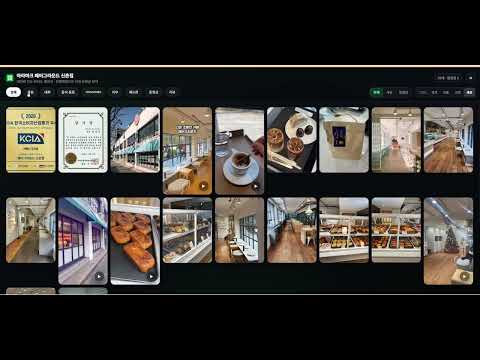
네이버 지도 사진을 전체화면 갤러리로 크게보기. 맛집·카페·여행지 사진과 리뷰를 무한 스크롤 없이 그리드로 빠르게 비교·탐색.
네이버 지도 사진, 아직도 끝없이 스크롤로 찾고 계신가요? 😮💨 맛집/카페/여행지를 고를 때 작은 썸네일을 계속 내리다 보면 중요한 사진을 놓치기 쉽습니다. 「네이버 지도 와이드 갤러리」는 사진 탭을 버튼 한 번으로 전체화면 와이드 갤러리로 바꿔 사진을 더 크게, 더 빠르게 비교할 수 있게 도와줍니다. 🖼️⚡ 왜 쓰나요? ⏱️ 시간 절약: 무한 스크롤 대신 큰 그리드로 빠르게 훑기 🎯 비교 정확도: 메뉴/분위기/좌석/외관을 더 선명하게 확인 🙌 피로 감소: 반복 스크롤 대신 키보드 탐색 중심으로 확인 🚀 빠른 결정: 상세 보기와 리뷰 맥락까지 한 번에 연결 🎨 테마 선택 지원: 기본/오션/바이올렛/앰버/포레스트/로즈/슬레이트 등 원하는 분위기로 갤러리 배경과 상단 UI를 맞춰 더 편하게 탐색 사용 방법 사진 탭 → 초록 버튼 클릭 → 전체화면 갤러리 열기 📸 또는 Alt+Shift+F로 즉시 열기/닫기 ⌨️ 그리드에서 ← → ↑ ↓ 이동 + Enter 상세 보기 Esc 또는 X로 언제든 원래 화면 복귀 개인정보/보안 ✅ 다른 사이트 접근 없음 ✅ 데이터 수집 없음 ✅ 외부 서버 전송 없음
5 out of 55 ratings
Details
- Version1.1.13
- UpdatedAugust 4, 2026
- Offered by이종현
- Size83.62KiB
- Languages한국어
- Developer
Email
belhyun@gmail.com - Non-traderThis developer has not identified itself as a trader. For consumers in the European Union, please note that consumer rights do not apply to contracts between you and this developer.
Privacy

Manage extensions and learn how they're being used in your organization
The developer has disclosed that it will not collect or use your data. To learn more, see the developer’s privacy policy.
This developer declares that your data is
- Not being sold to third parties, outside of the approved use cases
- Not being used or transferred for purposes that are unrelated to the item's core functionality
- Not being used or transferred to determine creditworthiness or for lending purposes
Support
For help with questions, suggestions, or problems, please open this page on your desktop browser