

IG Lead Extractor — IG Email & Phone Scraper

Overview
Extract emails & phones from Instagram followers, hashtags, locations, post likers & commenters. Export leads to CSV, Excel or JSON.
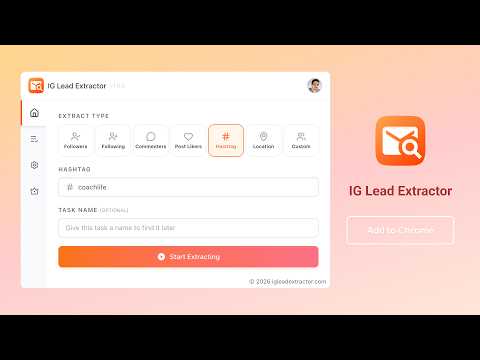
IG Lead Extractor — Extract Emails, Phone Numbers & Leads from Any Instagram Audience The fastest way to turn Instagram followers, hashtags, and post engagement into real business leads. IG Lead Extractor is a Chrome extension that finds emails, phone numbers, and detailed profile data from any public Instagram source then exports everything to CSV, Excel, or JSON so you can start outreach immediately. ⭐ WHAT MAKES IG LEAD EXTRACTOR DIFFERENT? Most Instagram scrapers only give you usernames. IG Lead Extractor goes further it automatically discovers email addresses and phone numbers from public profiles, bio text, and even linked websites. No manual copy-pasting, no coding, no external tools. • Extract emails & phone numbers from any Instagram audience • Smart email discovery from linked websites (linktree, personal sites, etc.) • One-click export to CSV, Excel (XLSX), or JSON • Works with followers, hashtags, locations, post likers, commenters & more • Real-time dashboard to track extraction progress 📊 7 EXTRACTION SOURCES Extract leads from any of these Instagram data sources: ① Followers — Extract email & phone from any account's followers ② Following — Get contact data from accounts someone follows ③ Post Commenters — Find emails of users who commented on any post or reel ④ Post Likers — Collect contact info from users who liked a post ⑤ Hashtag — Extract leads from users posting under any hashtag (e.g. #digitalmarketing, #fitness) ⑥ Location — Find leads from users posting at a specific place ⑦ Custom User List — Paste your own username list for bulk email & phone extraction 📋 DATA POINTS EXTRACTED PER LEAD Every lead includes up to 16 data fields: • Email address (from profile, bio & linked websites) • Phone number (from profile & bio) • Full name, username, bio • Website URL, city, address • Follower count, following count, post count • Account category • Verified, business, private status 📥 EXPORT TO CSV, EXCEL & JSON Download your Instagram leads in the format your CRM or outreach tool needs: • CSV — Import into Google Sheets, Salesforce, HubSpot, Apollo, Instantly • Excel (XLSX) — For advanced filtering and analysis • JSON — For developers, Zapier, Make, or custom automation Filter before exporting: All Leads | Emails Only | Phone Numbers Only ⚡ BUILT-IN SMART FEATURES • Auto-Detection — Detects the Instagram page you're on and pre-fills the source • Task Management — Create, pause, resume, and manage multiple extraction tasks • Real-Time Dashboard — Watch leads, emails & phones come in live • Adjustable Speed — Control request intervals (2s–60s) to match your needs • Defensive Wait — Automatic periodic pauses to stay under the radar • Profile Caching — Avoids re-fetching the same profiles twice 🎯 WHO IS THIS FOR? • Email marketers — Build targeted email lists from competitor audiences • Sales teams — Find prospect emails & phones for cold outreach at scale • Influencer marketers — Discover influencer contact info in any niche • Recruiters — Source candidate emails from industry-specific IG communities • Agency owners — Generate lead lists for clients from Instagram data • E-commerce brands — Find ambassadors, creators & potential customers • Researchers — Collect audience data for market & competitor analysis 💎 FREE vs PRO Free: • All 7 extraction sources • Export to CSV, Excel, JSON • Limited email extractions Pro: • Unlimited email & phone extractions • Priority support • All future premium features • Secure payment via Paddle & PayPal cancel anytime 💬 GET STARTED IN 60 SECONDS 1. Install IG Lead Extractor from the Chrome Web Store 2. Open Instagram and click the extension icon 3. Pick a source (Followers, Hashtag, Post Likers, etc.) 4. Enter a username, hashtag, post URL, or location 5. Click "Start Extracting" leads appear in real time 6. Export to CSV, Excel, or JSON when ready ⚠️ Statement INSTAGRAM is a trademark of Instagram, LLC. IG Lead Extractor is not affiliated with, endorsed by, sponsored by or otherwise related to INSTAGRAM, Inc. or any of its affiliates or subsidiaries. There is a risk that your account will be deactivated or blocked by IG when using the extension, and you should control the frequency of use at your own risk.
5 out of 55 ratings
Details
- Version1.2.1
- UpdatedMay 23, 2026
- Size736KiB
- Languages54 languages
- DeveloperWebsite
Email
hi@echobot.dev - Non-traderThis developer has not identified itself as a trader. For consumers in the European Union, please note that consumer rights do not apply to contracts between you and this developer.
Privacy

IG Lead Extractor — IG Email & Phone Scraper has disclosed the following information regarding the collection and usage of your data. More detailed information can be found in the developer's privacy policy.
IG Lead Extractor — IG Email & Phone Scraper handles the following:
This developer declares that your data is
- Not being sold to third parties, outside of the approved use cases
- Not being used or transferred for purposes that are unrelated to the item's core functionality
- Not being used or transferred to determine creditworthiness or for lending purposes
Support
For help with questions, suggestions, or problems, please open this page on your desktop browser