


Overview
Detect and inspect every iframe on a page. Highlight, count, copy URLs, and track when frames appear — built for devs and QA
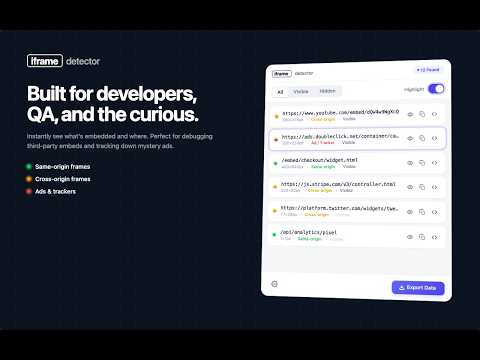
Ever wondered what's hiding inside a page? 🕵️ Iframe Detector shows you every iframe on any website — the good, the sketchy, and the "wait, when did that get there?" ones. Open the popup, and you instantly see them all. ✨ What you get 🎯 One-click scan of the page you're on — even iframes tucked away in Shadow DOM 🟢 🟡 🔴 Color-coded by origin so you know what's safe, what's cross-origin, and what's an ad or tracker ✨ Highlight any frame right on the page with a soft pulsing outline 🔎 Search by URL and filter by visible / hidden 📋 Copy a URL with one tap 📊 Export to JSON, CSV, or Markdown — or straight to your clipboard 🔬 Dig into the details Tap any frame to see: Where it's loaded from Its size and visibility Sandbox settings A copy-ready <iframe> snippet for your bug report or docs ⏱️ Activity timeline Iframes come and go. This extension keeps a tidy log of what appeared, what disappeared, and how long each one stuck around. Great for chasing down lazy-loaded ads, flaky embeds, or anything that loads a beat too late. 🎨 Built to feel nice Light and dark themes Cozy or compact layouts — pick your vibe Clean, quiet, and out of your way Speaks 55+ languages (every locale Chrome supports 🌍) 🔒 Privacy you don't have to think about Your data stays on your device. Full stop. No URLs, no page content, nothing ever leaves your browser Zero third-party requests Preferences and history live in local storage Optional anonymous usage counts (off by default) — and even those are just "feature X was opened," nothing about you or the pages you visit Only two permissions, both earn their keep: activeTab — reads iframes on the tab you're looking at, only when you open the popup storage — remembers your theme and history between sessions 👩💻 Who's it for? Devs debugging embeds, analytics, or payment widgets QA folks checking what actually loaded Security-curious people auditing cross-origin stuff Performance nerds hunting down late-injected frames Anyone who just wants to know what's on the page Pop the hood on any webpage. You'll be surprised what's in there. 🚀
5 out of 52 ratings
Details
- Version1.7.0
- UpdatedJune 12, 2026
- Size333KiB
- Languages55 languages
- DeveloperWebsite
Email
lewawebextensions@gmail.com - Non-traderThis developer has not identified itself as a trader. For consumers in the European Union, please note that consumer rights do not apply to contracts between you and this developer.
Privacy

This developer declares that your data is
- Not being sold to third parties, outside of the approved use cases
- Not being used or transferred for purposes that are unrelated to the item's core functionality
- Not being used or transferred to determine creditworthiness or for lending purposes
Support
For help with questions, suggestions, or problems, please open this page on your desktop browser