


Overview
Multi-broker portfolio tracker with per-broker stop-loss, XIRR, Decision Journal, and multi-asset tracking for Indian investors
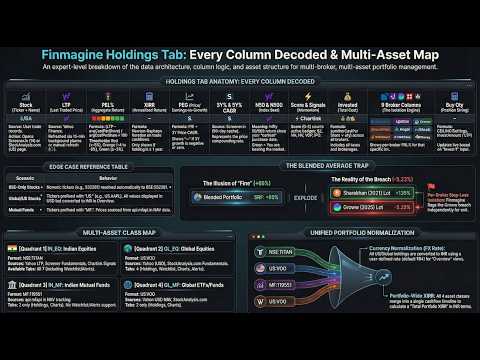
Stop managing your portfolio in a spreadsheet. Finmagine Portfolio Manager tracks every lot, every broker, and every asset class in one place — with per-broker stop-loss discipline built in from the start. 📌 Full feature guide & tutorials: https://finmagine.com/portfolio-manager.php 🏦 MULTI-BROKER, MULTI-ASSET TRACKING Most portfolio apps show you a blended average. If you hold TITAN across Zerodha, Upstox, and Groww, you see one merged number — useless for stop-loss decisions. Finmagine PM tracks every lot independently, per broker, so you see exactly which position is in trouble. 4 asset classes in one extension: • 🇮🇳 Indian Equities — NSE/BSE stocks, per-broker columns, XIRR, PEG, N50/N500 index beat • 🌏 Global Equities — US-listed stocks, USD + ₹ INR columns, XIRR • 🏦 Mutual Funds — Indian MF schemes, NAV, Units, P&L%, XIRR, Index Beat • 🌐 Global Funds — US ETFs and mutual funds (VOO, FBGRX etc.), USD + ₹ columns 📊 8 TABS OF PORTFOLIO INTELLIGENCE • Holdings — full portfolio with per-broker P&L%, XIRR, PEG, 3Y/5Y CAGR, signals, N50/N500 • Alloted — every lot of this stock is ≥ +5% P&L (fully committed positions) • Consider — positions below ₹3,00,000 invested (undersized, worth evaluating) • Add More — any lot below +5% P&L (room to strengthen) • Watchlist — 25-column fundamental comparison: P/E, P/B, ROCE, ROE, D/E, OPM%, EPS growth, pledging, promoter holding, Finmagine Score, Trader Signals and more. Large/Mid/Small cap filter chips. • Charts — 13 chart types including the History ✦ chart showing your portfolio's true value month by month vs a Nifty 50 DCA benchmark • Alerts — stop-loss breach dashboard with Chrome push notifications • Journal — Decision Journal with Pattern Analysis 🧠 DECISION JOURNAL Every trade you save gets a "Why did you buy this?" thesis — auto-generated from signals and fundamentals, or entered manually with 7 category chips (Momentum, Quality, Dip, Target, Adding, Tip, Index). After 20+ trades, the Pattern Analysis table shows which types of decisions have actually worked for you: average P&L% and win rate per category. Honest feedback on your investment process, built from your own trades. ⚡ LIVE DATA — AUTO-REFRESHED • Live prices, day change, and monthly price history • PEG, 3Y/5Y Price CAGR, Profit CAGR, and 18 fundamental metrics — refreshed automatically • Momentum signals per stock: Stage 2, Near High, High Volume, VCP, IPO Breakout • Indian MF NAV — real-time updates 🔔 STOP-LOSS ALERTS Configure your stop-loss % in Settings. The extension badge shows breach count. Chrome push notifications fire when any position crosses your threshold — even when the extension tab is not open. 📈 XIRR & INDEX BEAT Every holding shows annualised XIRR. The N50 and N500 columns show what Nifty 50 / Nifty 500 returned since your purchase date — the only honest benchmark for whether you're actually beating the market. 🔄 CORPORATE ACTIONS Stock split or bonus? One click updates all your lots across all brokers simultaneously — quantity adjusted, cost per share adjusted, net cost recalculated. No manual row-by-row editing. ☁️ CLOUD SYNC Sync your portfolio to your Finmagine account. Access across devices. Pull trades from any browser with one click. 🔒 PRIVACY • All portfolio data stored locally in Chrome storage • Prices fetched directly from public APIs — no proxy, no server sees your holdings • Cloud sync is opt-in and tied to your Finmagine account 📊 PART OF THE FINMAGINE ECOSYSTEM • Chart Builder — visualize 12 years of financials with 6-tab deep analysis: https://finmagine.com/chart-builder.php • AI Advisor — generate institutional-grade AI analysis prompts from Screener.in: https://finmagine.com/ai-advisor.php • Trader — NSE momentum scanner (Stage 2, VCP, Near 52W High): https://finmagine.com/finmagine-trader.php Full ecosystem: https://finmagine.com/portfolio-manager.php --- 🆕 WHAT'S NEW v1.4.0 (March 2026) • Any broker accepted — CSV import and the Add Trade form now accept any broker name (SBICaps, Axis, IIFL, Motilal, Kotak, and more). Previously only 9 brokers were recognised; trades from other brokers were incorrectly rejected. The broker field is now a free-text combo with suggestions — type anything. v1.2.0 (March 2026) • Add to Watchlist from anywhere — "★ + Watch" button now appears in the Finmagine AI Advisor and Chart Builder panels on Screener.in and stockanalysis.com. "★ PM" button on every row in Finmagine Trader scan results. One click adds the stock directly to your PM Watchlist — no need to open PM separately. v1.1.0 (March 2026) • Decision Journal — every trade gets a "Why did you buy this?" thesis. Auto-generated from signals and fundamentals (VCP → momentum, high ROCE + low PEG → quality compounder, adding to position → auto-noted). 7 category chips for manual classification. Pattern Analysis at top of Journal tab shows avg P&L% and win rate per category — honest data on what decisions have actually worked. • Watchlist Journal — pre-buy research notes on watchlist stocks. 4 intent categories: Breakout watch, Waiting for dip, Researching, Near buy zone. When a watched stock is later bought, the original note is preserved alongside the trade thesis. • History ✦ chart — true portfolio value month by month from your first trade, built from Yahoo Finance monthly closes. Overlaid with a Nifty 50 DCA benchmark using the same cash deployed at the same dates. • Corporate Action modal — Stock Split and Bonus Share support. Enter ratio (e.g. 1:5 split or 1:1 bonus), review per-lot preview, apply to all lots across all brokers in one click. • Dark / Light theme toggle — ☀/☾ button in header. Applies to all tables, charts, modals, and drawers. Persisted across sessions. • Profit Growth CAGR columns — PG3Y% and PG5Y% (compounded profit growth) alongside existing price CAGR columns. PEG denominator toggle in Settings: switch between Price CAGR (default) and Profit Growth CAGR. • Watchlist mcap filter chips — All | 🏛 Large (≥₹20K Cr) | 🏢 Mid (₹5K–₹20K Cr) | 🏪 Small (<₹5K Cr). • Add Qty for all asset classes — fractional quantities for Global Equities, Global Funds, and Mutual Funds. Invest bar now visible across all asset classes. • Stop-loss Chrome notifications — push notification when any position crosses your stop-loss threshold, even with the extension tab closed. • Export — Watchlist as CSV, full portfolio P&L as PDF. • Cloud sync now includes watchlist entries. v1.0.1 (March 2026) • Initial release — Indian Equities tracking with per-broker columns, XIRR, PEG, signals, N50/N500 index beat, Watchlist, Charts, and Alerts.
0 out of 5No ratings
Details
- Version1.4.1
- UpdatedJune 22, 2026
- Size334KiB
- LanguagesEnglish (United States)
- DeveloperFinmagineWebsite
1, SBI Officers Colony, 2nd Street, Arumbakkam Chennai, Tamil Nadu 600106 INEmail
ipersist@gmail.com - Non-traderThis developer has not identified itself as a trader. For consumers in the European Union, please note that consumer rights do not apply to contracts between you and this developer.
Privacy

This developer declares that your data is
- Not being sold to third parties, outside of the approved use cases
- Not being used or transferred for purposes that are unrelated to the item's core functionality
- Not being used or transferred to determine creditworthiness or for lending purposes
Support
For help with questions, suggestions, or problems, visit the developer's support site