

Moviva: AI Avatar for ChatGPT Voice

Overview
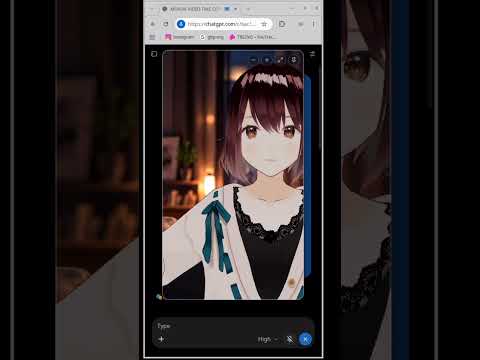
Talking 3D AI avatar for ChatGPT Voice: real-time lip sync, gestures and emotions in a video call window on chatgpt.com.
Moviva gives ChatGPT Voice a face. It is a Chrome extension that turns ChatGPT voice mode on chatgpt.com into a face-to-face AI video call: an animated 3D AI avatar appears in a call window, speaks with ChatGPT's voice in real-time lip sync, listens while you talk and reacts to what is being said. If you talk to ChatGPT by voice every day, Moviva makes the voice chat feel like a conversation with a person instead of a pulsing orb. HOW IT WORKS 1. Open chatgpt.com and click the Moviva icon to turn the avatar on. 2. Start ChatGPT Voice as usual. 3. The video call window appears. Talk. When the voice chat ends, the window disappears. ChatGPT's own controls (text field, mute, end call) stay visible and usable. Moviva adds no controls of its own to the call. WHAT THE TALKING AVATAR DOES • Real-time lip sync with ChatGPT's voice. • Listens when you speak: nods, keeps eye contact, stops gesturing the moment you interrupt. • Gestures that fit the reply: a question, agreement, a list, an explanation and a conclusion each look different. • Facial emotions: smiles, laughter, surprise, sadness, held for a few seconds like a real reaction. • Tone of voice matters: the same sentence said calmly and excitedly is acted differently. • Natural idle behaviour: breathing, blinking, shifting weight, glancing around. • Notices the page: may glance at a new message or follow your mouse pointer near its face. • A camera that moves gently with the conversation. THE CALL WINDOW • Opens full-screen by default; drag to move it, drag a corner to resize. • Picture-in-Picture: pin the call to float above other tabs and apps, so you can keep talking to your ChatGPT voice assistant while you work elsewhere. WHO IT IS FOR • Anyone who uses ChatGPT voice chat for practice, learning or company and wants to see who they are talking to. • Language learners: speaking practice feels more natural with a face that reacts. • Fans of anime avatars, VTubers and VRM models who want their character to come alive in a ChatGPT video call. MOVIVA FREE The full experience with one built-in avatar. No time limits, no session limits, no account. MOVIVA PLUS (one-time purchase, no subscription) • Character library: additional avatars to choose from, including anime-style characters. • Use your own avatar: bring a compatible VRM model (for example one made in VRoid Studio). • Your own call background image. • 18 character profiles, from calm and professional to playful, ironic or a sports commentator. Each changes how the avatar acts. • Inject Role: one click asks ChatGPT to speak in the chosen character and language. PRIVACY • Audio, voice analysis and reply text are processed locally in your browser. Nothing from your conversations is recorded, stored or sent to us. • No analytics, no ads, no tracking in the extension. • Moviva Free makes no network requests to us at all. Moviva Plus contacts our licensing server only to activate and renew the licence and to download the avatar pack. • The optional emotion model is downloaded once from Hugging Face and then runs offline. • Microphone reactions are optional and can be switched off at any time. REQUIREMENTS • Chrome 116 or newer on desktop. • A ChatGPT account with Voice available on chatgpt.com. • Headphones are recommended, so the avatar does not mistake ChatGPT's voice for yours. GOOD TO KNOW • Moviva works only on chatgpt.com and only during a voice chat. • Local text analysis for gestures understands English, Russian, Ukrainian and Spanish. In other languages the avatar reacts to the voice. Moviva is an independent product. It is not affiliated with, endorsed by or sponsored by OpenAI. ChatGPT is a trademark of OpenAI.
5 out of 52 ratings
Details
- Version1.4.0
- UpdatedNovember 11, 2026
- FeaturesOffers in-app purchases
- Size23.41MiB
- Languages18 languages
- DeveloperWebsite
Email
trezvo@bpt22.tech - Non-traderThis developer has not identified itself as a trader. For consumers in the European Union, please note that consumer rights do not apply to contracts between you and this developer.
Privacy

Moviva: AI Avatar for ChatGPT Voice has disclosed the following information regarding the collection and usage of your data. More detailed information can be found in the developer's privacy policy.
Moviva: AI Avatar for ChatGPT Voice handles the following:
This developer declares that your data is
- Not being sold to third parties, outside of the approved use cases
- Not being used or transferred for purposes that are unrelated to the item's core functionality
- Not being used or transferred to determine creditworthiness or for lending purposes
Support
For help with questions, suggestions, or problems, visit the developer's support site