

Translext: Meeting Translator & Live Captions

Overview
Real-time translated captions for online meetings, calls, videos and any app on your computer, plus spoken translation in tabs.
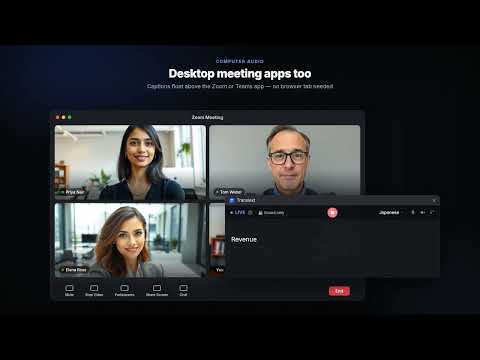
Translext is a meeting translator Chrome extension that turns speech into live translated captions in real time — for online meetings, calls and videos in any browser tab, and for any app on your computer, like a desktop meeting app, a game or a video player. Captions come first; in a browser tab you can also turn on audio translation and hear it in your language. There are no meeting bots to invite and nothing to upload. WHAT YOU GET • Translated captions in real time — read the original speech and its translation, side by side. • Audio translation, when you want it — in a browser tab, switch it on to hear the translation spoken in your language, in a natural voice, with the original sound turned down underneath. • 70+ languages — translate into and from the language you prefer, including right-to-left scripts. • Interface in 16 languages — English, Spanish, Portuguese, French, German, Italian, Russian, Turkish, Hindi, Indonesian, Vietnamese, Japanese, Korean, Chinese (Simplified and Traditional) and Arabic. • Works in the tab you're already in — any video call, webinar, course or live stream playing in the browser. • Computer audio — live captions for apps outside the browser too, such as the Zoom or Teams desktop app, games with voiced dialogue, or a film in a media player. Chrome asks you to share your screen with “Share system audio” switched on; Translext turns the picture off and only uses the sound. Computer audio is captions only. • A clean floating overlay — draggable, unobtrusive, always readable. • Your settings, synced — sign in to carry your preferences across devices. HOW IT WORKS 1. Pin Translext, click the icon and choose your language. 2. Pick where the sound comes from: a browser tab, Computer audio, or your microphone. 3. Press start — live captions appear in real time, on the page or in a floating window above your other apps. GOOD TO KNOW Tab audio needs the call or video to play in Chrome. For apps outside the browser, use Computer audio: in Chrome's sharing window, pick “Entire screen” and switch on “Share system audio”. On a Mac, your browser also needs permission under System Settings → Privacy & Security → Screen & System Audio Recording. Live speech translation is not perfect either: clear speech on a decent microphone works well, while heavy background noise, several people talking at once, and specialised jargon or proper nouns are harder. PRIVACY Audio is processed only to produce your live translation while a session is running, and stops the moment you stop. No bots, no meeting invites. Audio is never recorded. If you're signed in, each session's text transcript and translation are saved to your History so you can read them later. Delete any session, or turn saving off in Settings → History. Need help? support@translext.com · https://translext.com/support
5 out of 51 rating
Details
- Version0.1.12
- UpdatedOctober 22, 2026
- FeaturesOffers in-app purchases
- Size608KiB
- Languages16 languages
- DeveloperAI DribblersWebsite
lat 406A, 4th Floor, Block A, Royal Apartments Sector E-11/2 Islamabad 44000 PKEmail
admin@translext.com - Non-traderThis developer has not identified itself as a trader. For consumers in the European Union, please note that consumer rights do not apply to contracts between you and this developer.
Privacy

Translext: Meeting Translator & Live Captions has disclosed the following information regarding the collection and usage of your data. More detailed information can be found in the developer's privacy policy.
Translext: Meeting Translator & Live Captions handles the following:
This developer declares that your data is
- Not being sold to third parties, outside of the approved use cases
- Not being used or transferred for purposes that are unrelated to the item's core functionality
- Not being used or transferred to determine creditworthiness or for lending purposes
Support
For help with questions, suggestions, or problems, visit the developer's support site