

Inline Translator
평점 9개
)
개요
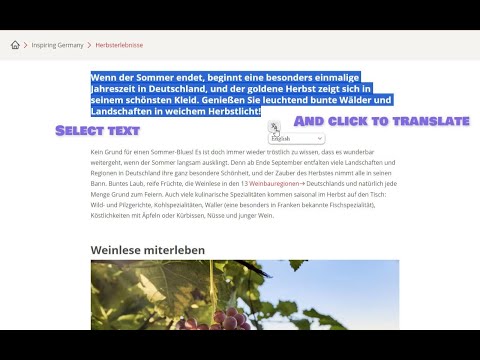
선택한 텍스트를 번역하는 도구: 페이지에서 텍스트를 직접 번역하세요.
«Inline Translator» will help you quickly and most conveniently translate selected text on any website. Unlike other similar tools, this one embeds the translation directly into the HTML markup of the page, preserving the formatting and not cluttering the page with pop-ups. Main Features: • Simple and Easy: Translate text by selecting it with the mouse and clicking on the button that appears or by pressing «Alt» + «T». • No Pop-Ups: The translation is embedded in the page, preserving the original formatting. • Multiple Translated Sections: Create an unlimited number of translated sections of text on a page. You can translate as many as you want! • Original Text in the Tooltip: When you hover over a translated section of text, the original text appears in the tooltip. • Individual Control: Cancel translations individually by simply clicking on the text. The handy «Cancel» and «Cancel All» menus help you to do this. • Button Drag and Drop: If a pop-up button is in the way, just drag it. • Competent Translation of Documentation Sites: «Inline Translator» ignores <pre> and <code> tags to avoid distorting code fragments. However, if you select a text fragment inside these tags, they can be translated. • Convenient Extension Access Control: You can disable «Inline Translator» on some sites or everywhere, but you can enable it only for those sites that you need. Usage Examples: • Translate entire pages in two steps: «Ctrl» + «A» and «Alt» + «T». • Translation of individual words highlighted by double-clicking. It is not necessary to translate everything if you forgot only one word from the text. • Learn foreign languages effectively by translating only what you really need. Translation Assistance: Erika S.
5점 만점에 3.9점평점 9개
세부정보
- 버전0.1.5
- 업데이트됨2023년 12월 19일
- 제공MikulanDev
- 크기55.28KiB
- 언어언어 55개
- 개발자
이메일
pavelretivoy@gmail.com - 비판매자판매자로 식별되지 않은 개발자입니다. 유럽 연합에 거주하는 소비자의 경우, 이 개발자와 체결한 계약에 대해서는 소비자 권리가 적용되지 않을 수 있음을 유의해야 합니다.
개인정보 보호

개발자가 사용자 데이터에 관해 다음과 같이 선언했습니다
- 승인된 사용 사례를 제외하고 서드 파티에 판매하지 않음
- 항목의 핵심 기능과 관련 없는 목적으로 사용하거나 전송하지 않음
- 신용도 판단 또는 대출 목적으로 사용하거나 전송하지 않음