

Eofent Capture: Screenshot & Screen Recorder, Video & PDF Editor, AI Notes

Overview
Screenshot, screen recorder, PDF editor and AI notebook in one. Capture as image, video, audio or text; edit; automate many sites.
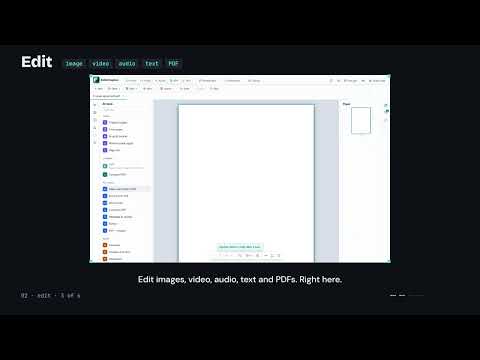
Eofent Capture takes what is on your screen and lets you work with it. Capture a whole page, record a tab, collect what you read into a notebook, ask questions about it with AI, and finish the job in built-in PDF, text, image and video editors. Everything you capture is created and kept on your own computer. CAPTURE Everything on the screen, in the form you need. • Full page: scrolls and stitches however long the page is, with sticky headers kept to one. A PDF open in the browser's viewer is captured whole, every page. • Visible area, a rectangle you draw, a single element, or a frame you scroll by hand (chat lists, inner panels). • Save as PNG, JPEG or WebP, as a PDF whose text you can search and select, or as one MHTML file that opens offline as it looked. • Record the current tab instantly, an area of it, a window or the whole screen, with tab sound, microphone or both. Record sound alone. • Take a page, a selection or a drawn area as text, with a link back to its source. • Archive a page and watch it: Eofent saves it again every hour, day or week and shows you what changed. • Edit the live page before you capture it: delete, highlight, add pictures. • Keyboard shortcuts and a right-click menu for the common captures. EDIT No other app to finish the job. • Shots editor: Arrows, shapes, lines, text, highlights, step markers and stamps; crop, blur and redact. • Image to Text: read the words out of any capture or area. Each word lands on its own pixels, as an invisible layer that makes the export searchable, or as editable text in the picture's own colours. • Save your work as a project and come back to it. • The Video and Audio editors: a timeline with split, trim, ripple, snapping and a second track; crop the output; undo every step. • Export video as WebM, MP4 or MKV or as an animated GIF; sound as WebA, WAV or MP3. • The Text Editor: outline, find and replace, word count, tables and diagrams, side-by-side preview. • Open Word, Markdown, HTML and CSV files. Download as Markdown, text, web page, PDF or Word. • PDF Editor: Organize, merge, split, compress, crop and rotate pages. • Sign, redact and annotate: highlights, notes, shapes and text that any PDF reader shows. • Make a scanned PDF searchable, in eleven languages, on your own computer. • Headers and footers with page numbers, dates and Bates numbers, watermarks, metadata, PDF to images, and pictures to PDF. AUTOMATE A whole list of sites, while you do something else. • Capture a whole list of pages in one run: typed, imported, from your open tabs or a tab group, or links found on a page. • Record steps to run on each page first, such as closing a banner or clicking a tab. • Run a list on a schedule (Premium) and keep the results of every run. NOTEBOOK AND AI One place for all of it, and answers with sources. • Open a notebook beside any page and collect as you read: shots, recordings, clipped passages with their source, links and your own notes, in one stream. • Clip a selection and its source comes with it: title, site and date. Copy every source in one click. • Ask a notebook a question and the answer cites the sources it used. • Summarize, translate or ask about any source. Rewrite, shorten, fix grammar, change the tone, proofread or continue your writing. • AI is off until you choose a model. Use your browser's built-in AI, which runs on your computer where available, or your own key for a provider or a model server you run yourself. • Download a notebook as a full web page, PDF, Markdown, Word file or one ZIP, or as a simple guide: your captioned pictures and notes, nothing else. LIBRARY • Every capture, recording, document, clip and notebook in one place, with folders, search inside captures, sorting and previews. • Export a folder as a report, combine shots, rename by pattern, and restore anything from the Trash for 30 days. • Save to your own Google Drive, or send a file to your phone with a QR code. MAKE IT YOURS • Eleven interface languages: English, Deutsch, Español, Français, Italiano, 日本語, 한국어, Português, Русский, Türkçe, 中文. • Light and dark themes, including Eofent Dark, plus your own. • Your own filename pattern and download folders, and settings presets. PRIVACY Your captures, recordings, notebooks and documents are created and stored on your own computer. Eofent does not receive them and keeps no copies. • Text recognition runs on your computer, with all eleven language models included in the extension. • AI is off until you choose a model. With your browser's built-in AI nothing leaves your computer. With your own key, the text you ask about goes from your browser directly to the provider you chose, under your account with them. Your key stays on your device and is never sent to us. • Save to Drive and Send to phone upload a file to your own Google Drive only when you press them, and the extension can see only the files it created there. Send to phone shares that file by link, and asks the first time before it does; Save to Drive keeps it private unless you switch on Share links. • eofent.com is contacted only for your optional account and plan, and for usage statistics if you switch them on. • Usage statistics are off until you switch them on, and are daily counts only, never what you captured. You can delete them in one action. Privacy policy: https://eofent.com/privacy FREE AND PREMIUM Free to use, with daily allowances on the heavier actions, raised by a free account. Premium removes the daily limits and adds scheduled captures, several windows at once and crawls from several start pages. Plans, limits and prices: https://eofent.com/products/capture/pricing SUPPORT https://eofent.com/en/support
5 out of 59 ratings
Details
- Version1.2.0
- UpdatedNovember 3, 2026
- FeaturesOffers in-app purchases
- Size83.62MiB
- Languages11 languages
- DeveloperEofent LLCWebsite
1209 Mountain Road Pl NE Albuquerque, NM 87110-7825 USEmail
contact@eofent.comPhone
+1 505-588-3377 - TraderThis developer has identified itself as a trader per the definition from the European Union and committed to only offer products or services that comply with EU laws.
- D-U-N-S149879102
Privacy

Eofent Capture: Screenshot & Screen Recorder, Video & PDF Editor, AI Notes has disclosed the following information regarding the collection and usage of your data. More detailed information can be found in the developer's privacy policy.
Eofent Capture: Screenshot & Screen Recorder, Video & PDF Editor, AI Notes handles the following:
This developer declares that your data is
- Not being sold to third parties, outside of the approved use cases
- Not being used or transferred for purposes that are unrelated to the item's core functionality
- Not being used or transferred to determine creditworthiness or for lending purposes
Support
For help with questions, suggestions, or problems, visit the developer's support site