


Overview
Adjust video playback speed with ease.
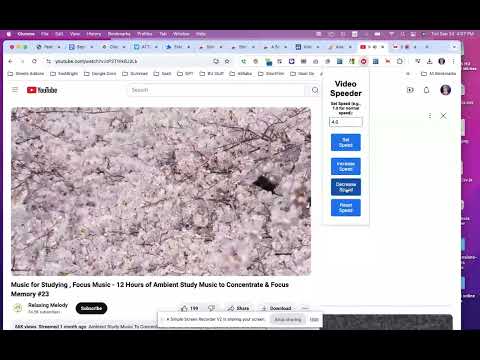
Video Speeder – Control Video Playback Speed Anywhere Take control of your video-watching experience with Video Speeder, a lightweight extension that lets you adjust playback speed on most websites that use HTML5 video players. Speed through tutorials, slow down complex scenes, or fine-tune your learning pace — all with simple, instant controls and no setup required. Designed for students, professionals, and everyday viewers, Video Speeder helps you stay productive and watch content at the speed that works best for you. 🚀 What’s New in Version 2.0 Refreshed, space-efficient interface Horizontal popup layout for easier control Slider with preset speeds and one-click reset ⭐ Key Features 🎥 Flexible Playback Speed Control Adjust video speed from 0.25× to 4× with an easy-to-use slider or preset buttons. 🔄 Fine-Grained Speed Adjustment Increase or decrease playback speed in small increments for precise control. 🔧 One-Click Reset Instantly return to normal playback speed (1.0×). ⚡ Real-Time Changes Speed updates apply immediately, without reloading or interrupting playback. 🔍 Works Across Many Websites Compatible with most modern websites that use standard HTML5 video players, as well as local video files opened in your browser. ⚙️ Clean Speed Indicator A minimal on-screen indicator briefly shows the current playback speed whenever it changes. 🔥 How It Works Video Speeder adjusts the built-in playback rate of HTML5 video elements directly in your browser. There’s no configuration required — once installed, the controls are ready whenever a video is detected. Typical actions include: Setting a custom playback speed Nudging speed up or down in small steps Resetting to normal playback instantly 🚀 Common Use Cases Learning & Study: Speed through familiar material or slow down difficult sections Content Review: Save time when reviewing long videos Language Practice: Adjust speed to improve listening comprehension Entertainment: Skip slow parts or analyze moments in detail 💡 Simple & Lightweight Video Speeder is built to be intuitive and distraction-free. No accounts No sign-ups No unnecessary permissions Just install and start controlling video speed right away. 🔒 Privacy First Video Speeder does not collect personal data or track browsing activity. It only interacts with video playback controls on the pages you visit. 🛠️ Troubleshooting & Compatibility Some websites may override playback speed automatically; Video Speeder includes logic to reapply your selected speed when possible. Most HTML5-based players are supported, though certain custom or restricted players may limit functionality. Works best on modern, up-to-date browsers. ⭐ Free & Easy to Use All core features are available immediately after installation — no registration required. Take control of your video playback with Video Speeder and watch content exactly the way you want.
4 out of 53 ratings
Details
- Version2.0
- UpdatedJanuary 25, 2026
- Offered byEBM Group
- Size28.93KiB
- LanguagesEnglish (United States)
- DeveloperLei Michael Lu
1466 41st Ave San Francisco, CA 94122-3034 USEmail
michaellu8@gmail.comPhone
+1 650-485-3188 - TraderThis developer has identified itself as a trader per the definition from the European Union and committed to only offer products or services that comply with EU laws.
Privacy

This developer declares that your data is
- Not being sold to third parties, outside of the approved use cases
- Not being used or transferred for purposes that are unrelated to the item's core functionality
- Not being used or transferred to determine creditworthiness or for lending purposes
Support
For help with questions, suggestions, or problems, please open this page on your desktop browser