

ChatGPT Table of Contents - LunaTOC
7 ratings
)
Overview
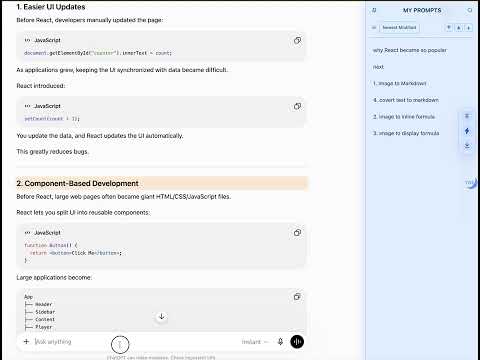
Add a table of contents, prompt navigator, and MyPrompts sidebar to long ChatGPT conversations.
ChatGPT Table of Contents - LunaTOC adds a complete, clickable table of contents to ChatGPT, making long conversations easy to navigate. Stop endless scrolling. LunaTOC automatically detects and captures every user prompt to build a complete conversation outline, so you can instantly jump to any question, section, or important part of your chat—even in very long conversations with ChatGPT's virtualized message list. Features - Complete table of contents, even for very long conversations - Automatically detects and captures every user prompt - Instantly jump to any part of the conversation - Built for ChatGPT's long conversation experience - Search the conversation outline instantly - Sub-navigation for faster browsing - MyPrompts for saving, managing, and reusing prompts - Right-click any prompt to save it to MyPrompts - Type # or // to quickly insert saved prompts - Toggle the sidebar on or off at any time - Toolbar popup with quick usage tips - Works on both chatgpt.com and chat.openai.com Privacy - No login required - No tracking - No data collection - Everything stays in your browser.
5 out of 57 ratings
Details
- Version1.11.5
- UpdatedSeptember 28, 2026
- Offered byLeo
- Size225KiB
- LanguagesEnglish
- Developer
Email
geneleoc@gmail.com - Non-traderThis developer has not identified itself as a trader. For consumers in the European Union, please note that consumer rights do not apply to contracts between you and this developer.
Privacy

This developer declares that your data is
- Not being sold to third parties, outside of the approved use cases
- Not being used or transferred for purposes that are unrelated to the item's core functionality
- Not being used or transferred to determine creditworthiness or for lending purposes
Support
For help with questions, suggestions, or problems, visit the developer's support site