

ListoRead — Speed Reading (RSVP)

Overview
Speed-read selected text or whole articles one word at a time. Private: nothing leaves your browser.
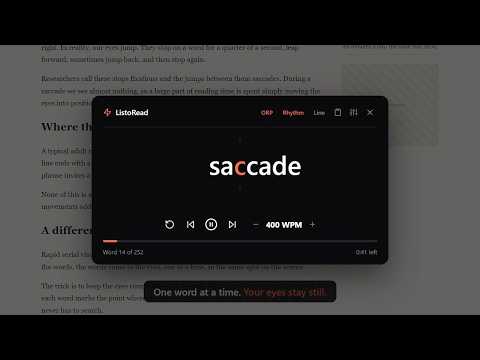
Read faster and stay focused. ListoRead shows text one word at a time in one spot, so your eyes stop jumping along the lines. HOW IT WORKS • Select text on any page — or select nothing to read the whole article. • Press Alt+R, click the ListoRead icon, or right-click → Read with ListoRead. • Press Space and read. Arrows change the word and the speed. FEATURES • Focus letter: a red letter in every word keeps your gaze perfectly still. • Smart rhythm: natural pauses at commas, sentence ends and paragraphs, a gentle start, and a short step back after a pause. • Whole articles: no selection needed — ListoRead finds the main text and skips menus, ads and comments. • Pause anytime: see the whole sentence and click any word to jump to it. • Never lose your place: when you close the reader, the page shows the word where you stopped. • Paste any text, for example from a PDF or a document (free: up to 1,000 words at a time). • Long words split smartly, jump by sentences with Shift+arrows. • Dark or light theme, three fonts, adjustable size, six colors for the focus letter. • 11 interface languages: English, Español, Deutsch, Português, Français, Italiano, Polski, Nederlands, Türkçe, Русский, Українська. PRIVATE BY DESIGN No account, no tracking, no analytics. The text you read is processed only in your browser and never leaves it. ListoRead stores nothing but your settings. Comfortable speed for most people: 250–400 words per minute. For dense study texts, slow down — pause, step back and reread anytime. Website: https://listoread.com · Support: support@listoread.com
0 out of 5No ratings
Details
- Version1.0.2
- UpdatedOctober 24, 2026
- Offered byListoRead
- Size70.63KiB
- Languages11 languages
- Developer
Email
support@listoread.com - Non-traderThis developer has not identified itself as a trader. For consumers in the European Union, please note that consumer rights do not apply to contracts between you and this developer.
Privacy

This developer declares that your data is
- Not being sold to third parties, outside of the approved use cases
- Not being used or transferred for purposes that are unrelated to the item's core functionality
- Not being used or transferred to determine creditworthiness or for lending purposes
Support
For help with questions, suggestions, or problems, visit the developer's support site