


Overview
Stop copying text into another tab. Fix grammar, rewrite sentences and change tone right where you type, free.
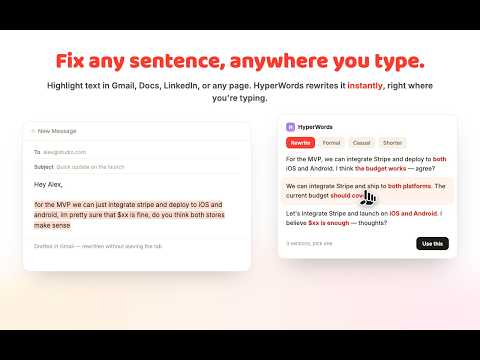
Tired of copying a sentence into Grammarly or QuillBot, waiting for it to load, then copying the fix back. HyperWords skips all of that. Highlight any text on any website, get an instant AI rewrite, grammar fix, tone change or summary right there, and keep typing. HyperWords is a free AI grammar checker and paraphrasing tool built for people who write everywhere, not just in one app. Email, Google Docs, LinkedIn, a support ticket, a job application, a school essay. If you can highlight it, HyperWords can fix it. Looking for a Grammarly alternative or a QuillBot alternative that does not lock its best features behind a paywall. HyperWords gives you a grammar checker, a paraphrasing tool, a tone changer and an AI writing assistant in one lightweight extension, and the free plan is actually usable, not a teaser. What you get One, a paraphrasing tool and AI rewriter that rewrites any sentence or paragraph while keeping your meaning intact. Great as a fast sentence rewriter for essays, emails, resumes and posts. Two, a real grammar checker. Catches grammar and spelling mistakes as you write, on top of any website, not just inside one editor. Three, a tone changer. Turn a blunt message into something professional, casual, friendly or academic in one click. Four, an AI text summarizer. Turn a long article or email into a short summary, or expand a rough note into full text. Five, built in translation. Translate highlighted text into another language without leaving the page. Six, writing continuation. Stuck mid sentence. Let the AI keep going in your own voice. Seven, custom prompts. Save your own rewrite instructions for tasks you repeat often. Eight, a word by word diff preview, so you see exactly what changed before you accept anything. Nothing gets rewritten behind your back. Nine, a floating popup or a side panel, your choice, plus keyboard shortcuts and dark mode. Why switch from Grammarly or QuillBot Most people end up paying for two or three separate tools, one for grammar, one for paraphrasing, one for tone. HyperWords puts all of it in a single chrome extension, so you stop juggling tabs and subscriptions. It is built for anyone who wants a fast grammar checker and paraphrasing tool without leaving the page they are writing on. Free, and actually free Twenty five rewrites a day. Twenty five chats a day. Unlimited grammar fixes. No credit card required to start. Built for Students who need a grammar checker and paraphrasing tool they can trust for essays and papers. Professionals who want a quick AI writing assistant for emails, reports and messages. Writers, marketers and support teams who need a fast text rewriter and tone changer every day. Non native English speakers who want grammar correction and paraphrasing help built right into the browser. Try it now Install HyperWords, highlight any text on any website, and see your first AI rewrite in seconds. Free to start, no credit card needed.
0 out of 5No ratings
Details
- Version0.1.8
- UpdatedAugust 23, 2026
- Size1.46MiB
- LanguagesEnglish (United States)
- DeveloperWebsite
Email
nguyentienm@gmail.com - Non-traderThis developer has not identified itself as a trader. For consumers in the European Union, please note that consumer rights do not apply to contracts between you and this developer.
Privacy

HyperWords AI Paraphrasing Tool and Grammar Checker has disclosed the following information regarding the collection and usage of your data. More detailed information can be found in the developer's privacy policy.
HyperWords AI Paraphrasing Tool and Grammar Checker handles the following:
This developer declares that your data is
- Not being sold to third parties, outside of the approved use cases
- Not being used or transferred for purposes that are unrelated to the item's core functionality
- Not being used or transferred to determine creditworthiness or for lending purposes
Support
For help with questions, suggestions, or problems, visit the developer's support site