


Overview
Build a website for your local business in Chrome, with the AI on your computer. Your details stay on your computer.
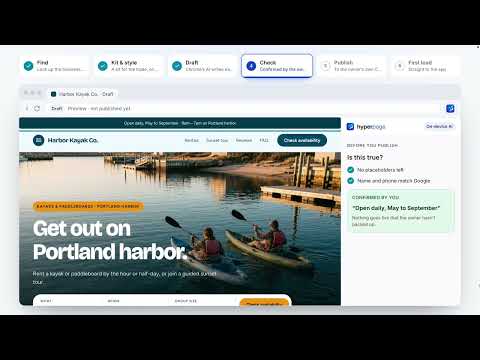
Hyperpage builds a real website for your local business, right in Chrome. Tell Ask Hyperpage about your business or find it on Google, let the AI built into Chrome write the first draft on your computer, change anything you like, and publish it to your own free Cloudflare account. It's free, with no card. You only need a free Hyperpage account when you publish. HOW IT WORKS 1. Tell us about your business. Ask Hyperpage asks a few questions, one at a time, and fills in your details as you answer. Or pick your Google listing, or let Hyperpage read your current website. You can also run the interview in Claude or Gemini and paste the answer back. 2. Draft. Chrome's built-in AI writes each section from your facts, on your computer. 3. Edit. Change the words, photos, sections, colors and style. Rewrite any line with one click (shorter, punchier, more local, or in another tone) and undo it if you don't like it. Before you publish, Hyperpage blocks leftover placeholders and asks "Is this true?" about anything your facts don't back up. 4. Publish. Sign in with your email, connect your free Cloudflare account, and your site goes live on a workers.dev address. Connect your own domain whenever you're ready. Or download the site as a single HTML file and host it anywhere. 5. Get reviews. Your site has its own review page. Send a customer a personal link: they choose to review you on Google or on your website, and you see when they've opened it. Reviews on your website are shown as written, good or bad. WHAT YOU GET - 27 industry kits, from plumbing and roofing to daycare, salons and nonprofits, each with the sections and request form that trade needs - 5 styles for every kit: Bold, Classic, Modern, Minimal and Vibrant - Photos for every industry, or upload your own - Your own domain, connected for you, certificate included - Leads come straight to the app: requests from your site's form are saved in your Cloudflare account and listed in Hyperpage, with any photos and a CSV export. A badge on the toolbar icon counts new ones. - A review page and a public reviews page on your own site, and personal review links for your customers - A backup of every site you publish, kept in your own Cloudflare account: connect it on a new computer and your sites come back. Or keep a backup file. - On hyperpage.io, Ask Hyperpage drafts replies to your Google reviews and your leads with the AI built into Chrome, on your computer. Nothing is posted or sent until you do it. - Unlimited sites and pages - Fast, accessible pages with no third-party scripts YOUR DATA Your drafts, business details and chats are stored in Chrome on your computer. Your site, its backup, and the requests and reviews your customers send are kept in your own Cloudflare account, using a token that stays on your computer. Hyperpage's servers only: - look up your business on Google when you ask (up to 3 lookups per install) - sign you in when you publish, with a link sent to your email - keep the address of each site you publish with your account, so you can find it again Requests and reviews from your customers never pass through Hyperpage. WHAT YOU NEED - Chrome on a computer that supports Chrome's built-in AI. If yours doesn't, you start from your industry's ready-made page and write the words yourself, or run the interview in Claude or Gemini. - To publish: a free Hyperpage account (sign in by email, no password) and a free Cloudflare account. Hyperpage walks you through both. Neither is needed if you download the HTML instead. Free sites carry a small "Built with Hyperpage" link in the footer. Made by Zima Media OÜ, Tallinn, Estonia. Questions: hello@hyperpage.io Privacy policy: https://hyperpage.io/privacy
5 out of 52 ratings
Details
- Version0.2.0
- UpdatedNovember 7, 2026
- Size6.71MiB
- LanguagesEnglish (United States)
- DeveloperZima Media OÜWebsite
Lasnamäe linnaosa, Sepapaja tn 6 Tallinn, Harjumaa 15551 EEEmail
hello@zimamedia.comPhone
+34 673 55 58 34 - TraderThis developer has identified itself as a trader per the definition from the European Union and committed to only offer products or services that comply with EU laws.
- D-U-N-S987976493
Privacy

Hyperpage — AI website builder has disclosed the following information regarding the collection and usage of your data. More detailed information can be found in the developer's privacy policy.
Hyperpage — AI website builder handles the following:
This developer declares that your data is
- Not being sold to third parties, outside of the approved use cases
- Not being used or transferred for purposes that are unrelated to the item's core functionality
- Not being used or transferred to determine creditworthiness or for lending purposes
Support
For help with questions, suggestions, or problems, visit the developer's support site