


Overview
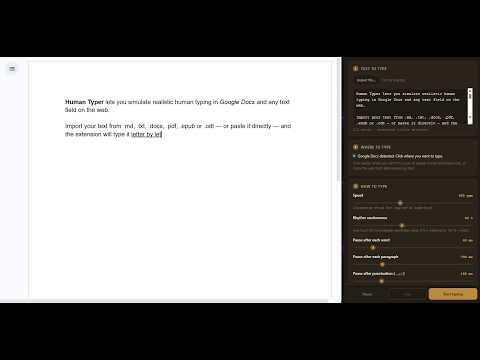
Simulate human handwriting in Google Docs and text fields. Import files and type them letter by letter.
Human Typer lets you simulate realistic human typing in Google Docs and any text field on the web. Import your document or paste text directly, and the extension will type it letter by letter with natural human rhythm. Supports the most common document formats including plain text, Markdown, Word documents, PDFs... Controls: — Typing speed (characters per minute) — Rhythm randomness (how much variation between keystrokes) — Pause after each word — Pause after each paragraph — Pause after punctuation marks — Optional occasional typos with auto-correction — Initial "thinking" pause before starting — Quick presets: Slow, Normal, Fast, Nervous Supports: Google Docs and any standard input or textarea on the web.
0 out of 5No ratings
Details
- Version1.0.0
- UpdatedJuly 10, 2026
- Size591KiB
- Languages2 languages
- DeveloperWebsite
Email
ruben.valverde.arana@gmail.com - Non-traderThis developer has not identified itself as a trader. For consumers in the European Union, please note that consumer rights do not apply to contracts between you and this developer.
Privacy

This developer declares that your data is
- Not being sold to third parties, outside of the approved use cases
- Not being used or transferred for purposes that are unrelated to the item's core functionality
- Not being used or transferred to determine creditworthiness or for lending purposes
Support
For help with questions, suggestions, or problems, please open this page on your desktop browser