
![Logo položky Hulu Speeder: adjust playback speed [QVI]](https://lh3.googleusercontent.com/WGf30CE7BblwmEX8hL1wMlt9ANBw0rD3ezk-PuTyCF78zTuCCeiUUJLv9DHLVej7Oe90MlYYDixRuj3go1TLQShV=s60)
Hulu Speeder: adjust playback speed [QVI]
24 hodnotení
)![Médium 2 (snímka obrazovky) pre Hulu Speeder: adjust playback speed [QVI]](data:image/gif;base64,R0lGODlhAQABAIAAAP///////yH5BAEKAAEALAAAAAABAAEAAAICTAEAOw==)
Prehľad
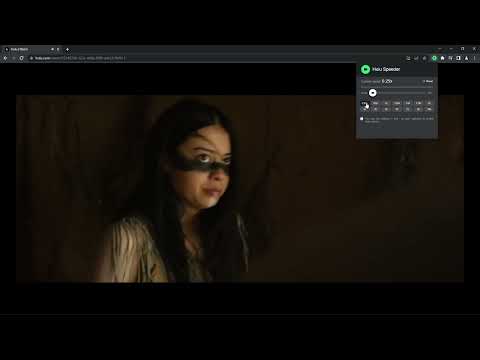
Extension allows to adjust the playback speed on Hulu according to your preferences
Get your skates on and be in control of the playback speed on Hulu. This extension will allow you to either speed up or slow down shows and movies to enjoy watching your favorite content at your own pace. Didn't catch that fast-talking dialogue? Want to experience your favorite scenes in slow-motion? Or maybe you'd like to fast forward the less interesting part to enjoy the series finale? You're in the right place! Here's the solution for changing the video speed. All you need to do is to add the extension to your browser and run the control panel which enables you to choose from 0.25x up to 16x speed rates. You can also use hotkeys on your keyboard to control it. It is as simple as that! How to find Speeder's control panel: 1. After installation, click the small puzzle piece icon next to your Chrome profile avatar (top right corner of the browser window) 2. You'll see all your installed and enabled extensions. 3. You can pin Speeder to have it always on top in your browser. 4. Click the Speeder icon and try different speed settings. This extension is part of the Quality Viewership Initiative, a collaborative effort to enhance the understanding of audience engagement. It collects anonymous, aggregated viewing insights to support creators and studios in improving the quality of their content. You can stop sharing your information at any time by switching the toggle on the options page. Disclaimer : Hulu is a trademark of Disney Media and Entertainment Distribution. This website & extension hold no association or affiliation with Hulu or any third-party companies.
4,3 z 524 hodnotení
Podrobnosti
- Verzia1.2.8
- Aktualizované5. februára 2026
- Od vývojáradogooodapp
- Veľkosť121KiB
- JazykyJazyky: 8
- VývojárHideApp
1021 East Lincolnway Cheyenne, WY 82001 USE-mail
dogooodapp@gmail.comTelefón
+1 802-284-5301 - Obchodný subjektTento vývojár sa podľa definície Európskej únie identifikoval ako obchodník a zaviazal sa že bude ponúkať iba produkty alebo služby, ktoré sú v súlade s právnymi predpismi EÚ.
- D-U-N-S132615120
Ochrana súkromia

V súvislosti so zhromažďovaním a používaním vašich údajov zverejnil vývojár položky Hulu Speeder: adjust playback speed [QVI] nasledujúce informácie. Podrobnejšie informácie nájdete v dokumente privacy policy príslušného vývojára.
Hulu Speeder: adjust playback speed [QVI] spracúva:
Tento vývojár vyhlasuje, že vaše údaje:
- sa nepredávajú tretím stranám mimo schválených prípadov použitia,
- sa nepoužívajú ani neprevádzajú na účely, ktoré nesúvisia so základnou funkciou položky,
- sa nepoužívajú ani neprevádzajú na zisťovanie úverovej bonity ani na účely poskytovania úverov.
Podpora
Ak máte otázky, návrhy alebo problémy, otvorte túto stránku v prehliadači pre počítače