

Huefinch – Color Blind Filter & Color Identifier

Overview
Helps color-blind eyes tell colors apart on any website and names any color on screen. Private: nothing leaves your browser.
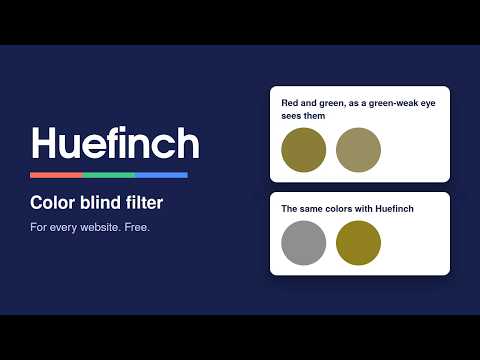
Most birds see more colors than people do, with four kinds of color-sensing cells where we have three; Huefinch lends your eyes a little of that, by adjusting web pages so colors that look alike become easy to tell apart. Huefinch is a color blind filter for people with red-weak, green-weak or blue-weak color vision (about 1 in 12 men and 1 in 200 women), and a color identifier that names any color on your screen. Designers can use it to see their work the way color-blind people do. SEE THE DIFFERENCE ON EVERY WEBSITE • Choose your type once: red-weak (protan), green-weak (deutan) or blue-weak (tritan), and set the strength. • Huefinch then works automatically on every page you open. No need to switch it on again for each site or tab. • It recolors everything on the page: text, charts, maps, photos, video and canvas, plus pop-up dialogs, menus and full-screen video. • Charts with red and green lines, status lights, heat maps, shop color swatches and error messages become easy to tell apart. • Hold Alt+Shift+X to see a page's original colors for a moment; let go and Huefinch is back. • Turn it off for one site with a single switch, or everywhere with Alt+Shift+F. NAME ANY COLOR ON YOUR SCREEN • Press Alt+Shift+C and click anywhere, even inside a photo. • Huefinch tells you the color in plain words ("Olive green", "Dark muted red"), the nearest CSS color name, and the hex code, which it copies for you. FIND MY SETTING • Not sure which type fits you? Mark which color pairs look alike, and Huefinch suggests a setting. • Then move one slider until the pairs look clearly different. FOR DESIGNERS • Simulate mode shows any page the way red-, green- or blue-weak eyes see it, at the severity you choose, so you can check charts, buttons and forms while you design. PRIVATE BY DESIGN • No account, no sign-up, no ads, no tracking. • Huefinch never reads, stores or sends what is on the pages you visit. It only adds a color filter. • It makes no network requests at all. Its settings stay in your browser. • Everything is free. FAQ Is this a medical test? No. Huefinch is a comfort setting that adjusts colors on screen. It can't diagnose or treat color vision deficiency; an eye-care professional can tell you about your color vision. Will it make me see colors like everyone else? No tool can do that. Huefinch shifts colors so that ones you confuse look different from each other. Does it work on pop-ups and full-screen video? Yes. Dialogs, menus and full-screen content are recolored too, exactly once. Why does it ask to "read and change all your data on all websites"? That is the browser's standard wording for any extension that works on the pages you visit. Huefinch uses it only to add its color filter, and only if you choose "Turn on for all websites". Without it, Huefinch works on one tab at a time when you click its icon. Why doesn't it work on some pages? Browsers don't let extensions change their own pages (like settings or the extension store). Does it slow pages down? The filter is drawn by the browser itself. On very busy pages, such as long, fast scrolling past video, older computers may draw slightly fewer frames. Do you spell it colour? Huefinch speaks US English in its menus, but it works the same for everyone. CREDITS Color simulation: Machado, Oliveira and Fernandes (2009), "A Physiologically-based Model for Simulation of Color Vision Deficiency". Correction: error redistribution ("daltonization") after Fidaner, Lin and Ozguven (2005), "Analysis of Color Blindness". Made by Wrenbox: small, private tools for your browser.
0 out of 5No ratings
Details
- Version1.1.0
- UpdatedOctober 13, 2026
- Offered bywrenbox.studio
- Size68.48KiB
- LanguagesEnglish (United States)
- DeveloperJones Ruskin
57, Ratchagar Nagar West Extension, Chavadi Cuddalore, Tamil Nadu 607001 INEmail
wrenbox.studio@gmail.comPhone
+91 73392 05870 - TraderThis developer has identified itself as a trader per the definition from the European Union and committed to only offer products or services that comply with EU laws.
Privacy

This developer declares that your data is
- Not being sold to third parties, outside of the approved use cases
- Not being used or transferred for purposes that are unrelated to the item's core functionality
- Not being used or transferred to determine creditworthiness or for lending purposes
Support
For help with questions, suggestions, or problems, please open this page on your desktop browser