

Huadong · Explain Selected Text
Overview
Select text and get explanations without leaving the page. English and Chinese. OpenAI API key or local helper required.
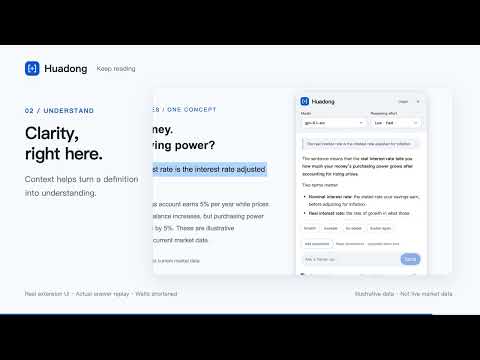
Select text. Understand it in place. Keep reading. Huadong helps you understand unfamiliar terms, concepts, formulas, and data while reading webpages. Enable it on a website, select text, and click Explain to open a floating conversation without leaving the page. Features • Context-aware explanations, with optional nearby paragraphs you can inspect or turn off. • Ask for a simpler explanation, an example, or a deeper walkthrough, and continue the conversation. • English and Chinese interfaces. Answers in English, Chinese, or both. • New installations follow your browser's interface language: Chinese for Chinese browsers, English otherwise. You can change this in settings. • Choose a model available to your account and its supported reasoning effort. • Add or paste up to 3 screenshots per message. Preview or remove them before sending. • Automatically search the web when current or real-world data is needed, with clickable sources and retrieval time. • Math formulas, tables, line charts, bar charts, and scatter plots. Hover for values, enlarge charts, or download SVG files. • Illustrative data is explicitly labeled. Web-sourced charts must cite sources from the current search and include the data date. Setup requirements Use your own OpenAI API key; API usage is billed separately by OpenAI. Alternatively, eligible ChatGPT accounts can sign in through the local helper. Account eligibility and model availability depend on OpenAI. ChatGPT sign-in currently requires macOS, Node.js 22 or later, and a separately installed local helper. Windows and Linux users can use API key mode. For screenshot questions, use helper version 0.6.0 or later. Existing helper 0.6.0 installations work with extension 0.6.1. Helper setup: https://wp3xpp.github.io/huadong-privacy/helper.html Privacy and limitations Selected text and screenshots you add are sent to OpenAI only when you actively send a request. Follow-up questions may include earlier images and relevant conversation context. Nearby page context can be inspected or disabled. No ads or developer-operated analytics server in the extension. Browser internal pages and the built-in PDF viewer are not supported. AI answers may be inaccurate; verify important figures and original sources. Huadong is an independent product, not an official OpenAI or Google extension.
0 out of 5No ratings
Details
- Version0.6.1
- UpdatedOctober 22, 2026
- Size1.37MiB
- Languages2 languages
- Developer
Email
wp3xpp@gmail.com - Non-traderThis developer has not identified itself as a trader. For consumers in the European Union, please note that consumer rights do not apply to contracts between you and this developer.
Privacy

Huadong · Explain Selected Text has disclosed the following information regarding the collection and usage of your data. More detailed information can be found in the developer's privacy policy.
Huadong · Explain Selected Text handles the following:
This developer declares that your data is
- Not being sold to third parties, outside of the approved use cases
- Not being used or transferred for purposes that are unrelated to the item's core functionality
- Not being used or transferred to determine creditworthiness or for lending purposes
Support
For help with questions, suggestions, or problems, visit the developer's support site