

Encrypted Clipboard Manager - History, Secure Sync & Snippets

Overview
Zero-knowledge encrypted clipboard with cross-device sync, code snippets, PIN lock, quick capture. Source available on GitHub.
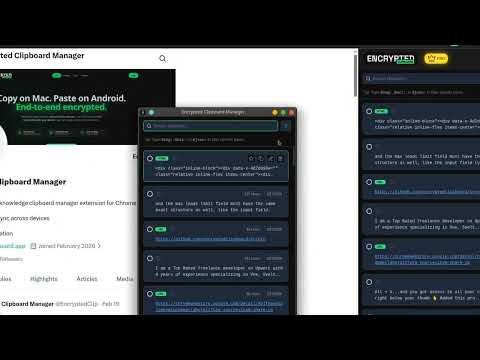
End-to-end encrypted clipboard manager for Chrome. Zero-knowledge sync, source available, fully auditable. Your clipboard data stays yours - always. Stop worrying about accidentally copying passwords, API keys, or credit card numbers. ECM encrypts everything locally before it ever syncs - the cloud only sees encrypted blobs. We cannot read your data, ever. 🔥 KEY FEATURES - 🔒 Security & Privacy - End-to-End Encryption: AES-256-GCM, encrypted on your device before sync - Source Available: Fully auditable at github.com/encryptedclipboard/chrome-extension - Zero Telemetry: No tracking, no analytics, no data collection - ever - PIN Lock: Secure your clipboard with an encrypted PIN and auto-lock after inactivity 📋 Clipboard History - Smart Search: Instantly find anything you've copied across your entire history - Rich Data Types: Automatically detects JSON, URLs, emails, phones, colors, SSH keys, API tokens, credit cards, OTP codes, and more - Image Support: Thumbnail previews for copied images - Favorites & Tags: Organize, star, and categorize your clips 🧩 Snippets & Developer Tools - Code Syntax Highlighting: JavaScript, Python, TypeScript, Go, Rust, and more - JSON Editor: Inspect and format JSON directly - Quick Capture: One-click capture of page content, screenshots, and DOM elements - Floating Mode: Pop out the clipboard as a persistent overlay ☁️ Cross-Device Sync (Optional) - Sync seamlessly between computers - zero-knowledge, end-to-end encrypted - Offline-first: Works without internet, syncs when you reconnect - The server stores only encrypted blobs - it has no access to your content ⚡ Quick Palette - Press Alt+V (customizable) to search and paste from your clipboard history instantly - Type filters (@url:, @img:, @json:) for fast targeted searching 🛡️ PRIVACY PROMISE - No Tracking: We do not collect usage analytics, telemetry, or behavioral data. - No Ads: A clean, distraction-free experience. - Transparent: What happens on your device, stays on your device. Perfect for: Developers, IT Professionals, Security-Conscious Users, and anyone who values digital privacy. Install now. 100% free. Your clipboard, your data, your control. --- 📢 CHANGELOG v5.4.2 - - Actions like Lock, Select, and Clear are now disabled while a sync is running - Fix: auto-write synced items to the OS clipboard now works correctly - Fix: auto syncs now run silently without showing the progress bar - Compact bottom bar with icon-only Lock and Clear buttons v5.4.1 - - Refined UI radius everywhere: modals, fields, and editors now use a consistent 28px squircle shape - FAB button reappears on upward scroll and uses cleaner hover style - Onboarding page visual polish: fixed hover borders and button backgrounds - Removed unused gcm permission v5.4.0 - - Source code is now publicly available - fully auditable at github.com/encryptedclipboard/chrome-extension - UI refresh with corner-shape styling across all elements for a modern, polished look - Added "Set Master Pass" button in bottom bar for quick access when master password is not set - Various minor bug fixes and UX improvements v5.3.0 - - Master Password Change (MPC) is now fully resilient - survives browser restart, shows ETA, and never blocks other devices indefinitely - Fixed a rare data-loss scenario where PIN-lock timer could silently abort MPC and delete cloud data - Backup system redesigned for reliability - per-item backups with automatic TTL cleanup, no more orphaned lock scenarios - Improved sync reliability with adaptive timeouts, MPC lock atomic release, and streaming upload completion - Various UX fixes - progress shows item counts, "MPC Running" indicator in toolbar, cancel button consistency across modals v5.2.0 - - Improved first sync performance - Fixed long running sync process failures and made more reliable - Improved some small UX issues v5.1.0 - - Smart Type + Keyword based search wasn't working on the "Magic Notch" v5.0.0 - - 🧩 Text Snippets - Save and organize reusable text with code syntax highlighting across 10+ programming languages. Perfect for developers, support templates, and repetitive content. - 🔐 PIN Lock & Auto Lock - Add an encrypted PIN to lock your clipboard on demand or configure automatic locking after inactivity. - ⚡ Quick Capture - Instantly capture text, links, images, and screenshots from any webpage in one click. - 🔍 Snippet Search - Smart search with language prefix filters (e.g. @js:, @python:) to find code snippets instantly. v4.0.0 - - 🔗 Clipboard Sharing - Share clipboard items with end-to-end encrypted links for seamless team collaboration. --- - Website: https://encryptedclipboard.app - GitHub: https://github.com/encryptedclipboard/chrome-extension - X: https://x.com/EncryptedClip - LinkedIn: https://linkedin.com/company/encryptedclipboard
5 out of 56 ratings
Details
- Version5.4.2
- UpdatedAugust 25, 2026
- FeaturesOffers in-app purchases
- Size915KiB
- LanguagesEnglish
- Developer
- Non-traderThis developer has not identified itself as a trader. For consumers in the European Union, please note that consumer rights do not apply to contracts between you and this developer.
Privacy

Encrypted Clipboard Manager - History, Secure Sync & Snippets has disclosed the following information regarding the collection and usage of your data. More detailed information can be found in the developer's privacy policy.
Encrypted Clipboard Manager - History, Secure Sync & Snippets handles the following:
This developer declares that your data is
- Not being sold to third parties, outside of the approved use cases
- Not being used or transferred for purposes that are unrelated to the item's core functionality
- Not being used or transferred to determine creditworthiness or for lending purposes
Support
For help with questions, suggestions, or problems, please open this page on your desktop browser