

Companion for YouTube: Audio Only & Feeds
3 ratings
)
Overview
Follow YouTube channels without an account: one merged feed, alerts on new uploads, and a low-data audio mode.
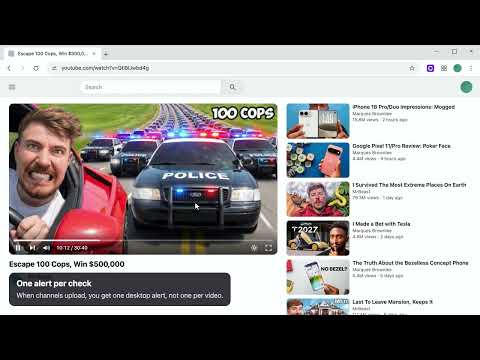
Keep up with the YouTube channels you care about without signing in to anything, and listen with a fraction of the data. FEEDS • Every new video from the channels you follow, in one list, newest first • A New tag marks what arrived since you last opened the popup • Put channels in groups and show one group at a time; rename, merge or delete a group whenever you like • Your groups also show as chips on YouTube's own Subscriptions page, so one tap narrows it there too • Live streams and premieres are tagged; Shorts are left out • Filter by title or channel, or show only your favourites WATCHLIST • Add a channel by pasting its link or @handle, or press Add while you are on its page • On a YouTube channel or video you do not follow yet, a Follow button adds it in one press — every channel of a collab video too • Import all your YouTube subscriptions from your signed-in YouTube tab, choosing the Google account if you have several. Signed out? A Google Takeout file works too. Both are read on your device • Star your favourites: they sit at the top and always alert • Mute a channel to keep it in your feed but out of your alerts • Open any channel to see its latest videos without leaving the popup, load older ones with See more, or jump to it on YouTube • Channels whose check fails are marked, and one tap shows just those • Removed one by mistake? Undo puts it back with its star, its place in the list and its videos • Clear the whole list in one go, after a confirm that offers to export it first ALERTS • A desktop notification when a channel uploads: one per check, even when several channels posted • Listen and Add to Up next buttons right on the alert • The toolbar badge counts new videos since you last looked PLAYER, WITH AUDIO MODE • Drops the video to 144p and covers it, so you keep the sound and use about 8× less data than 720p • Switch it off and the video goes back to the quality you were watching • Pick the cover from a picture on your device; it stays on the device and is never uploaded • Seek, skip 10 seconds, change speed and volume from the popup • With several YouTube tabs open, pick which one to control, or jump straight to it • A sleep timer: pause after 15, 30 or 60 minutes, even with the popup closed • Open videos from your feed straight into audio mode • See how much data you saved this month and all time • Keyboard shortcut: Alt+Shift+A for audio mode UP NEXT • A listen-later queue in the Player tab: add a video from your feed or an alert, and drag to reorder • It stays in step with YouTube's own queue on the Player tab: add, remove or reorder on either side • Press Play all and the list plays itself in one tab, moving on as each video ends • Works with audio mode on or off, and keeps going with the popup closed • Up to 100 videos, and the list stays until you clear it PRIVATE BY DESIGN • No account of its own, no API key • Checks read only public youtube.com pages, without your YouTube cookies • Import from YouTube reads your list inside your own signed-in YouTube tab, only when you press it • Your channels, feed and settings stay in your browser: no analytics, no ads, no tracking • Export your channels and settings to a file, and import them back SUPPORT • Free, with no ads and no tracking. If it saves you time or data, the heart in the popup opens PayPal and InstaPay • Send feedback from the bottom of Settings: one box, no account and no email needed In English and Arabic, with a full right-to-left layout. Light, dark, or follow your system. Free and open source: https://github.com/ashahinL/Youtube-Companion Companion for YouTube is not affiliated with, endorsed by or sponsored by YouTube or Google. YouTube is a trademark of Google LLC.
5 out of 53 ratings
Details
- Version2.2.1
- UpdatedOctober 16, 2026
- Offered byAmmar Shahin
- Size732KiB
- Languages2 languages
- Developer
Email
ashahin.work@gmail.com - Non-traderThis developer has not identified itself as a trader. For consumers in the European Union, please note that consumer rights do not apply to contracts between you and this developer.
Privacy

This developer declares that your data is
- Not being sold to third parties, outside of the approved use cases
- Not being used or transferred for purposes that are unrelated to the item's core functionality
- Not being used or transferred to determine creditworthiness or for lending purposes
Support
For help with questions, suggestions, or problems, visit the developer's support site