


Overview
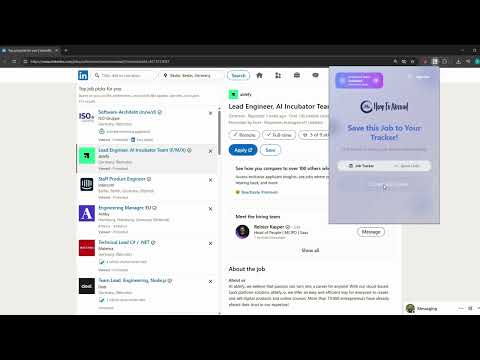
Best job application tracker extension by Jobstacky. Save and track applications from LinkedIn, Indeed and more in 1 click.
JobStacky – Smart Job Application Tracker & Autofill Assistant Track applications, auto-save jobs, and never apply twice. 🔥 Why JobStacky? Stop wasting hours copying job details and tracking applications manually. JobStacky is your AI-powered job search assistant that helps you: Save jobs in 1 click Auto-extract job details Track every application in one place Avoid duplicate applications instantly Built for modern job seekers who want speed, clarity, and results. ⚡ What You Can Do ✅ Save Jobs Instantly No more copy-paste. Capture job listings directly from any site. ✅ AI Job Data Extraction Automatically pulls: Job title Company name Salary (if available) Requirements ✅ Duplicate Application Detection Already applied? JobStacky tells you immediately. ✅ Quick Links (Power Feature) Save and reuse: Resume links Portfolio Frequently used job portals Access them in one click. ✅ Daily AI Limits (Free Plan) Use AI extraction daily for free. Upgrade anytime for unlimited usage. ✅ Works Everywhere Supports: LinkedIn Indeed Glassdoor And most job boards 🧠 Built for Efficiency ✔ No spreadsheets ✔ No lost applications ✔ No repeated effort Everything stays organized automatically. 🚀 Perfect For Active job seekers Students applying to internships Professionals switching roles Anyone applying to multiple jobs daily ⚙️ How It Works Install the extension Open any job listing Click “Extract Data” Done — job saved, tracked, and organized Job searching is already hard. Tracking it shouldn’t be. Use JobStacky. Apply smarter. Get hired faster. This application was previously known as HowToAbroad JobTracker.
5 out of 57 ratings
Details
- Version4.5.5
- UpdatedJune 11, 2026
- Size642KiB
- LanguagesEnglish
- DeveloperWebsite
Email
info@howtoabroad.com - Non-traderThis developer has not identified itself as a trader. For consumers in the European Union, please note that consumer rights do not apply to contracts between you and this developer.
Privacy

Jobstacky Job Application Tracker has disclosed the following information regarding the collection and usage of your data. More detailed information can be found in the developer's privacy policy.
Jobstacky Job Application Tracker handles the following:
This developer declares that your data is
- Not being sold to third parties, outside of the approved use cases
- Not being used or transferred for purposes that are unrelated to the item's core functionality
- Not being used or transferred to determine creditworthiness or for lending purposes
Support
For help with questions, suggestions, or problems, please open this page on your desktop browser