

Hover Street View for RideWithGPS — preview cycling routes
1 rating
)
Overview
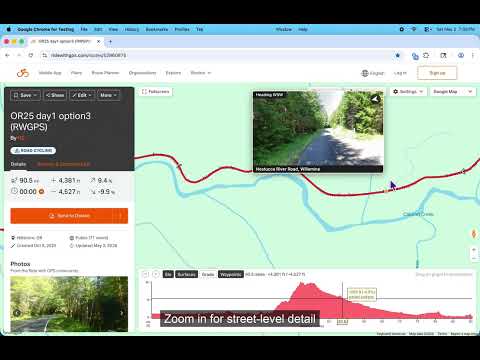
Hover over a RideWithGPS route to preview Google Street View. Scout entire cycling routes without dragging the pegman.
Hover anywhere on a RideWithGPS route and see a Google Street View preview of that exact spot — oriented in the direction the route is heading. Sweep your cursor along the route to scout the entire ride in seconds. The map alone doesn't show road conditions: surface type, shoulder width, traffic. RideWithGPS has Google's pegman built in, but you have to drag it, drop it, peek, back out, and re-drag for every point you want to check. This extension adds a continuous street view hover over the route & elevation map. Features: - Hover near any part of a route to see a Google Street View image - Shows street name and city, plus a compass and heading - Click the preview to open full Google Maps Street View - Works in both the route editor and route viewer, on any public or private route Two modes: * Experimental Preview — no API key needed. Bike trail coverage is limited. The fastest way to try the extension. * Bring your own API key — better bike trail coverage. 10,000 free requests / month from Google's Street View Static API. Requirements: * Google Maps must be selected as the map type in RideWithGPS * (Optional) Google Maps API key with Street View Static API enabled, for the API key mode When using the API key mode, the extension keeps usage under the 10k/month free tier by bucketing nearby points for a better cache hit ratio, skipping redundant requests, and throttling requests as the cursor moves. The popup shows current monthly usage and lets you set a hard monthly cap. Fully open source under MIT license: https://github.com/nslussar/rwgps-streetview Recent changes: * Experimental Preview mode (opt-in): no Google Maps API key needed, but limited trails coverage * Keyboard shortcuts: `s` toggles the overlay, `v` opens full Street View in new tab * UX tweaks, verbose/debug logging toggle
5 out of 51 rating
Details
- Version2.0.0
- UpdatedMay 16, 2026
- Offered bynslussar
- Size63.74KiB
- LanguagesEnglish
- Developer
Email
nslussar+chromewebstore@gmail.com - Non-traderThis developer has not identified itself as a trader. For consumers in the European Union, please note that consumer rights do not apply to contracts between you and this developer.
Privacy

This developer declares that your data is
- Not being sold to third parties, outside of the approved use cases
- Not being used or transferred for purposes that are unrelated to the item's core functionality
- Not being used or transferred to determine creditworthiness or for lending purposes
Support
For help with questions, suggestions, or problems, please open this page on your desktop browser