


Overview
Inspector is the tool which mimic display dimension between selected and hover element. It would be good for designers, QA
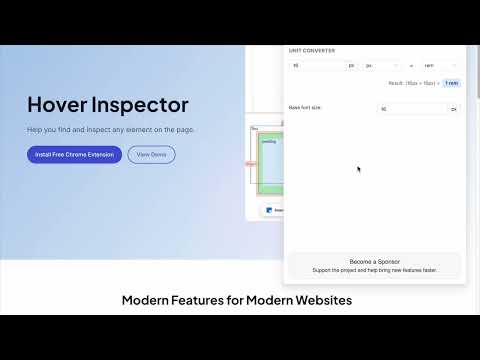
Pixel-perfect checks in one hover. See sizes, spacing and styles of any element on any page, right where you look. Built for designers, QA and front-end developers. HOW IT WORKS Click the Hover Inspector button in the toolbar on any page. Hover over elements to see their size, padding, margin and styles. Click an element to select it, then hover another one to see the distances between the two. Open more tools from the floating panel. Press Esc to turn the extension off. TOOLS IN ONE PANEL • Element Inspector: size, padding, margin, font, colors and other styles of the hovered element, plus its distances to the selected one. • Page Ruler: the current viewport size compared with common device widths and CSS framework breakpoints. • Color Picker: pick solid colors and gradients from the page and copy them as HEX or rgba(). • Unit Converter: convert between px, rem, em, %, vw and vh. • Color Palette & Typography: the page's colors, type scale, spacing, radii and shadows, compared with your design theme. • Automation Scenarios: record, edit and replay step-by-step scenarios on a page. • CSS Snapshot Inspector: capture the CSS of a page or an element and compare two snapshots side by side. • Live Watching: a floating log of your actions across pages that turns repeated steps into reusable scenarios. DOES NOT GET IN THE WAY The whole interface runs in an isolated shadow root, so it does not change the page's own styles, and turning it off removes everything it added. FOR AI AGENTS (OPTIONAL) An optional local MCP server lets AI coding agents such as Claude Code, Cursor or Codex read a page's palette and type scale, take CSS snapshots and screenshots, and run scenarios through the extension. It is off until you turn it on and only talks to 127.0.0.1. PRIVACY Your settings, scenarios, snapshots and watch log stay in the browser's extension storage on your computer. No analytics, no tracking. Data leaves the browser only where you send it: the MCP bridge to your own machine, or a scenario sync server whose address you enter yourself. OPEN SOURCE Hover Inspector is free and open source under the MIT license. Source code, bug reports and release notes: https://github.com/liubomyr-kozak/HoverInspector-extension
4.8 out of 533 ratings
Details
- Version3.2.3
- UpdatedNovember 3, 2026
- Offered byLiubomyr Kozak
- Size1.25MiB
- LanguagesEnglish
- Developer
Email
liubomyr.kozak@gmail.com - Non-traderThis developer has not identified itself as a trader. For consumers in the European Union, please note that consumer rights do not apply to contracts between you and this developer.
Privacy

Hover inspector has disclosed the following information regarding the collection and usage of your data. More detailed information can be found in the developer's privacy policy.
Hover inspector handles the following:
This developer declares that your data is
- Not being sold to third parties, outside of the approved use cases
- Not being used or transferred for purposes that are unrelated to the item's core functionality
- Not being used or transferred to determine creditworthiness or for lending purposes
Support
For help with questions, suggestions, or problems, please open this page on your desktop browser