


概述
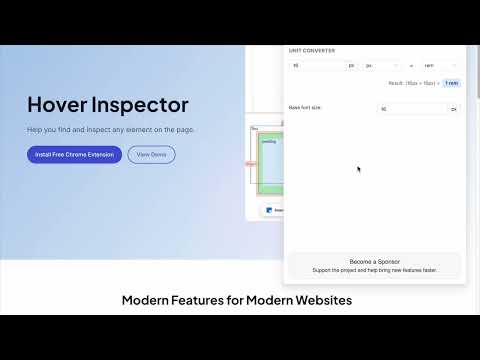
Inspector is the tool which mimic display dimension between selected and hover element. It would be good for designers, QA
Pixel-perfect checks in one hover. See sizes, spacing and styles of any element on any page, right where you look. Built for designers, QA and front-end developers. HOW IT WORKS Click the Hover Inspector button in the toolbar on any page. Hover over elements to see their size, padding, margin and styles. Click an element to select it, then hover another one to see the distances between the two. Open more tools from the floating panel. Press Esc to turn the extension off. TOOLS IN ONE PANEL • Element Inspector: size, padding, margin, font, colors and other styles of the hovered element, plus its distances to the selected one. • Page Ruler: the current viewport size compared with common device widths and CSS framework breakpoints. • Color Picker: pick solid colors and gradients from the page and copy them as HEX or rgba(). • Unit Converter: convert between px, rem, em, %, vw and vh. • Color Palette & Typography: the page's colors, type scale, spacing, radii and shadows, compared with your design theme. • Automation Scenarios: record, edit and replay step-by-step scenarios on a page. • CSS Snapshot Inspector: capture the CSS of a page or an element and compare two snapshots side by side. • Live Watching: a floating log of your actions across pages that turns repeated steps into reusable scenarios. DOES NOT GET IN THE WAY The whole interface runs in an isolated shadow root, so it does not change the page's own styles, and turning it off removes everything it added. FOR AI AGENTS (OPTIONAL) An optional local MCP server lets AI coding agents such as Claude Code, Cursor or Codex read a page's palette and type scale, take CSS snapshots and screenshots, and run scenarios through the extension. It is off until you turn it on and only talks to 127.0.0.1. PRIVACY Your settings, scenarios, snapshots and watch log stay in the browser's extension storage on your computer. No analytics, no tracking. Data leaves the browser only where you send it: the MCP bridge to your own machine, or a scenario sync server whose address you enter yourself. OPEN SOURCE Hover Inspector is free and open source under the MIT license. Source code, bug reports and release notes: https://github.com/liubomyr-kozak/HoverInspector-extension
4.8 星(5 星制)34 个评分
详情
- 版本3.2.3
- 上次更新日期2026年11月3日
- 提供方Liubomyr Kozak
- 大小1.25MiB
- 语言English
- 开发者
邮箱
liubomyr.kozak@gmail.com - 非交易者该开发者尚未将自己标识为交易者。欧盟地区消费者须知:消费者权利可能不适用于您与该开发者达成的合约。
隐私权

该开发者已声明,您的数据:
- 不会因未获批准的用途出售给第三方
- 不会为实现与产品核心功能无关的目的而使用或转移
- 不会为确定信用度或放贷目的而使用或转移
支持
若有任何疑问、建议或问题,请在桌面浏览器中打开此页面