

Hold to 2x Speed for Twitch
Overview
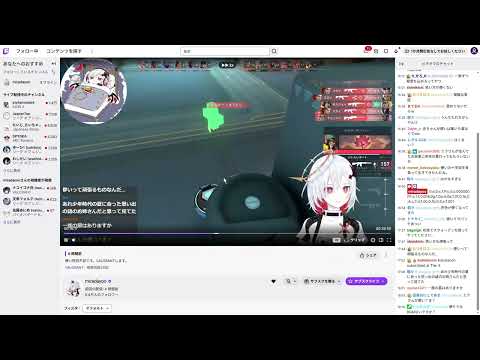
Press and hold the Twitch player to watch VODs and streams at 2x speed. Release to return to normal speed.
Watch Twitch VODs and live streams at 2x speed, just by pressing and holding the video. HOW TO USE 1. Open a VOD or a live stream on twitch.tv. 2. Press and hold the video (about 0.4 seconds). 3. The video plays at 2x speed while you hold. Release to return to normal speed. FEATURES - 2x speed only while you hold. It goes back to your original speed automatically. - A small "▶▶ 2x" badge appears at the top of the player so you know it's active. - Does not react on the player controls (seek bar, volume, and so on). - Releasing the hold will not accidentally pause or resume the video. - If the mouse moves while you are pressing, it is treated as a drag and 2x speed is not triggered. NOTES - On live streams, 2x speed works while you are behind the live edge. At the live edge, the player may catch up and buffer. - If Twitch changes its page layout, the extension may stop working until it is updated. PRIVACY - This extension does not collect or send any personal data or browsing history. - It requests no special permissions and only runs on www.twitch.tv. This extension is an independent project and is not affiliated with or endorsed by Twitch Interactive, Inc. Twitch is a trademark of Twitch Interactive, Inc.
0 out of 5No ratings
Details
- Version1.1.0
- UpdatedOctober 25, 2026
- Offered byきつつき
- Size23.51KiB
- Languages5 languages
- Developer
Email
fusufu57@gmail.com - Non-traderThis developer has not identified itself as a trader. For consumers in the European Union, please note that consumer rights do not apply to contracts between you and this developer.
Privacy

This developer declares that your data is
- Not being sold to third parties, outside of the approved use cases
- Not being used or transferred for purposes that are unrelated to the item's core functionality
- Not being used or transferred to determine creditworthiness or for lending purposes