

Quick Fill
4 ratings
)
Overview
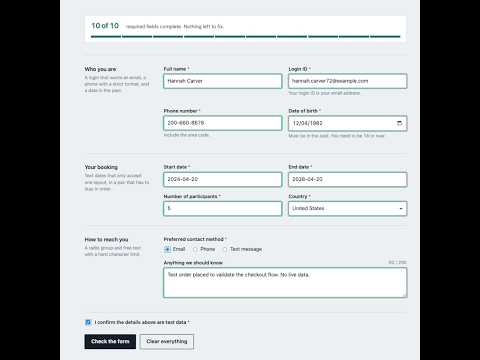
Fills test forms with one coherent, context-aware persona. Reads the form, skips lookups, respects validation.
A tool for developers and QA engineers. Filling the same registration form for the fortieth time is a bad use of an afternoon. Quick Fill reads the form you are on, works out what kind of record it is for, and fills it with placeholder data that actually holds together: one person, consistently, across every field. Click the toolbar icon, or press Alt+Shift+F. Press Alt+Shift+P to preview what it would do without writing anything. IT UNDERSTANDS THE FORM BEFORE IT FILLS IT A page headed "Add User Details" gets a user-age person. An onboarding form gets a working-age one. Names, email, phone, city, state and postcode all belong to the same fictional person rather than being drawn at random per field. It works on modern component-based pages too, including Salesforce Lightning and other web-component sites. REQUIRED FIELDS FIRST, EVERYTHING IF YOU WANT By default Quick Fill fills only the fields the page marks as required, so you get a valid form fast without cluttering optional fields. Turn on "Fill all fields" in Settings to fill required and optional fields alike. DATES THAT MAKE SENSE TOGETHER Dates are solved as a set, not one at a time. A date of birth anchors the rest: an issue date lands after the eighteenth birthday and before today, an expiry date lands after its matching start date and in the future, and an application date is today. No more birth years in 1901 sitting next to an issue date in 2029. Dates are typed in the layout the field expects, such as MM/DD/YYYY. IT RESPECTS THE FORM'S OWN RULES Character patterns, input masks, length limits and numeric ranges are read from the field before anything is written. If the page rejects a value, Quick Fill reads the validation message it displays and corrects itself instead of leaving the field broken. A final pass catches errors that only appear once the whole form is filled. YOU STAY IN CONTROL Settings let you choose the region, how dropdowns are filled, a seed (the same seed gives the same person every time, handy across the steps of a wizard), whether to overwrite fields that already have a value, whether to validate and fix after filling, and whether to show a result panel. A full report of what was filled, skipped or failed always goes to the browser console. WHAT IT DELIBERATELY WILL NOT TOUCH - Fields backed by a record search or lookup are never typed into, because a junk value in one can dead-end validation or create a record. If a lookup offers a fixed list of choices, Quick Fill picks from it; otherwise the field is left empty and listed for you. - Checkboxes whose labels imply a side effect (delete, publish, notify, subscribe, auto-renew) are left alone, even when marked required. - Controls wired to reload the page are not clicked. - It never submits a form. PRIVACY No data is collected, stored remotely, or transmitted. The extension makes no network requests of any kind. All generated data is synthetic and created on your machine. Local storage holds only your own settings, such as region, dropdown behaviour, seed and your on/off switches. It runs only on the tab you are on, and only when you click the toolbar icon or use its shortcut. Privacy policy: https://anshulsharma4014.github.io/Quick-Fill-Privacy-Policy/privacy-policy.html Intended for test and staging environments. The data it produces is fictional and is not suitable for production records.
5 out of 54 ratings
Details
- Version1.3.3
- UpdatedNovember 25, 2026
- Offered byAnshul Sharma
- Size87.48KiB
- LanguagesEnglish
- Developer
Email
a.s.s.s.a.s.v.d.z@gmail.com - Non-traderThis developer has not identified itself as a trader. For consumers in the European Union, please note that consumer rights do not apply to contracts between you and this developer.
Privacy

This developer declares that your data is
- Not being sold to third parties, outside of the approved use cases
- Not being used or transferred for purposes that are unrelated to the item's core functionality
- Not being used or transferred to determine creditworthiness or for lending purposes