

Click & Change - Delete, Change webpage element

Overview
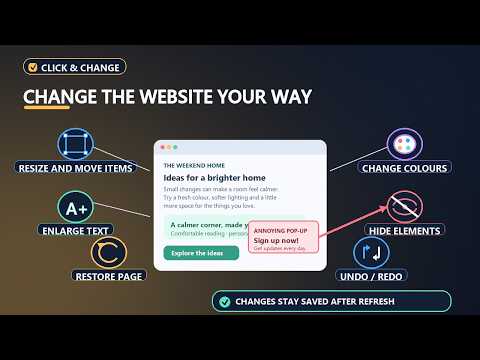
Click any part of a web page to delete, resize, move and restyle it permanently or temporarily. Changes remain after refresh.
# Change webpages visually with Click & Change Click & Change lets you customize the appearance and layout of webpages directly in your browser. Select elements on a page and make visual changes without manually editing the website's code. ## What you can do - **Delete elements:** Remove unwanted webpage elements from your view. - **Resize elements:** Adjust their size to suit your needs. - **Move elements:** Change the position of elements on the page. - **Restyle elements:** Customize the appearance of selected elements. - **Save your changes:** Keep supported edits after refreshing a page. - **Customize webpages as you browse:** Make pages easier to read and more comfortable to use. ## Made for personal customization Use Click & Change to adjust webpage layouts, remove visual clutter, and personalize the way websites look in your browser. ## Free to use Click & Change is free to use. Donations, if offered, are optional and are not required to use its features. ## Privacy Click & Change stores your saved changes and settings in Chrome's local extension storage. Webpage elements may be processed locally to identify the elements you select and apply or restore your edits. Please see the Privacy Policy for details. **Note:** Changes made by the extension customize your view in the browser. They do not change the original website for other visitors, and some websites or page updates may affect how edits behave.
0 out of 5No ratings
Details
- Version1.0.0
- UpdatedOctober 28, 2026
- Offered bynoman737ali@gmail.com
- Size87.29KiB
- LanguagesEnglish
- Developer
Email
noman737ali+Click&Change@gmail.com - Non-traderThis developer has not identified itself as a trader. For consumers in the European Union, please note that consumer rights do not apply to contracts between you and this developer.
Privacy

Click & Change - Delete, Change webpage element has disclosed the following information regarding the collection and usage of your data. More detailed information can be found in the developer's privacy policy.
Click & Change - Delete, Change webpage element handles the following:
This developer declares that your data is
- Not being sold to third parties, outside of the approved use cases
- Not being used or transferred for purposes that are unrelated to the item's core functionality
- Not being used or transferred to determine creditworthiness or for lending purposes