

YouTube Subscription Organizer

Overview
Organize your YouTube subscriptions by content niche with drag-and-drop categorization
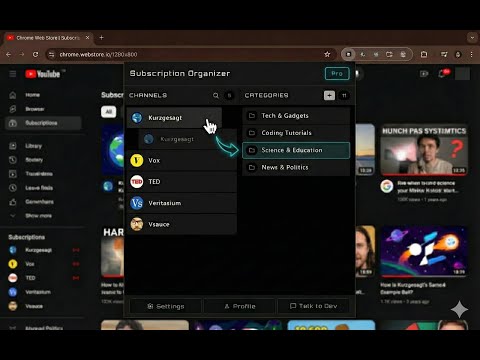
ired of scrolling through a messy YouTube Subscriptions feed? Take back control of your viewing experience with the ultimate YouTube Subscription Manager. This extension lets you organize your YouTube channels into custom categories and filter your Subscriptions page with a single click, ensuring you only see the videos you’re actually in the mood for. If you’re subscribed to dozens or hundreds of channels, your feed quickly becomes a chaotic mix of gaming, tech reviews, music, vlogs, and news. Since YouTube doesn’t let you sort or filter subscriptions natively, you end up endlessly scrolling. This extension fixes that by adding YouTube folders and categories directly into your browser. Create custom categories (like Gaming, Tech, Music, Education, or Podcasts), assign your favorite channels to them using an intuitive drag-and-drop interface, and instantly filter your Subscriptions feed. Instead of chaos, you get a clean, focused, and personalized content dashboard. ⭐ Key Features & Benefits ✔ Organize YouTube Subscriptions: Sort your channels into custom folders and categories. ✔ Filter Your Feed: Instantly filter the YouTube Subscriptions page by topic with one click. ✔ Switch Content Moods: Seamlessly pivot between studying, relaxing, gaming, or productivity modes. ✔ Drag-and-Drop Manager: Effortlessly group and reorder channels. ✔ Auto-Detect New Subs: Automatically alerts you to categorize newly subscribed channels. ✔ Built for Power Users: Handles massive lists effortlessly (supports 100–500+ subscriptions). 🎯 Who Is This Perfect For? Power Viewers: Users subscribed to many different types of channels who need a YouTube subscription sorter. Students & Professionals: Switch seamlessly between educational content and entertainment. Productivity Seekers: Binge-watch less by filtering out distracting videos when you want to focus. Anyone: Those who want a calmer, cleaner, and more organized YouTube experience. 🧩 How It Works 1️⃣ Load your YouTube channels into the extension. 2️⃣ Create custom categories that match your interests. 3️⃣ Drag and drop channels into your new folders. 4️⃣ Go to your YouTube Subscriptions page. 5️⃣ Click a category on the new top bar → instantly see only those videos! Click the active category again to turn the filter off and see your full feed. It requires no complex setup, injects no heavy scripts, and has zero performance impact on your browser. 🔧 Advanced Tools Included Popup Channel Manager Easily drag & drop channels into groups. Search channels by name instantly. Reorder categories to fit your workflow. Badge alerts when new, uncategorized channels are found. Pro feature: Add a single channel to multiple categories. Subscriptions Page Integration Adds a sleek category filter bar directly to YouTube. One-click content switching. Automatically matches YouTube’s Dark Mode / Light Mode themes. Auto-Sync New subscriptions appear automatically for easy sorting. Unsubscribed channels are automatically removed from your lists. 🔐 Privacy & Data Security First No tracking. No external analytics. All data stays locally on your device. Optional cloud sync is available for users who want to use the exact same category setup across multiple computers. 💰 Free vs Pro Free Plan: Includes up to 5 custom categories and all essential organizing features forever. Pro Plan: Unlocks unlimited categories and advanced features. Flexible pricing options (including one-time lifetime access) are available. ❓ FAQ Does it work on the YouTube homepage? No — this extension is explicitly designed to organize your Subscriptions page (/feed/subscriptions). Does it slow down YouTube? Not at all. Filtering is done via ultra-lightweight CSS (hiding/showing elements), meaning zero lag. Does it work with large subscription lists? Yes! The extension is optimized to handle 500+ channels smoothly. Is a login required? No login is required to use the extension, unless you explicitly want to use the optional cross-device cloud sync. 🟢 Stop scrolling through the chaos. Organize your YouTube feed once, and filter it forever.
3.6 out of 55 ratings
Details
- Version1.3.5
- UpdatedOctober 29, 2026
- FeaturesOffers in-app purchases
- Size116KiB
- LanguagesEnglish
- DeveloperANSHUMAN MANDALWebsite
BANIPUR MIYAPUR RAGHUNATHGANJ, West Bengal 742235 INEmail
superextensions25000@gmail.comPhone
+91 97335 26888 - TraderThis developer has identified itself as a trader per the definition from the European Union and committed to only offer products or services that comply with EU laws.
Privacy

YouTube Subscription Organizer has disclosed the following information regarding the collection and usage of your data. More detailed information can be found in the developer's privacy policy.
YouTube Subscription Organizer handles the following:
This developer declares that your data is
- Not being sold to third parties, outside of the approved use cases
- Not being used or transferred for purposes that are unrelated to the item's core functionality
- Not being used or transferred to determine creditworthiness or for lending purposes