

#TagChoose - Bookmark Manager with client-side AI

Overview
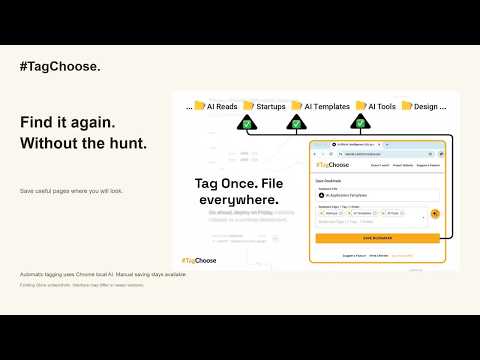
Chrome local AI suggests bookmark folders. Review and save in several places, or choose folders manually without AI.
TagChoose helps you save the page you are viewing in all the Chrome bookmark folders where it belongs. CHROME LOCAL AI, WITH YOU IN CONTROL Automatic folder suggestions use Chrome's built-in, on-device AI. Review its choices, change the title or folders, then save. TagChoose does not use a cloud AI service or a rules-based automatic fallback. MANUAL SAVING IS ALWAYS AVAILABLE Choose folders yourself while Chrome downloads or prepares the model, or when local AI is unavailable. No account, API key or paid subscription is required. ONE PAGE, SEVERAL FOLDERS Save a copy in each selected folder. Existing copies in other folders stay intact. Full folder paths help distinguish folders with matching names. Your bookmarks remain ordinary Chrome bookmarks. CLEAR SETUP AND RECOVERY The dedicated AI setup tab explains compatibility and distinguishes waiting, reported download progress, model preparation and readiness. Stop waiting or retry if Chrome stalls. Automatic suggestions require compatible desktop Chrome, supported hardware and a ready local model; they are not available on every computer. WHAT TAGCHOOSE DOES • Suggests existing folders for the current page using Chrome local AI. • Lets you review and manually change folder choices. • Saves the current page in multiple selected locations. • Updates selected bookmark copies without deleting the others. TagChoose does not bulk reorganize your library, create folders automatically or read entire page contents. It uses the page title, URL and folder names for local AI suggestions. It does not send those details to cloud AI. Chrome sync follows your browser settings. VERSION 2.0 Rebuilt local AI setup, clearer progress and recovery, reliable folder identification, safer saves and protection against late AI results overwriting your choices. Website and setup: https://tagchoose.site/ Privacy: https://tagchoose.site/privacy-policy/ 30-second introduction: https://www.youtube.com/watch?v=Rc8u494w-Dc Made by Saulius.
3.7 out of 56 ratings
Details
- Version2.0.0
- UpdatedSeptember 14, 2026
- Size730KiB
- LanguagesEnglish (United States)
- DeveloperWebsite
Email
sauliusthedev@gmail.com - Non-traderThis developer has not identified itself as a trader. For consumers in the European Union, please note that consumer rights do not apply to contracts between you and this developer.
Privacy

This developer declares that your data is
- Not being sold to third parties, outside of the approved use cases
- Not being used or transferred for purposes that are unrelated to the item's core functionality
- Not being used or transferred to determine creditworthiness or for lending purposes
Support
For help with questions, suggestions, or problems, please open this page on your desktop browser