

Screen Canvas - Draw on any Web page

Overview
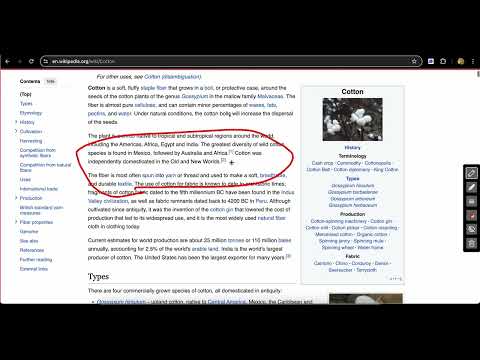
Draw on any web page, highlight text blocks, annotate with notes and colours, or open a whiteboard, all for FREE.
With Screen Canvas, you can draw on any web page, annotate them, or open a blank whiteboard. Highlight text and add a note so you remember why you marked it. Snap a rough sketch into a clean shape, and drag your drawings around the page. Finally, you can take a screenshot of the page when you're done or create a link that you can easily share with others. Features: ⭐ You can draw on any web page with any colour ⭐ Snap drawings into clean shapes, including arrows, rectangles, circles, and triangles ⭐ You can highlight texts and add notes to them for easy recollection ⭐ You can drag around your drawings ⭐ Undo and redo your annotations ⭐ Open a whiteboard for a blank canvas to draw and illustrate. ⭐ You can save your work and re-store it when a website reloads (Paid feature) ⭐ You can take full page screenshots that actually work 📸 ⭐ You can hide and show drawings at any point ⭐ You can easily delete each drawing with your keyboard ⭐ Share your annotations as a link you can send to friends and colleagues
4.3 out of 522 ratings
Details
- Version1.7.0
- UpdatedOctober 30, 2026
- Size233KiB
- LanguagesEnglish
- DeveloperWebsite
Email
ifedapoolarewaju@gmail.com - Non-traderThis developer has not identified itself as a trader. For consumers in the European Union, please note that consumer rights do not apply to contracts between you and this developer.
Privacy

This developer declares that your data is
- Not being sold to third parties, outside of the approved use cases
- Not being used or transferred for purposes that are unrelated to the item's core functionality
- Not being used or transferred to determine creditworthiness or for lending purposes