

Recorder Action
การให้คะแนน 3 รายการ
)
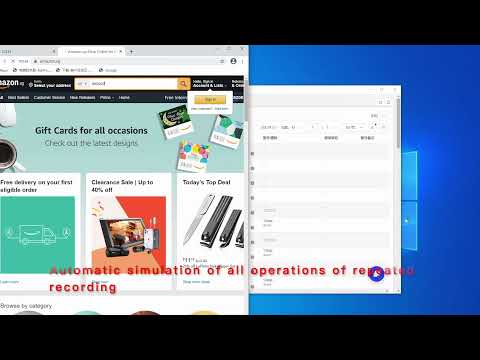
ภาพรวม
The operation on the operation webpage automatically generates AdsPower's RPA process
Operation recording is used for browser automation step recording. After starting, it will record clicks, input, page scrolling, and drop-down selections on the current page. The operation steps are as follows: 1. Click Recorder Now to start recording 2. The click, scroll, input, and jump of the operation page will be recorded as an RPA automation process 3. When the page jumps, you need to wait for the status WAIT to update to REC, and then re-operate to record 4. During the recording process, if some operations are not recorded, click Pause first, and then click Resume after the operation is complete 5. After the recording is complete, click Export and copy to the pasteboard 6. Process of RPA robot imported into AdsPower Operate on AdsPower: 1. Go back to the RPA robot process of AdsPower, create process -> import 2. Check the browser environment and select the RPA robot process just created 3. Here AdsPower will automatically open the browser, visit the website just recorded and repeat the operation just recorded
1.3 จาก 5 คะแนนการให้คะแนน 3 รายการ
รายละเอียด
- รุ่น0.0.2
- อัปเดตแล้ว2 กรกฎาคม 2564
- นำเสนอโดยwonderful563
- ขนาด63.78KiB
- ภาษา2 ภาษา
- นักพัฒนาซอฟต์แวร์
อีเมล
wonderful563@gmail.com - ไม่ใช่ผู้ค้านักพัฒนาซอฟต์แวร์รายนี้ไม่ได้ระบุว่าตัวเองเป็นผู้ค้า สำหรับผู้บริโภคในสหภาพยุโรป โปรดทราบว่าสิทธิของผู้บริโภคไม่มีผลกับสัญญาระหว่างคุณกับนักพัฒนาซอฟต์แวร์รายนี้
ความเป็นส่วนตัว

นักพัฒนาซอฟต์แวร์รายนี้ประกาศว่าข้อมูลของคุณจะ
- ไม่ถูกขายไปยังบุคคลที่สามหากไม่ใช่ Use Case ที่ได้รับอนุมัติ
- ไม่ถูกใช้หรือถูกโอนเพื่อวัตถุประสงค์ที่ไม่เกี่ยวข้องกับฟังก์ชันการทำงานหลักของรายการ
- ไม่ถูกใช้หรือถูกโอนเพื่อพิจารณาความน่าเชื่อถือทางเครดิตหรือเพื่อวัตถุประสงค์การให้สินเชื่อ
สนับสนุน
โปรดเปิดหน้านี้บนเบราว์เซอร์ในเดสก์ท็อป หากมีข้อสงสัย ต้องการขอคำแนะนำ หรือประสบปัญหาใดๆ