

PostMini — Lightweight API Client
2 ratings
)
Overview
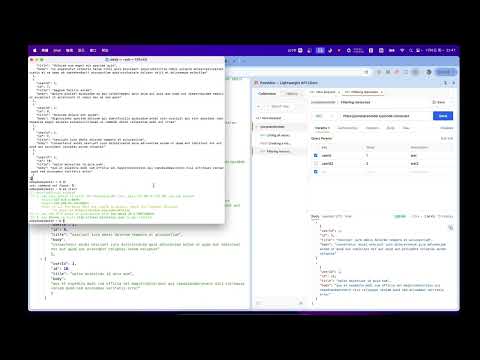
Lightweight Postman alternative in Chrome Side Panel. Send REST requests, view responses, history & cURL export.
English PostMini is a lightweight API client for Chrome. Send HTTP requests from the Side Panel beside your docs — no desktop app, no account. Why PostMini - Side Panel (default), popup, or full tab — open how you work - No account — collections and history stay local on your device - Postman's core workflow without the weight Features - All common HTTP methods; params, auth (Basic, Bearer, API Key, OAuth2), headers, body - Body types: form-data, urlencoded, raw JSON/text, binary - Response viewer: status, timing, body, headers, raw - Projects, folders, multi-tab editor - Per-request and global history - Copy as cURL (includes proxy when enabled) - Export workspace as JSON - HTTP / HTTPS / SOCKS4 / SOCKS5 proxy with on-screen indicator - Configurable timeout and redirect following Built for frontend and full-stack developers who debug APIs while reading docs in the browser. Questions, bug reports, or feedback? Open an issue at: https://github.com/eddy5885/postmini/issues 中文 PostMini 是 Chrome 里的轻量 API 客户端。在侧边栏里发 HTTP 请求,文档和调试并排 —— 无需桌面客户端,无需账号。 为什么选 PostMini - 侧边栏(默认)、弹窗或标签页,按你的工作方式打开 - 无需账号,集合与历史记录保存在本机 - 保留 Postman 核心流程,没有臃肿负担 功能 - 常用 HTTP 方法;Params、鉴权(Basic、Bearer、API Key、OAuth2)、Headers、Body - Body:form-data、urlencoded、Raw JSON/文本、二进制 - 响应:状态码、耗时、Body、Headers、Raw - 项目、文件夹、多标签编辑 - 单请求与全局历史记录 - 复制为 cURL(启用代理时包含 `--proxy`) - 导出工作区 JSON - HTTP / HTTPS / SOCKS4 / SOCKS5 代理,界面显示状态 - 可配置超时与是否跟随重定向 适合在浏览器里边看文档边调 API 的前端与全栈开发者。 有问题、Bug 反馈或建议?欢迎在 GitHub 提 Issue: https://github.com/eddy5885/postmini/issues
5 out of 52 ratings
Details
- Version0.5.0
- UpdatedSeptember 12, 2026
- Offered byzhangsanfeng
- Size705KiB
- LanguagesEnglish (United States)
- Developer
Email
hbnu001@gmail.com - Non-traderThis developer has not identified itself as a trader. For consumers in the European Union, please note that consumer rights do not apply to contracts between you and this developer.
Privacy

This developer declares that your data is
- Not being sold to third parties, outside of the approved use cases
- Not being used or transferred for purposes that are unrelated to the item's core functionality
- Not being used or transferred to determine creditworthiness or for lending purposes
Support
For help with questions, suggestions, or problems, please open this page on your desktop browser