

Udemy Time Remaining
평점 22개
)
개요
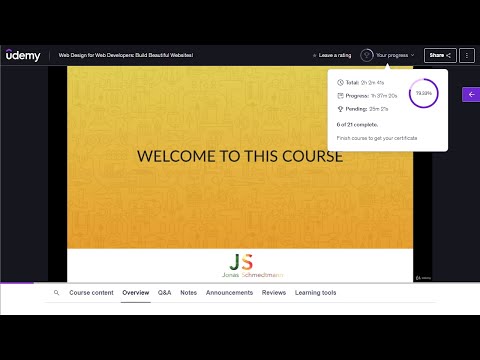
Chrome extension that modifies the Udemy course page, displaying the time remaining after each section
Supercharge your time management within the Udemy platform! Expand the Udemy interface to display for each section and lecture, how much time is left to finalize the course. The extension also visually marks the section progress with progress bars, and highlights which sections have already been completed, so that they can be easily distinguished, in case you go through the course in a non-linear order. Additionally it adapts to the playback speed updating the times accordingly. This extension is designed to seamlessly integrate with, and react to the Udemy interface. Features: * Display the time-based course progress inside Udemy's progress popup. * Display accurate course, section, and lecture durations. * Display remaining time for each section, and lecture. * Display remaining time for each section and lecture, considering the user progress. * Display remaining time for each section and lecture, considering the playback speed. * Display a progress bar for all sections or just the current section. * Highlight completed sections in a distinguishable color. * Fully configurable settings, so that you can toggle or tweak all the features. The way this extension works is, for every section and lecture, using that section or lecture as the point of reference, it displays how much time is left on the section and the course, from that reference point downwards. Considering or not considering the completed lectures underneath (in case you are completing the course in a non-linear manner) depending on whether or not that feature is enabled. Otherwise, if you are just interested in your current progress, and time left in the entire course, you can either check it any time, by checking Udemy's progress popup, or enable the "focus on current lecture only" mode, which will display the time left in the course and section, only in the current lecture. You can read the release notes in the Extension settings popup, to know more about these features. Notes: * This extension does not currently work with Udemy for business, it only supports standard Udemy. If you're a business interested in the extension, and can provide access to the Udemy for business product, please reach out to us, and we'll be happy to implement support for it. * Please bear in mind that Udemy's native interface rounds the estimated durations of the lectures, but this extension calculates the remaining times based on the real accurate estimated durations (to the seconds) of the lectures as reported by Udemy's API. The extension can optionally show the real estimated duration of each lecture and section through the extension settings. * The extension underwent a massive update in order to make it more functional. If you detect any issues with it please let us know in the email indicated at the Extension Details section below, or using the extension settings' "contact us" link, so that we can address it. Dislaimer: * This extension is not associated with, nor endorsed by Udemy. All product and company names are the registered trademarks of their original owners. The use of any trade name or trademark is for identification and reference purposes only and does not imply any association with the trademark holder of their product brand.
5점 만점에 4.8점평점 22개
세부정보
- 버전3.0.3
- 업데이트됨2025년 11월 21일
- 제공DInteractive
- 크기1.05MiB
- 언어English (United States)
- 개발자
이메일
ddbm.dev@gmail.com - 비판매자판매자로 식별되지 않은 개발자입니다. 유럽 연합에 거주하는 소비자의 경우, 이 개발자와 체결한 계약에 대해서는 소비자 권리가 적용되지 않을 수 있음을 유의해야 합니다.
개인정보 보호

개발자가 사용자 데이터에 관해 다음과 같이 선언했습니다
- 승인된 사용 사례를 제외하고 서드 파티에 판매하지 않음
- 항목의 핵심 기능과 관련 없는 목적으로 사용하거나 전송하지 않음
- 신용도 판단 또는 대출 목적으로 사용하거나 전송하지 않음