


Overview
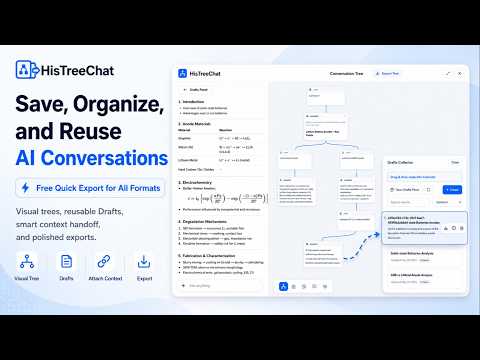
Show branches as a chat tree. Create Drafts. Edit before export. Export ChatGPT to PDF, Markdown, HTML, DOCX, and more formats.
HistreeChat helps you export, organize, edit, and reuse ChatGPT conversations. Core conversation data workflows, including export, tree view, Drafts, editing, and local history, are processed locally in your browser. Quick Export lets you export ChatGPT to PDF, Markdown, DOCX, HTML, Image, and a total of 10 document formats with one click. When you need a polished document, edit before export. Clean up sensitive text, reorganize sections, refine wording, preserve headings, tables, code blocks, formulas, and images where supported, then export the final version. HistreeChat also turns chats into visual chat tree, saves useful turns into reusable Drafts, keeps local export records, and helps you reuse selected context in a new chat. Key features 🖥️ Local-first conversation workflows Conversation text, selected turns, Drafts, reusable context, tree data, cache content, export snapshots, and local export history are processed in your browser for export, Visual Tree, Drafts, preview, editing, and local history workflows. HistreeChat servers do not automatically receive your conversation content for those workflows. 📤 Quick Export Create files directly from the current conversation page without opening the full editor. 🌳 Visual Conversation Tree View the current conversation as a branch-aware tree. Revisit alternate paths, focus the current node, inspect conversation structure, collect useful turns, and save the full tree as an interactive archive. 📝 Drafts for reusable context Save important turns from the conversation page or tree view into Drafts. Reorder saved items, add notes, combine selected turns, edit saved material, create a document from a full Draft. 🔁 Reuse selected context in a new chat Reuse the exact parts of a previous conversation that matter. Insert a Draft, selected turn, or prepared context into a new conversation for review before sending. ✍️ Edit before export Use the editing workflow to clean up AI output before saving or sharing. Remove sensitive text, reorganize sections, adjust wording, refine lists, and prepare polished material from Drafts or selected conversation turns. 📄 High-fidelity document export Create cleaner exports with preserved structure, headings, lists, tables, code blocks, formulas, images, references, and rich conversation content where supported by the selected export format. 🧮 Mermaid and formula support HistreeChat supports conversations that include Mermaid diagrams and LaTeX formulas. 🗂️ My Exports Keep local export records so you can reopen previous exports, review earlier outputs, continue editing, and export again without starting over. FAQ Can I export only part of a conversation? Yes. You can collect selected turns into Drafts, combine useful parts, reorder them, edit the result, and export only the material you want to keep. Can I edit content before exporting? Yes. You can clean up, reorganize, and polish selected content in an editor before creating the final file. Can I reuse saved content in a new conversation? Yes. You can insert a Draft, selected turn, or prepared context into a new conversation for review before sending. Can I export for free? Yes. You can quick export all supported export formats free. Can I save the conversation as a tree? Yes. HistreeChat can export an interactive Visual Tree archive so branch context and node navigation are preserved. Is HistreeChat an official OpenAI or ChatGPT product? No. HistreeChat is an independent browser extension. It is not affiliated with, endorsed by, sponsored by, or officially connected to OpenAI or ChatGPT.
0 out of 5No ratings
Details
- Version3.28.0
- UpdatedJune 16, 2026
- FeaturesOffers in-app purchases
- Size3.46MiB
- LanguagesEnglish
- DeveloperJinan Piaoduoduo Information Technology Co., Ltd.Website
No. 5 Shanshi East Road, Lixia District 济南市, 山东省 250000 CNEmail
support@histree.chat - Non-traderThis developer has not identified itself as a trader. For consumers in the European Union, please note that consumer rights do not apply to contracts between you and this developer.
Privacy

ChatGPT to PDF & ChatGPT Tree - HistreeChat has disclosed the following information regarding the collection and usage of your data. More detailed information can be found in the developer's privacy policy.
ChatGPT to PDF & ChatGPT Tree - HistreeChat handles the following:
This developer declares that your data is
- Not being sold to third parties, outside of the approved use cases
- Not being used or transferred for purposes that are unrelated to the item's core functionality
- Not being used or transferred to determine creditworthiness or for lending purposes
Support
For help with questions, suggestions, or problems, please open this page on your desktop browser