


概述
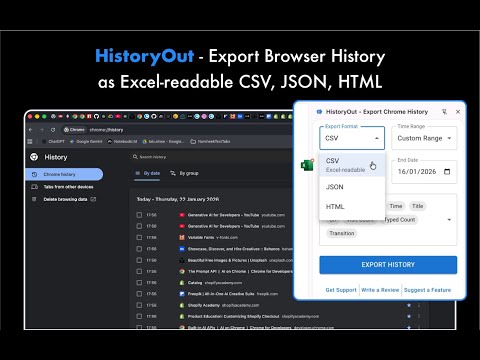
Export Chrome History in Excel-readable CSV, JSON or HTML formats. Use custom date ranges and customize the output fields.
HistoryOut gives you full control over your history exports, allowing you to select custom date ranges instead of being limited to only "last 24h", "last 7 days" or "last month." Whether you need history from a specific day, specific week or month. In addition, HistoryOut lets you fine-tune the level of detail in your exports, giving you control over what information is included. Your export settings are saved between sessions, so you don’t have to reconfigure them every time. HistoryOut lets you export exactly what you need—nothing more, nothing less.⠀⠀ 🔐 100% Private – No Backend, No Data Collection⠀⠀ HistoryOut runs entirely within your browser, meaning no data is sent or stored on external servers. There’s no backend, no tracking, and no third-party access. Everything stays on your device.⠀⠀ 📂 Export in CSV, JSON, or HTML – With Fully customisable Detail Levels⠀⠀ Whether you need a full breakdown with URLs, titles, and timestamps or just a simple list of visited sites, you decide. Your export settings are saved between sessions, so you don’t have to reconfigure them every time. HistoryOut lets you export browsing history in multiple formats, so you can choose the one that best fits your needs:⠀⠀ ✔️ CSV – Easily open and analyse history in Excel or Google Sheets 📊⠀ ✔️ JSON – Ideal for developers or structured data processing 🛠️⠀⠀ ✔️ HTML – Save and browse your history like a webpage 🔍⠀⠀ ✔️ A Modern UI That Feels Familiar⠀⠀ Built with Google’s Material UI (MUI) components, HistoryOut provides a smooth, intuitive interface that feels like a natural extension of Chrome.⠀⠀ Why Use HistoryOut?⠀⠀ 📌 Eliminate Bookmark Anxiety. Stop saving every page "just in case." Instead of cluttering your bookmarks bar, quickly export your full history and search through it later when needed.⠀⠀⠀ 📌 Useful for Task Management & Documentation. Keep a record of research sessions, project work, or time tracking — all stored locally in formats you control. Whether you're a student, researcher, or professional, having access to your past activity helps you stay organised.⠀⠀ 🔍 Why Choose HistoryOut Over Other Tools?⠀⠀ ✔️ Custom date range selection – Export exactly what you need⠀⠀ ✔️ Adjustable detail levels – Choose how much info to include⠀⠀ ✔️ Material UI design – A smooth, familiar user experience⠀⠀ ✔️ No backend, no tracking – Your data stays with you⠀⠀ ✔️ Lightweight & fast – Get your history in seconds⠀⠀ ✔️ Multiple export formats – Excel-readable CSV, JSON, and HTML support⠀⠀ ✔️ Saved settings – No need to reconfigure export preferences every time⠀⠀ Take control of your browsing history—privately, securely, and with flexibility. Try HistoryOut today! 🚀⠀⠀ More details in the HistoryOut website: https://historyout.site. ----UPDATES---- v1.0.1: • Clearer indication of Excel compatibility for CSV exports • Smarter alerts that only appear when relevant • Refreshed visual design for better consistency
5 星(5 星制)4 个评分
详情
隐私权

该开发者已声明,您的数据:
- 不会因未获批准的用途出售给第三方
- 不会为实现与产品核心功能无关的目的而使用或转移
- 不会为确定信用度或放贷目的而使用或转移
支持
若有任何疑问、建议或问题,请在桌面浏览器中打开此页面